Desk Decorating Ideas for a Spooky Office Cubicle

Create a spooky office cubicle with Halloween desk decor ideas that keep your workspace usable, tidy, and mindful of workplace safety.
We often share our Wi-Fi passwords when we have guests over. However, giving them access to your main wireless network can give them full, unrestricted access to all of your devices, which can be risky. So to help secure your network and keep your devices safe, here’s what you can do instead.
Some routers allow setting up guest networks.
You can use a mesh Wi-Fi system in your home to provide a seamless networking experience. The TP-Link Deco mesh Wi-Fi system comes with the Deco app to help you set up and control the system. One advantage of the app is that if you tap the More tab and select Guest Network , you can create a network that is separate from your main network but still allows visitors to enjoy the Internet connection at home.
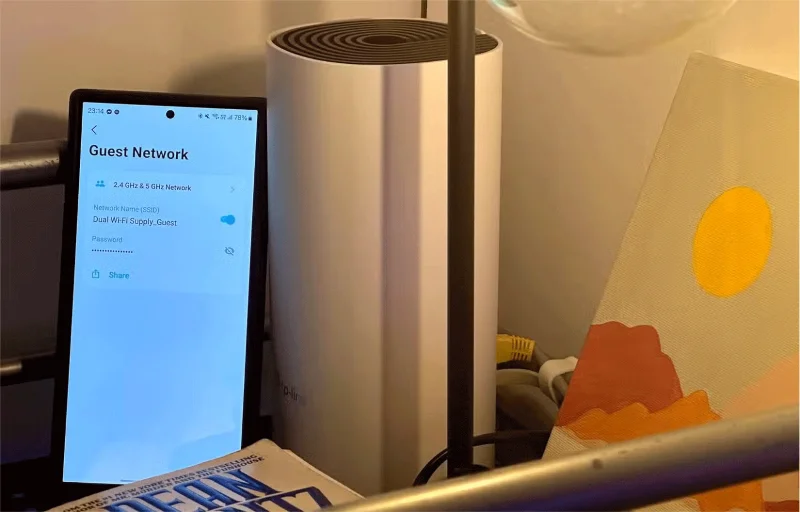
When you enable the app's Guest Network feature, you can create unique name and password combinations to differentiate it from your main network. For example, you can create a Wi-Fi QR code on your iPhone to make it easier for guests to connect to the network.
If you don’t have a TP-Link Deco Mesh router with an app, you can still check with your router manufacturer to see if your specific Wi-Fi router model has a guest network mode. You can also check your router’s settings when setting up a Wi-Fi network on your new router to see if it offers a Guest Network feature.
Buy cheap router for customer use
If your current router doesn’t have Guest Network functionality and you don’t want to upgrade your current system, your next best option is to buy one of the cheap routers for guests to use. That way, you can just connect it directly to your modem and create a completely different wireless network for your guests. If you have a large home, you can limit yourself to one router and place it near where guests typically spend time, like the living room, dining room, and family room, rather than buying a more expensive mesh system that will cover the entire house.
Alternatively, you can buy one of the best travel routers and set it up when people come over. That way, you can use it while traveling and have more secure connectivity.
Setting up a guest Wi-Fi network helps keep your home network secure by isolating it and preventing strangers from accessing your devices. If your current router already offers this, you’re in luck because you don’t have to worry about spending extra money on additional equipment. But if not, the money and effort you put into setting up your own guest Wi-Fi network will likely keep you safe and save you a lot of trouble in the future.
Create a spooky office cubicle with Halloween desk decor ideas that keep your workspace usable, tidy, and mindful of workplace safety.
Plan a recognizable Halloween 2026 look with pop culture costumes inspired by Spider-Man, Supergirl, Toy Story 5, Moana, Mario, and Wednesday.
Sort leftover Halloween candy safely, share or repurpose sealed treats, and choose food use or compost for pumpkins based on their condition.
Compare workplace Halloween costume choices by respect, dress code, mobility, and safety—and learn when a subtle accessory or a policy check is the better option.
Find a couples costume that fits your style, budget, and comfort level, from Addams Family classics to original inside-joke duos.
Need a last-minute high school Halloween costume? Compare 10 easy closet-based ideas by prep time, comfort, school-day practicality, and simple safety checks.
Use a simple 2026 Halloween decorating timeline for indoor décor, outdoor displays, and fresh pumpkins, with practical adjustments for weather and events.
Mix five vivid, approachable Halloween cocktails with measured recipes, simple prep tips, and an alcohol-free option for your party guests.
Find 15 office-friendly Halloween costume ideas for 2026, with practical checks for dress codes, respectful themes, comfort, and workplace safety.
Plan a fun elementary school Halloween party with easy crafts, games, inclusive treats, costume tips, and a sample 75-minute classroom schedule.








