Amazon Announces Nova Reel 1.1: A Tool to Create Videos Up to 2 Minutes Long

Last December, Amazon announced Nova, a new set of platform models available on Amazon Bedrock, which includes Micro, Lite, Pro, Premier, Canvas, and Reel editions. Each of these editions has different capabilities: Micro is the smallest and only handles text, Premier supports multimodality and is the largest, Canvas focuses on image creation, while Reel handles video creation.

At launch, Reel could only create videos up to 6 seconds long. Now, with the announcement of Reel 1.1, Amazon has increased the length to 2 minutes (including multiple 6-second scenes). This update allows users to create multi-scene videos up to 2 minutes long with a consistent style throughout the scenes. Specifically, notable features include:

Provides a single prompt to create a 2-minute video (combined from 6-second scenes).
Design each scene individually with custom prompts. This opens up new ways to create video content with Amazon Bedrock.
Reel 1.1 currently offers two modes:

Multishot Automated:

  • No input image accepted.
  • Allows entering a single prompt (up to 4,000 characters) to create multi-scene videos.

Multishot Manual:

  • Suitable if you want more control.
  • Allows specifying prompts for each scene (limited to 512 characters/scene).
  • Unlike auto mode, this mode accepts input images with a resolution of 1280×720.

To use Amazon Reel 1.1, simply follow these steps:
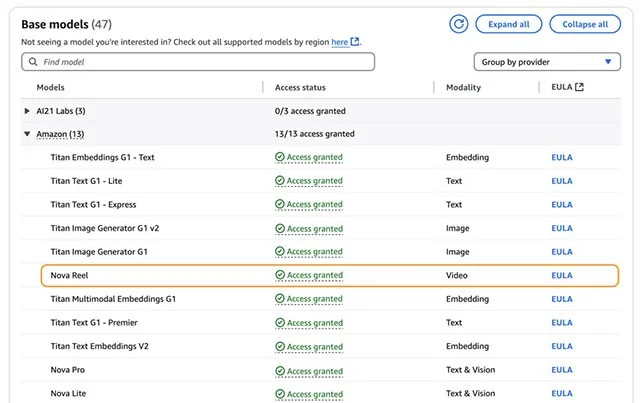
  1. Go to Amazon Bedrock Console .
  2. Sign in to your AWS account.
  3. On the left navigation panel, select Model access.
  4. Find the Amazon Nova Reel model in the list.
  5. Click Request access next to the Amazon Nova Reel model.
  6. Pending approval. Once approved, access applies to both Nova Reel 1.0 and 1.1.
  7. Once you have access, you can use Nova Reel 1.1 via the console, AWS SDK, or AWS CLI.
    Amazon Announces Nova Reel 1.1: A Tool to Create Videos Up to 2 Minutes Long

To test on console follow these steps:

  1. Go to the left menu and select Playgrounds > Image/Video .
  2. In the playground, select Nova Reel 1.1 as the model.
  3. Enter prompt into the input field to create a video.

Reel 1.1 is currently only available on Amazon Bedrock in the US East (N. Virginia) AWS Region. Pricing follows the same pay-as-you-go model as other Amazon Bedrock services, with each second of video generated costing approximately $0.08.

Leave a Comment

Troubleshooting Microsoft Teams Offline Error in 2026

Troubleshooting Microsoft Teams Offline Error in 2026

Stuck with Microsoft Teams offline error in 2026? Discover proven troubleshooting steps, common causes, and quick fixes to restore your connection fast. No tech skills required!

How to Fix Microsoft Teams Error M Memory

How to Fix Microsoft Teams Error M Memory

Tired of Microsoft Teams crashing with "Error M" memory issues? Follow our step-by-step guide to fix Error M in Teams, clear cache, update software, and boost performance—no tech skills required!

Step-by-Step: Setting Up Microsoft Teams Town Hall Events

Step-by-Step: Setting Up Microsoft Teams Town Hall Events

Discover the easiest step-by-step guide to setting up Microsoft Teams Town Hall events. Host massive virtual gatherings effortlessly with pro tips for seamless execution. Perfect for leaders and organizers!

How to Fix Microsoft Teams Download Error for PC

How to Fix Microsoft Teams Download Error for PC

Struggling with Microsoft Teams "Download Error" on PC? Discover proven, step-by-step fixes to resolve download failed issues quickly. Get back to seamless collaboration in minutes—no tech skills needed!

Troubleshooting Microsoft Teams Error L License

Troubleshooting Microsoft Teams Error L License

Stuck with Microsoft Teams "Error L" License error? Follow this step-by-step troubleshooting guide to resolve licensing issues quickly, restore access, and boost productivity without IT hassle. Updated with latest fixes.

Troubleshooting Microsoft Teams Video Call Freezing

Troubleshooting Microsoft Teams Video Call Freezing

Tired of Microsoft Teams video call freezing mid-meeting? Follow this proven troubleshooting Microsoft Teams video call freezing guide with quick fixes, advanced tips, and real solutions to restore smooth video instantly.

How to Fix Microsoft Teams Download Failed Due to Unexpected Error

How to Fix Microsoft Teams Download Failed Due to Unexpected Error

Frustrated by Microsoft Teams 'Download Failed Due to Unexpected Error'? Discover proven, step-by-step solutions to fix this common issue quickly and get back to seamless collaboration. Updated with the latest fixes for peak performance.

Why Did My Microsoft Teams Recording Fail? Common Reasons

Why Did My Microsoft Teams Recording Fail? Common Reasons

Frustrated because your Microsoft Teams recording failed? Uncover the top common reasons like permissions issues, storage limits, and network glitches, plus step-by-step fixes to prevent future failures and record flawlessly every time.

Solving Microsoft Teams Error B Connection

Solving Microsoft Teams Error B Connection

Struggling with Microsoft Teams "Error B" connection? Discover step-by-step fixes for smooth connectivity. Clear cache, check networks, and more in this ultimate guide to resolving Error B instantly.

How to Fix Microsoft Teams Application Is In A Bad State Error

How to Fix Microsoft Teams Application Is In A Bad State Error

Tired of the frustrating Microsoft Teams "Application Is In A Bad State" error crashing your meetings? Discover proven, step-by-step fixes to resolve it quickly and restore smooth teamwork. Updated with the latest solutions.

How to Check Microsoft Teams Version History and Build Number

How to Check Microsoft Teams Version History and Build Number

Discover simple steps to check your Microsoft Teams version history and build number on desktop, web, and mobile. Stay updated with the latest features and fixes effortlessly. Perfect for IT pros and everyday users.

How to Fix Microsoft Teams Uninstall Error Stuck

How to Fix Microsoft Teams Uninstall Error Stuck

Tired of Microsoft Teams "Uninstall Error" Stuck? Discover proven, step-by-step fixes to completely remove Teams from your PC. Works on latest Windows versions – no tech skills needed!

Troubleshooting Microsoft Teams Where is My Team? Error

Troubleshooting Microsoft Teams Where is My Team? Error

Facing the frustrating Microsoft Teams "Where is My Team?" error? Discover step-by-step troubleshooting tips, common causes, and quick fixes to resolve it instantly and resume seamless collaboration. Updated with the latest solutions.

How to Fix Microsoft Teams VDI Error on Virtual Machines

How to Fix Microsoft Teams VDI Error on Virtual Machines

Tired of Microsoft Teams VDI errors crashing your virtual machine calls? Get step-by-step fixes for audio glitches, video freezes, and optimization issues on Citrix, VMware, or RDP setups. Boost productivity now!

How to Fix Microsoft Teams Error AADSTS70011

How to Fix Microsoft Teams Error AADSTS70011

Struggling with Microsoft Teams Error AADSTS70011? Discover step-by-step fixes for invalid scope errors, clear cache tips, and quick authentication resets to get back to seamless collaboration in minutes. Updated with latest Teams patches.









