Apex Legends is one of the most famous battle royale games in the world. The intense matches are often decided by who has the better aim and gunplay skills. To help players make the most out of their abilities, Apex Legends has two aim settings: toggle and hold modes. Each player has their own preference, but the default toggle aim setting might not be for everyone, especially for new players learning the ropes.

Here’s how to disable toggle aim in Apex Legends and some exciting information about the game’s aiming mechanic.
How to Turn Off Toggle Aim on PC?
PC players can play the game either on their mouse and keyboard or by plugging in a controller. Both options have their advantages and disadvantages, and the controller settings aren’t much different from any other console you can play on.
If you’re using the mouse + keyboard setup to play the game, follow these steps to disable toggle aim:
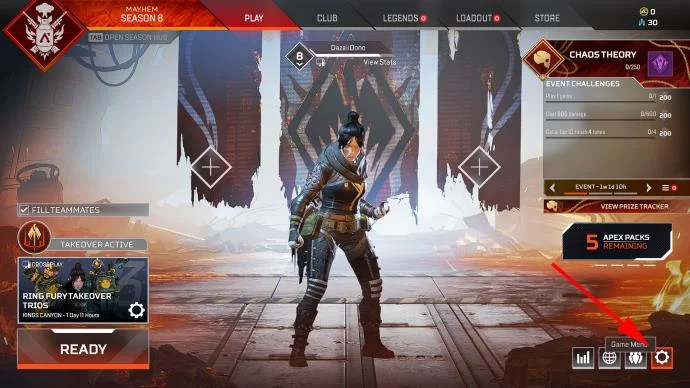
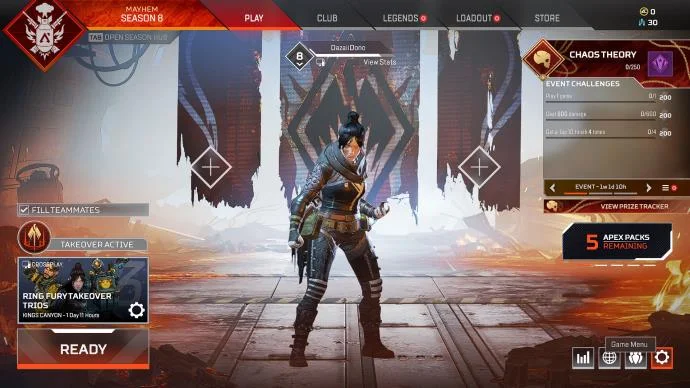
- Click on the gear icon in the bottom-right corner. You can also press “Escape,” which works while you’re in the match.

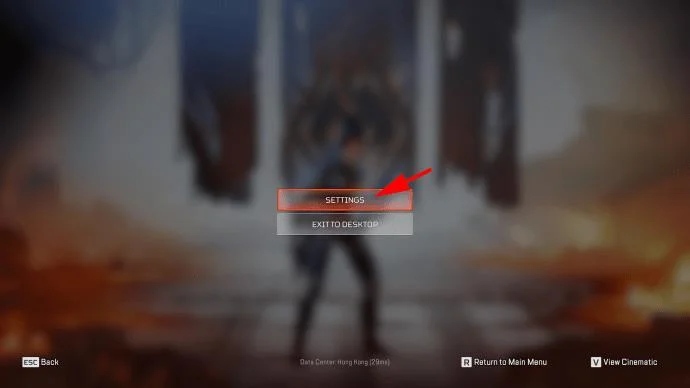
- Select “Settings.”

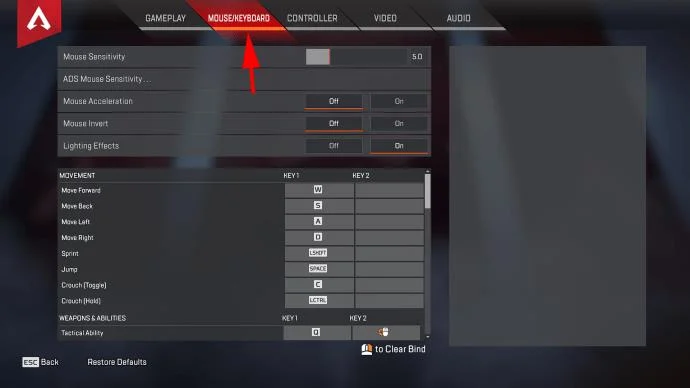
- Select the “Mouse/Keyboard” tab on the top.

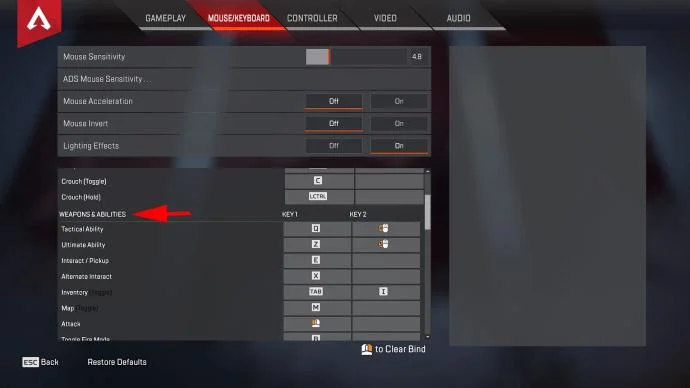
- In the bottom half of the menu, scroll down to the “Weapons & Abilities” section.

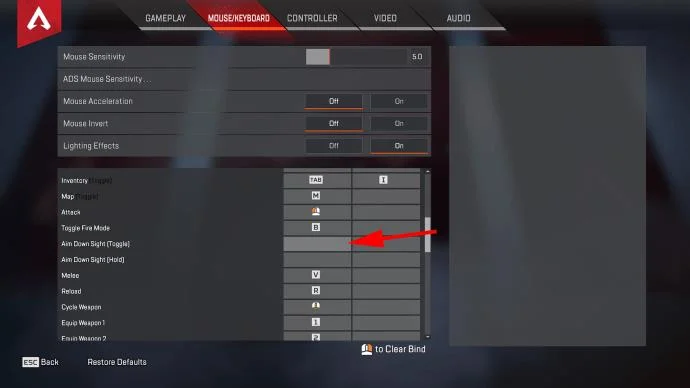
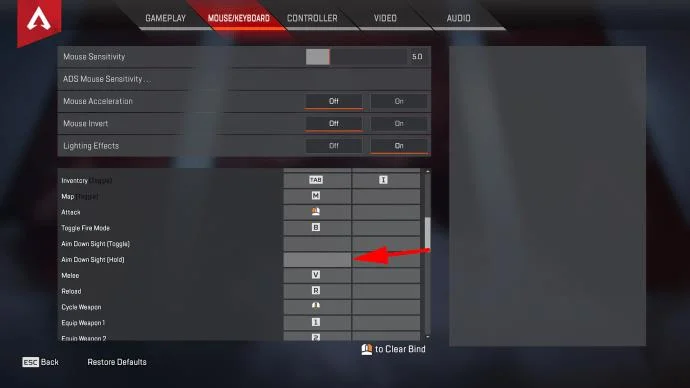
- You’ll see two aiming options: “Aim Down Sight (Toggle)” and “Aim Down Sight (Hold).”
- If you want to turn off the toggle aim, right-click on the boxes next to “Aim Down Sight (Toggle)” to unbind the keyboard combinations.

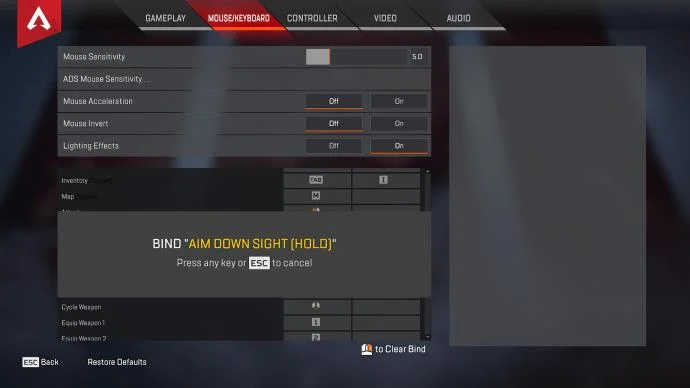
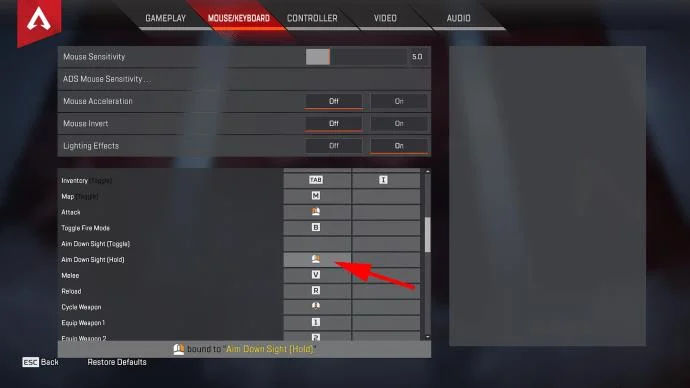
- Bind the “Aim Down Sight (Hold)” to the buttons or keys of your choice. Left-click on the box next to the setting name, then press the binding in place. Most players use the right mouse click to aim down sights (ADS).


- You can open the Firing Range to tinker with the settings and see whether the hold or toggle options feel more natural.
If you’re using the controller to play the game, you’ll need to access a different tab to make changes. Follow these steps:
- Open the game settings (press the gear icon or “Escape” > “Settings”).
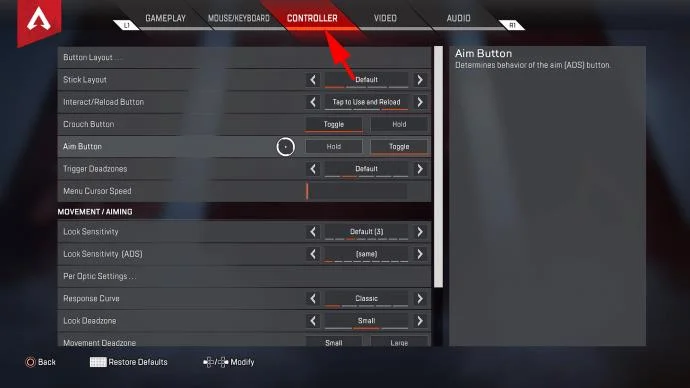
- Select the “Controller” tab.

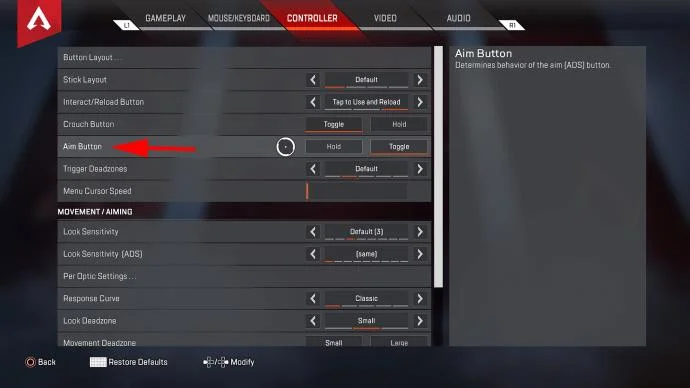
- In the top half of the menu, find the “Aim Button” line.

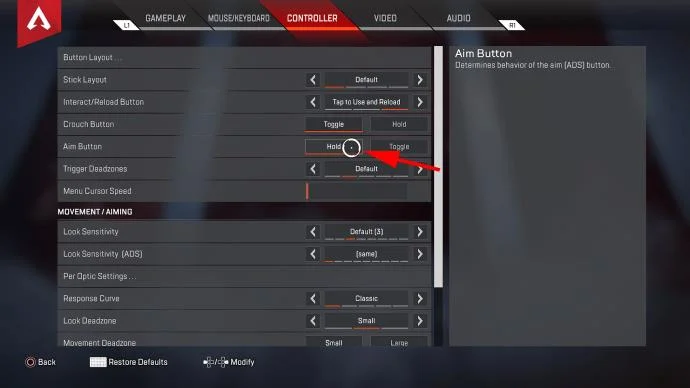
- Select the “Hold” option to turn off toggling.

How to Turn Off Toggle Aim on Consoles?
If you’re using a console to play Apex (PS4, PS5, Xbox One, Xbox S/X, or Switch), you have no option but to play the game using the controller. Since you lack the sheer button layout availability that the keyboard + mouse setup offers, your options to change your settings are somewhat limited.
However, that doesn’t mean that you can’t turn off toggle aim. Here’s what you need to do:
- Press the “Menu” button.

- Select “Settings.”

- Select the “Controller” tab from the top.

- Navigate to the “Aim Button” line, then select “Hold.”

That’s it! You’ll now need to hold down the “Aim” button (LT by default) to keep aiming down sights. You can test the settings in the Firing Range.
Additional FAQ
What Is Toggle Aim?
“Toggle Aim” refers to pressing a button to aim down sights (ADS). While in the ADS mode, you’ll use the weapon’s currently equipped sights (or iron sights if none are equipped). ADS improves weapon handling, zooms in your screen (if you have a sight that zooms), and reduces weapon recoil and inaccuracy. When you press the “Toggle Aim” ADS button again, you’ll return to normal weapon handling.
The other available ADS setting is “Hold Aim.” Unlike in Toggle Aim, you have to hold the ADS button to remain zoomed in and aiming through sights. As soon as you release the button, the weapon handling returns to default.
How Do I Change Toggle Zoom on Apex?
Some weapon sights have two different zoom modes. By default, when you first engage ADS, you’ll zoom in to the lower zoom setting.
You can change the zoom level (for select sights) by pressing “Left Shift” on the PC (or whatever your “Sprint” setting is).
On a controller, the button is bound to the “Sprint” key, so use the current sprint keybinding.
Can You Play Apex Legends With a Controller?
Yes, you can use a controller, regardless if you are playing on PC or console. You can use whatever controller you like for the PC, but we recommend the Xbox-compatible controllers since they tend to perform best.
Does Apex Legends Have Aim Assist?
Apex Legends does have aim assist. Bad news for PC players though, as the mouse + keyboard setup disables the game’s aim assist.
Aim assist is primarily there to help users bridge the gap between the controllers’ somewhat clunky sensitivity compared to a better range of motions while using the mouse and keyboard. As such, everyone that plays the game using a controller (whether on the PC or consoles) has aim assist to help them land more shots.
Can You Turn Off Apex Legends Aim Assist?
There currently are no options to turn off aim assist for controllers. While such an option might become available in the future, its general effect on the game is vastly positive for controller players.
Other Helpful Settings?
If you’re playing the game on the mouse and keyboard, you have the luxury of a vast selection of different buttons to use in-game. Additionally, most gaming mice come with additional buttons on the sides.
You can use these buttons to bind your most-pressing consumable items (Cells or Batteries, for example). By default, these items are bound to the number line (specifically 4-8), which may be out of reach in a tense team fight.
Hold Aim Still Acting Like Toggle Aim?
If you’ve made changes to the keybindings and use the “Hold Aim” options, but the game still behaves as if it were “Toggle Aim”, you have a few options:
• Restart the game. Sometimes, a restart will correct the bindings and your ADS setting will work as expected.
• Remove all keybindings for “Toggle Aim” if you haven’t done that already.
• Change the controller settings appropriately. If you’re using a controller on the PC, you might need to unbind all ADS settings for the “Mouse/Keyboard” tab noted above to see an improvement.
Hold Your Ground in Apex Legends
If you’re a new player, the ADS mode to use can mean the difference between victory and defeat. Both options have their benefits and downsides, but now you know how to make the appropriate changes. It might take a while for the muscle memory to set in after you’ve made a significant change, so don’t stop playing!
What are your favorite settings for Apex Legends? Do you use toggle aim or hold aim? Let us know in the comments section below.