Pop Culture Costume Ideas That Will Dominate Halloween 2026

Plan a recognizable Halloween 2026 look with pop culture costumes inspired by Spider-Man, Supergirl, Toy Story 5, Moana, Mario, and Wednesday.
Apple's Find My app, which has long been considered a savior in situations of locating lost iPhones and AirPods, has just been significantly upgraded with a new feature that is extremely useful and has been long-awaited. Accordingly, the latest iOS 18.2 update has introduced a feature called Share Item Location - as the name suggests - that allows users to share the location of lost items with third parties, including not only individuals but also organizations and businesses outside the Apple ecosystem, without limitation.
Previously, the Find My app only allowed users to locate their Apple devices and other items within the Apple ecosystem. This meant that only Apple devices could be used to track lost items. However, with the latest update, users can create a link that gives access to the item’s location to anyone with an internet connection.
To use the feature, simply open the Find My app on your iPhone, iPad, or Mac, select the lost item, and tap “Share Item Location.” This will generate a unique link that can be shared via text, email, or any other method. Notably, the recipient doesn’t need to have an Apple device or the Find My app to access the link.
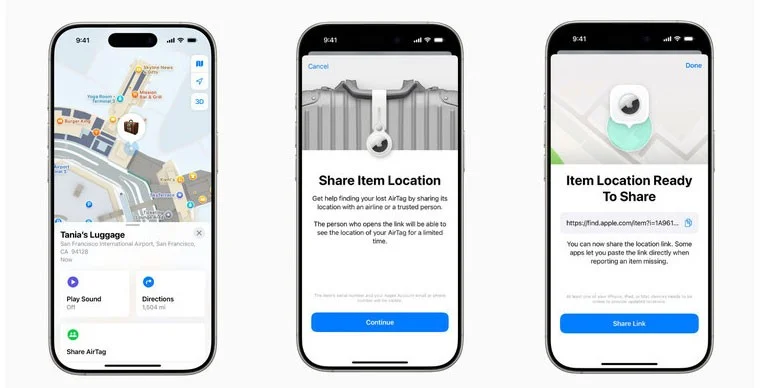
Of course, Apple has kept privacy and security in mind with the new feature. The entire process is end-to-end encrypted, ensuring that only authorized people can access location information. Users have full control over who can see their location and for how long. The link automatically expires after seven days, or you can manually stop sharing your location at any time.
Not only that, more than 15 major airlines have now signed a partnership agreement with Apple to accept Find My Item as part of their customer service process to help customers find lost or delayed luggage. More airlines are expected to join the initiative in the future.
The feature is currently available via the iOS 18.2 public beta and is expected to roll out soon as a free software update for iPhone Xs and later.
Plan a recognizable Halloween 2026 look with pop culture costumes inspired by Spider-Man, Supergirl, Toy Story 5, Moana, Mario, and Wednesday.
Sort leftover Halloween candy safely, share or repurpose sealed treats, and choose food use or compost for pumpkins based on their condition.
Compare workplace Halloween costume choices by respect, dress code, mobility, and safety—and learn when a subtle accessory or a policy check is the better option.
Find a couples costume that fits your style, budget, and comfort level, from Addams Family classics to original inside-joke duos.
Need a last-minute high school Halloween costume? Compare 10 easy closet-based ideas by prep time, comfort, school-day practicality, and simple safety checks.
Use a simple 2026 Halloween decorating timeline for indoor décor, outdoor displays, and fresh pumpkins, with practical adjustments for weather and events.
Mix five vivid, approachable Halloween cocktails with measured recipes, simple prep tips, and an alcohol-free option for your party guests.
Find 15 office-friendly Halloween costume ideas for 2026, with practical checks for dress codes, respectful themes, comfort, and workplace safety.
Plan a fun elementary school Halloween party with easy crafts, games, inclusive treats, costume tips, and a sample 75-minute classroom schedule.
Compare realistic side hustles for 2026 by startup cost, fees, flexibility, and income control, with current tax and scam guidance from official sources.








