Pop Culture Costume Ideas That Will Dominate Halloween 2026

Plan a recognizable Halloween 2026 look with pop culture costumes inspired by Spider-Man, Supergirl, Toy Story 5, Moana, Mario, and Wednesday.
A new Apple patent recently granted and published by the United States Patent and Trademark Office (USPTO) discusses a promising technology that the company is developing to integrate into head-mounted displays (like virtual reality glasses) and other wearable devices in the future: Flexible speakers.
In the patent, Apple talks about a speaker housing with flexible walls, magnets, and a speaker cone that are designed to deform together under bending stress. However, the overall flexible design would still ensure that the speaker can continuously produce sound in both its undistorted and deformed states.
The speaker will have sensors to detect the curvature of the flexible wall and the amount of deformation that has occurred in the flexible wall, magnet and speaker cone. This information will be used to adjust the speaker operation so that the sound continues as desired.
According to the patent, the flexibility and deformability of the speaker can be improved by adding components (in conjunction with hinges) to the speaker wall. One or more speakers can be mounted inside the headrest of virtual reality headsets or integrated into the device's display, which is made of fiberglass, polymers, or liquid crystals. The patent further explains:
The speaker may include a flexible, deformable, bendable, or pliable enclosure in a manner consistent with the changing shape of the headrest of the virtual reality headset.
For example, in one configuration, the shape of the headrest may be suitable for a user with a smaller, shorter, or narrower head shape. In another configuration, the shape of the headrest may be suitable for a different user with a larger, wider, or longer head shape.
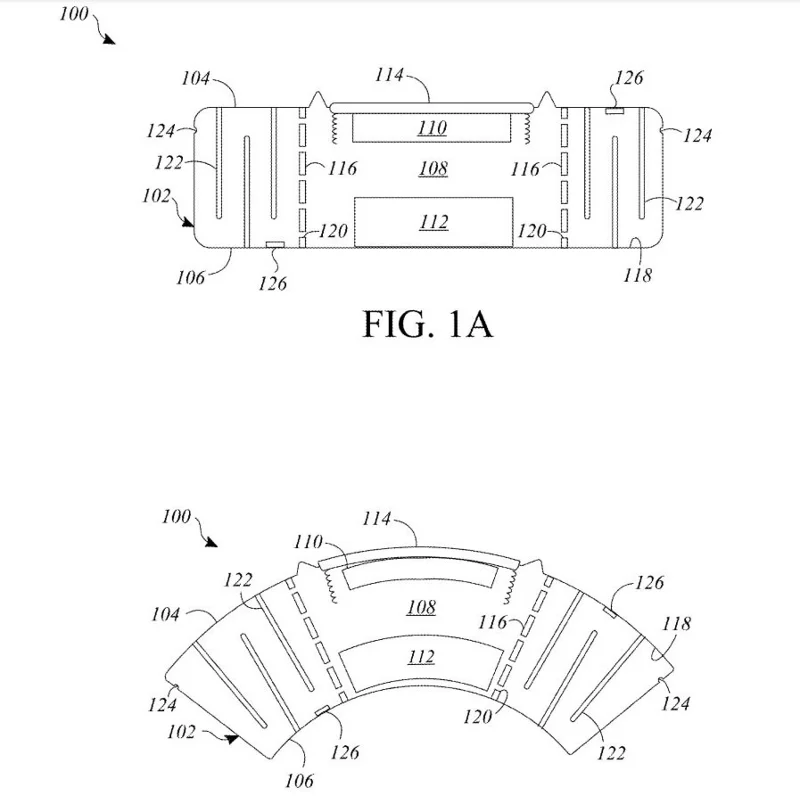
In addition to virtual reality headsets, this flexible speaker technology could be suitable for a variety of use cases and products that have “custom-designed folds” or “packaging space constraints or the goal of increasing user comfort in a wearable product.” In other words, this flexible speaker technology, if successfully applied, could be used inside clothes, backpacks, laptops, and smartwatches.
Plan a recognizable Halloween 2026 look with pop culture costumes inspired by Spider-Man, Supergirl, Toy Story 5, Moana, Mario, and Wednesday.
Sort leftover Halloween candy safely, share or repurpose sealed treats, and choose food use or compost for pumpkins based on their condition.
Compare workplace Halloween costume choices by respect, dress code, mobility, and safety—and learn when a subtle accessory or a policy check is the better option.
Find a couples costume that fits your style, budget, and comfort level, from Addams Family classics to original inside-joke duos.
Need a last-minute high school Halloween costume? Compare 10 easy closet-based ideas by prep time, comfort, school-day practicality, and simple safety checks.
Use a simple 2026 Halloween decorating timeline for indoor décor, outdoor displays, and fresh pumpkins, with practical adjustments for weather and events.
Mix five vivid, approachable Halloween cocktails with measured recipes, simple prep tips, and an alcohol-free option for your party guests.
Find 15 office-friendly Halloween costume ideas for 2026, with practical checks for dress codes, respectful themes, comfort, and workplace safety.
Plan a fun elementary school Halloween party with easy crafts, games, inclusive treats, costume tips, and a sample 75-minute classroom schedule.
Compare realistic side hustles for 2026 by startup cost, fees, flexibility, and income control, with current tax and scam guidance from official sources.








