Desk Decorating Ideas for a Spooky Office Cubicle

Create a spooky office cubicle with Halloween desk decor ideas that keep your workspace usable, tidy, and mindful of workplace safety.
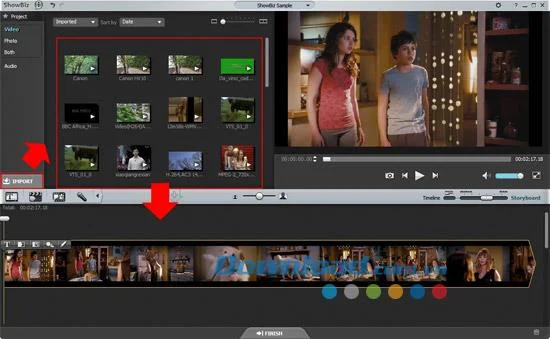
ArcSoft ShowBiz 2024-2025 is an advanced software designed to help users create movies and edit videos in various popular formats with exceptional quality. This software allows you to seamlessly add stunning transitions between clips, including titles and credits. You can also enrich your projects with your favorite music or voiceovers. Share your creations effortlessly on platforms like YouTube or Facebook with the integrated sharing tools, stream content to popular mobile devices, or burn DVDs, AVCHD, or Blu-ray discs for optimum viewing on large screens.
| 1. | Add support for the latest iPhone models to the output device list. |
| 2. | Enhanced 4K output options for devices that support ultra-high definition. |
| 3. | Improved performance for disc creation with higher write speeds. |
| 4. | Full-screen recording support for a more immersive experience. |
| 5. | Bug fixes and stability improvements for a smoother user experience. |
| 1. | Import files easily from both built-in media libraries and external devices. |
| 2. | Enhance your video, picture, and audio files before movie creation. |
| 3. | Add beautiful effects to bring life to your creations. |
| 4. | Fully compatible with Windows 11. |
| 1. | Integrated Video Editing Tools: Perfect every frame by adding effects, transitions, titles, and captions, plus options for color adjustment and noise reduction. |
| 2. | Storyboard and Timeline Modes: Organize clips and access additional editing tools for advanced customization. |
| 3. | Create and Share 3D Photos: Edit and share 3D images and videos directly on YouTube's 3D platform. |
| 4. | Complete Audio Track Editing: Compose and edit audio tracks with advanced playback and volume controls. |
| 5. | Quick and Easy Disc Creation: Use preset themes and menu templates for disc creation. |
| 6. | Share and Export Options: Share your creations on social media or export files to a variety of devices. |
| Input Formats: | AVI, MP4, WMV, MOV, and many more for video; MP3, WAV for audio; various image formats like JPEG, PNG, BMP, etc. |
| Output Formats: | AVI, MP4, DVD, AVCHD, and Blu-ray among others. |
| Processor: | Core 2 Duo E6600 2.4GHz or higher. |
| RAM: | 4 GB or more. |
| Graphics Card: | NVIDIA GeForce 8xxx series or higher. |
| Screen Resolution: | 1280 x 720 or higher. |
| ATI Graphics: | Radeon HD series and later. |
| Intel Graphics: | Intel HD Graphics 4000 or later. |
Learn how to use ShowBiz efficiently:
Create a spooky office cubicle with Halloween desk decor ideas that keep your workspace usable, tidy, and mindful of workplace safety.
Plan a recognizable Halloween 2026 look with pop culture costumes inspired by Spider-Man, Supergirl, Toy Story 5, Moana, Mario, and Wednesday.
Sort leftover Halloween candy safely, share or repurpose sealed treats, and choose food use or compost for pumpkins based on their condition.
Compare workplace Halloween costume choices by respect, dress code, mobility, and safety—and learn when a subtle accessory or a policy check is the better option.
Find a couples costume that fits your style, budget, and comfort level, from Addams Family classics to original inside-joke duos.
Need a last-minute high school Halloween costume? Compare 10 easy closet-based ideas by prep time, comfort, school-day practicality, and simple safety checks.
Use a simple 2026 Halloween decorating timeline for indoor décor, outdoor displays, and fresh pumpkins, with practical adjustments for weather and events.
Mix five vivid, approachable Halloween cocktails with measured recipes, simple prep tips, and an alcohol-free option for your party guests.
Find 15 office-friendly Halloween costume ideas for 2026, with practical checks for dress codes, respectful themes, comfort, and workplace safety.
Plan a fun elementary school Halloween party with easy crafts, games, inclusive treats, costume tips, and a sample 75-minute classroom schedule.








