Desk Decorating Ideas for a Spooky Office Cubicle

Create a spooky office cubicle with Halloween desk decor ideas that keep your workspace usable, tidy, and mindful of workplace safety.
As 2024 comes to a close, it’s natural to feel like time is flying by before you’ve accomplished everything you set out to do. While you can’t get back the time you’ve lost, there are steps you can take to ensure 2025 is your most productive year yet.
Table of Contents
The first and perhaps most important step to starting 2025 off right is to reflect on how you spent the past year accomplishing tasks. Ask yourself the following questions:
These questions will help you figure out what went wrong, teaching you exactly what to avoid next year. Take a moment to evaluate your current life by asking yourself:
These questions will help you identify areas for improvement and adjust your goals for the coming year. The key to reflecting on what happened is not just focusing on what went wrong, but also acknowledging your accomplishments, no matter how small they may seem. To do this, think about:
These questions not only encourage you to acknowledge your accomplishments, but also give you the motivation to implement these positive habits in the new year.
Tip : Write them down somewhere, like in the Notes app on your iPhone!
After reflecting on the failures you faced in 2024, the direction of your life, and the successes you witnessed this year, you will have a clearer and more balanced vision for the coming year.
Don't be afraid to set challenging goals that will get you closer to the life you want, but don't get too excited about them. Be realistic and take into account what you've struggled with this year.
Note : Use the answers to the above questions to set meaningful and achievable goals that align with what you want to achieve in the coming year.
For example, one of your personal goals for the coming year is to become more active. Telling yourself, “I’m going to walk 20,000+ steps every day after school” is unrealistic given your busy schedule. Instead, a more achievable goal would be to walk 10,000 steps every day, including school. Setting an extreme goal that you know you can’t meet every day of the year will only discourage you!
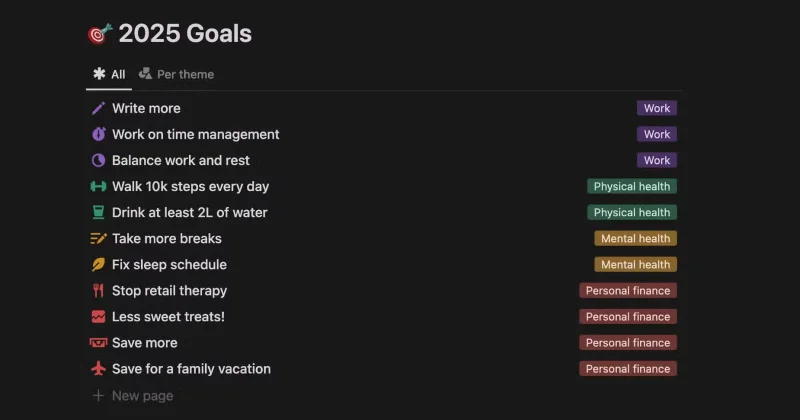
Your goals don’t always have to be focused solely on productivity. For example, this year you may have noticed that you have a bad habit of working too hard and not taking enough breaks. While taking more breaks will hurt your productivity in the long run, it will also improve your overall health. So one of your goals for next year is to take more intentional breaks throughout the day!
To make sure you don’t forget about your goals, it’s important to write them down somewhere. While there are plenty of goal tracking apps out there, many people like to use Notion to set and track their goals. It doesn’t matter which system you choose to use, as long as it works for you and helps you stay consistent.
If getting your finances under control has been on your to-do list for a while, the new year is the perfect opportunity to start fresh. It’s a clean slate, and there’s no better time than now to get your finances under control.
Start by reflecting on your current financial habits and asking yourself:
The answers to these questions will help you better understand your current spending and saving patterns. Now, look for ways to improve the way you budget and track your finances. For example, if you’ve been overspending, consider using a budgeting app to track your income and expenses. This way, you’ll always know exactly where your money is going.
This is also a good time to review and manage your subscriptions. Sometimes you can accidentally sign up for services you never use, especially if you sign up for a free trial and forget to cancel.
Remember, even small expenses add up, so take the opportunity to cancel any unused subscriptions and free up your budget for what really matters.
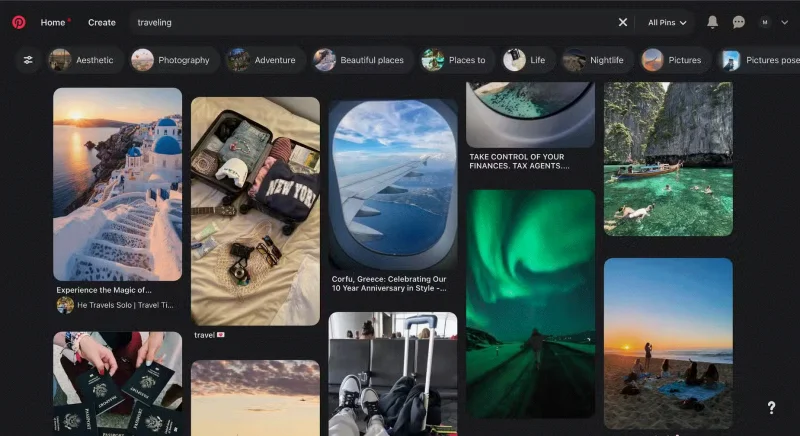
One of the best ways to make your goals and desires a reality is to visualize them. A vision board is essentially a combination of your wildest dreams and the goals you want to achieve. If you keep your vision board somewhere visible every day, it will train your mind to focus on what you are working toward.
While you can collect materials like photos and paste them onto a physical board, an easier option is to create a digital vision board using a tool like Canva . People's favorite place to find images is Pinterest, and you can even set it as your computer or phone wallpaper to make sure you see it every day.
Whenever you feel down, take a glance at your vision board and it will inspire you to make your dreams come true.
By taking the steps mentioned above, you will be able to realize everything you want to achieve in 2025 and be fully prepared for a productive year.
Create a spooky office cubicle with Halloween desk decor ideas that keep your workspace usable, tidy, and mindful of workplace safety.
Plan a recognizable Halloween 2026 look with pop culture costumes inspired by Spider-Man, Supergirl, Toy Story 5, Moana, Mario, and Wednesday.
Sort leftover Halloween candy safely, share or repurpose sealed treats, and choose food use or compost for pumpkins based on their condition.
Compare workplace Halloween costume choices by respect, dress code, mobility, and safety—and learn when a subtle accessory or a policy check is the better option.
Find a couples costume that fits your style, budget, and comfort level, from Addams Family classics to original inside-joke duos.
Need a last-minute high school Halloween costume? Compare 10 easy closet-based ideas by prep time, comfort, school-day practicality, and simple safety checks.
Use a simple 2026 Halloween decorating timeline for indoor décor, outdoor displays, and fresh pumpkins, with practical adjustments for weather and events.
Mix five vivid, approachable Halloween cocktails with measured recipes, simple prep tips, and an alcohol-free option for your party guests.
Find 15 office-friendly Halloween costume ideas for 2026, with practical checks for dress codes, respectful themes, comfort, and workplace safety.
Plan a fun elementary school Halloween party with easy crafts, games, inclusive treats, costume tips, and a sample 75-minute classroom schedule.








