Pop Culture Costume Ideas That Will Dominate Halloween 2026

Plan a recognizable Halloween 2026 look with pop culture costumes inspired by Spider-Man, Supergirl, Toy Story 5, Moana, Mario, and Wednesday.
Asus has just launched a trio of monitors that feature a unique feature – a built-in Nano ion generator that the company claims can remove up to 90% of airborne dust in three hours. The monitors come in three sizes; whether you prefer a standard or an ultra-wide screen, Asus has a model that will keep you breathing clean.
New screens that care for your health and the environment
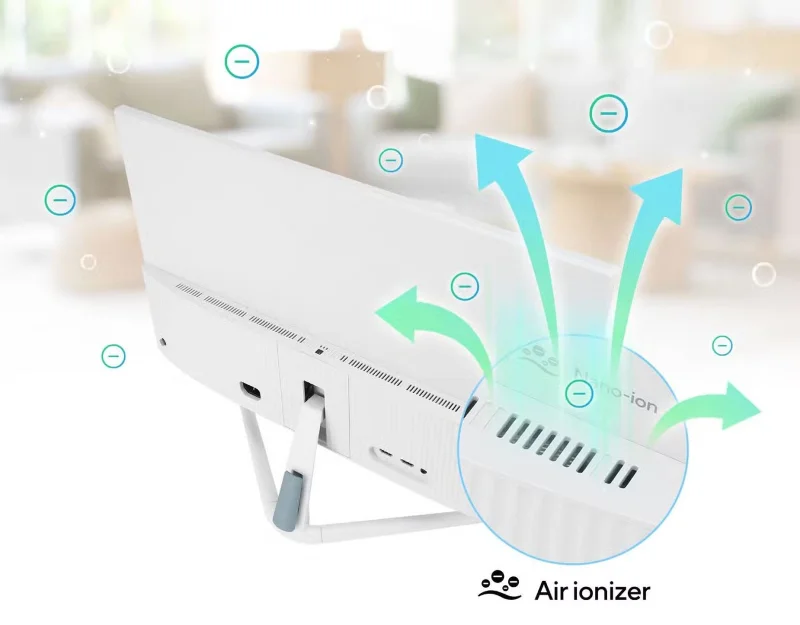
The VU Air Ionizer series of monitors uses nano-ion technology to draw air in from the front to ionize and remove airborne pollutants. Asus says the monitor will remove pollen and allergens within a square meter, which is the space in front of your monitor. It does this without a filter, making it much more convenient to use than a regular air purifier.
The monitor also comes with Eye Care Plus technology, with a blue light filter and a flicker-free screen that reduces eye strain even after long hours of work. And if you're the type to get lost in your work and forget about everything else, Asus has added a Rest Reminder feature that will remind you to look away from time to time to avoid eye strain.
Additionally, people with some form of color blindness will appreciate the Color Augmentation feature, which makes it easier for those affected to appreciate what they see on screen.
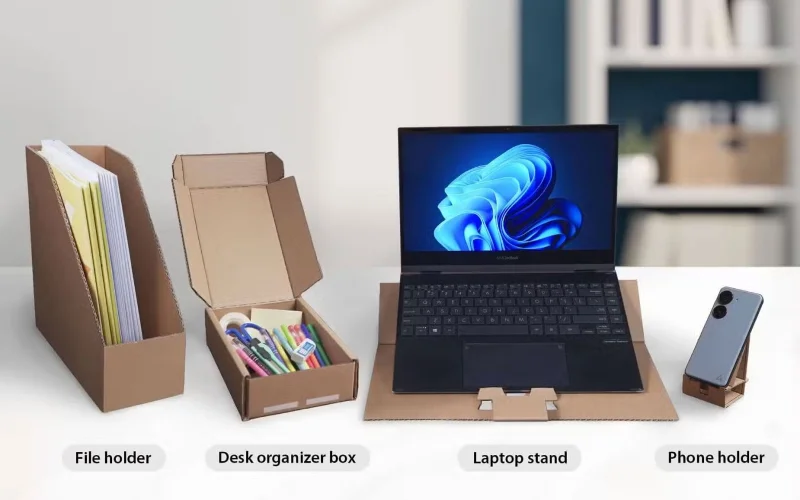
Asus is doing its part by reusing the packaging for these monitors. The boxes for the 24- and 27-inch models can be turned into phone stands, laptop stands, and desk cases. And if you opt for the larger 34-inch model, you get all three desk accessories plus a file holder. This helps reduce packaging waste — even if you don’t need these items, you can gift them to someone who will appreciate them instead of throwing them in the trash.
Monitor specifications and price
As mentioned above, these monitors come in three sizes: a 24-inch model, a 27-inch model, and a 34-inch ultrawide curved model. The two smaller screens have a maximum resolution of 1920 x 1080 pixels, while the larger 21:9 screen gives you 3440 x 1440 pixels.
They all have a 100Hz refresh rate and a 1ms response time; while those numbers won't be good enough for hardcore and competitive gaming, they should be more than enough for most casual gamers.
You get two HDMI 1.4 ports and a headphone jack for the 24-inch and 27-inch displays, so you can easily swap between devices. But if you opt for the curved ultrawide monitor, you get DisplayPort 1.4, an HDMI 2.0 port, and a USB-C port with DP Alt Mode, allowing you to connect three different sources.
The largest monitor also has four USB 3.2 Gen 1 Type-A ports and a headphone jack, making it easier to connect USB peripherals. Plus, its USB-C port also offers 65W PD, which can charge your laptop while using the ultrawide display.
Here are the full specifications of the three monitors:
|
Screen |
Asus VU249HFI-W |
Asus VU279HFI-W |
Asus VU34WCIP-W |
|---|---|---|---|
|
Screen size (inches) |
23.8 |
27 |
34 |
|
Panel Type |
IPS |
IPS |
VA |
|
Curvature |
- |
- |
1500R |
|
Resolution |
1920 x 1080 |
1920 x 1080 |
3440 x 1440 |
|
Brightness (cd/m2) |
250 |
250 |
300 |
|
Contrast ratio |
1300:1 |
1300:1 |
3000:1 |
|
Response time (ms) |
1 |
1 |
1 |
|
Refresh rate (Hz) |
100 |
100 |
100 |
|
HDR support |
- |
- |
HDR10 |
|
Gate |
2x HDMI 1.4, headphone jack |
2x HDMI 1.4, headphone jack |
1x HDMI 2.0, 1x DisplayPort 1.4, 1x USB-C (DP Alt Mode) PD 65W, 4x USB 3.2 Gen 1 Type-A, headphone jack |
|
Footrest |
Tilt and height adjustment |
Tilt and height adjustment |
Tilt and height adjustment |
|
Price |
$129 |
$159 |
$359 |
Despite their novel air-purifying features, these monitors are still relatively affordable, so if you find yourself getting a runny nose every time you sit in front of your computer, consider getting one of these. Just make sure you avoid these mistakes when shopping for a monitor to make sure you get the right one for your desk.
Plan a recognizable Halloween 2026 look with pop culture costumes inspired by Spider-Man, Supergirl, Toy Story 5, Moana, Mario, and Wednesday.
Sort leftover Halloween candy safely, share or repurpose sealed treats, and choose food use or compost for pumpkins based on their condition.
Compare workplace Halloween costume choices by respect, dress code, mobility, and safety—and learn when a subtle accessory or a policy check is the better option.
Find a couples costume that fits your style, budget, and comfort level, from Addams Family classics to original inside-joke duos.
Need a last-minute high school Halloween costume? Compare 10 easy closet-based ideas by prep time, comfort, school-day practicality, and simple safety checks.
Use a simple 2026 Halloween decorating timeline for indoor décor, outdoor displays, and fresh pumpkins, with practical adjustments for weather and events.
Mix five vivid, approachable Halloween cocktails with measured recipes, simple prep tips, and an alcohol-free option for your party guests.
Find 15 office-friendly Halloween costume ideas for 2026, with practical checks for dress codes, respectful themes, comfort, and workplace safety.
Plan a fun elementary school Halloween party with easy crafts, games, inclusive treats, costume tips, and a sample 75-minute classroom schedule.
Compare realistic side hustles for 2026 by startup cost, fees, flexibility, and income control, with current tax and scam guidance from official sources.








