Home
» Wiki
»
Beware of These 5 YouTube Comment Scams!
Beware of These 5 YouTube Comment Scams!
YouTube has a huge user base, which unfortunately makes it a prime target for scammers. If you’re not careful, you could fall victim to people trying to take advantage of unsuspecting viewers in the comments section.
While this is not an exhaustive list, these are the most common types of scams found in YouTube comments.
1. Cryptocurrency scams
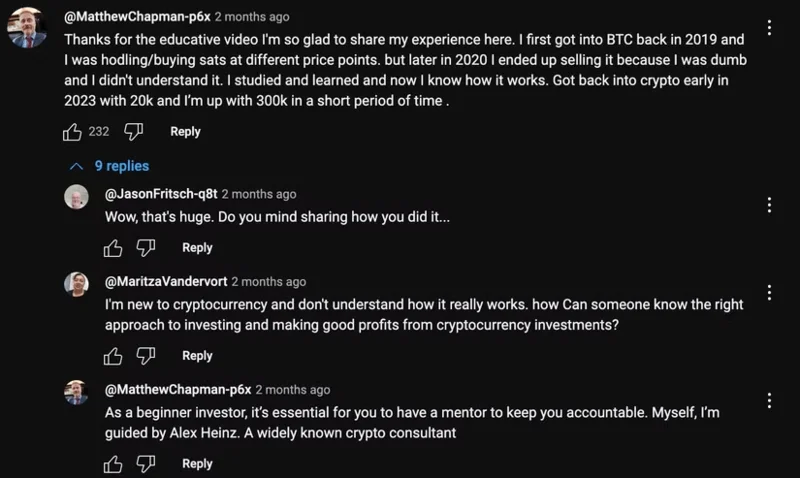
Example of a cryptocurrency comment scam on YouTube.
Cryptocurrency scams are common on YouTube, especially videos related to cryptocurrency, investing, or broader financial topics. Many of these scams are difficult to spot because they are posted by accounts that appear to be legitimate. The scams are often not easy to spot at first, as the comments often start with the scammer sharing their experience or some tips that might help them.
However, these scam comments often have multiple replies. The accounts reply claiming that they have had better luck in their crypto journey, thanks to the guidance of a so-called mentor. These names are almost always fake; the purpose of the initial comment and reply is to create a false sense of credibility.
When a person messages a scam account or replies to a scammer in the comments section, they are often given a Telegram or WhatsApp number to continue the conversation. While Telegram and WhatsApp are generally secure, scammers use these messaging platforms to maintain anonymity and continue conversations with their victims.
2. Gift/lottery scams
Many companies and YouTubers run legitimate giveaways and sweepstakes. However, you shouldn’t always trust giveaways on social media and video sharing platforms like YouTube.
If you see comments from accounts claiming to be hosting giveaways or sweepstakes for popular brands or YouTubers whose videos the comment is posted under, it’s best to ignore them. Unless you’re sure the comment was posted by the YouTuber (in which case their comment will have a verification badge), it’s best not to respond or click on any links in the comment.
Warning : Sometimes fake accounts use unusual characters to mimic YouTube's verification badge. Always double-check these; click on the account name to see if you're unsure.
3. Investment fraud
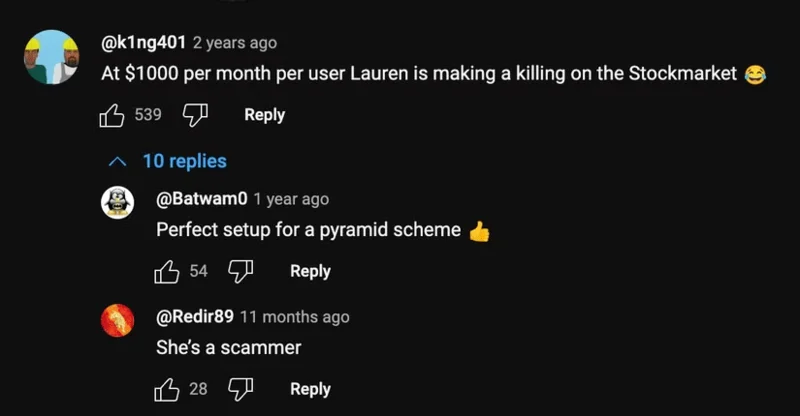
Example of investment comment scam on YouTube.
Investment scams are very similar to cryptocurrency scams, except that they are designed to appeal to a wider audience. Essentially, these scams try to exploit people’s desire to make quick money and financial gain.
On YouTube, these scam comments are often posted under videos posted by “influencers.” Because the comments are posted under popular videos with lots of views, they sometimes attract the attention of unsuspecting viewers.
4. Phishing scams
Phishing attacks are rampant, whether it's through cybercriminals sending emails with fraudulent links disguised as legitimate website links or through platforms like YouTube via the comments section.
If you’re watching a video about an upcoming tech gadget and see a seemingly innocent comment saying you can pre-order the device or get it at a discount through a certain link, you might be tempted to click. But these phishing links are just designed to steal your login credentials or personal information. Always stick to the official websites.
5. Impersonation scam
Have you ever come across comments where the commenter name and display image look identical to the YouTuber or business running the channel? These are impersonation scams, where cybercriminals create fake accounts with a slight change in the original creator's name.
They also often use stolen images from creators to appear more legitimate. Fake accounts may start commenting on creators’ videos and reply to comments, instruct viewers to set up contact outside of YouTube, or ask them to click on a link to claim a prize, among other tricks.
How to Identify Scam Comments on YouTube
While scammers are constantly looking for new ways to take advantage of innocent YouTube users, there are some warning signs that can help you identify scam comments.
1. Check the commenter's profile
Do you suspect a comment might be posted by a scammer? Check their profile. If the profile is completely new or the account name is misspelled like "Mr. Beest" instead of "Mr. Beast," you know you're dealing with a scammer. If the scammer is impersonating the creator, you'll also notice that their profile doesn't have a verification badge or that their videos are old.
2. Beware of offers that are too good to be true
Sometimes scam comments may claim that you have won a prize or offer exclusive investment tips/opportunities. In general, if a comment promises something that seems too good to be true, it is best to always be cautious and not engage with the account. Any legitimate business or YouTuber will reach out through the appropriate channels if you have won a prize or are eligible to claim something.
3. Analyze the language used
There are many free spelling and grammar checkers available online, but scammers rarely make the effort to use them. As a result, scam comments are often full of grammatical and spelling errors.
Another thing you’ll notice is that scam comments often follow the same script, with comments often being copied and pasted across multiple videos. If you see a comment and think it’s similar to another comment you’ve read on a similar video, then it’s likely from a scam account.