Chrome security extension hacked to steal user data

At least five Chrome extensions have been compromised in a coordinated attack, where a threat actor successfully injected code that stole sensitive information from users.

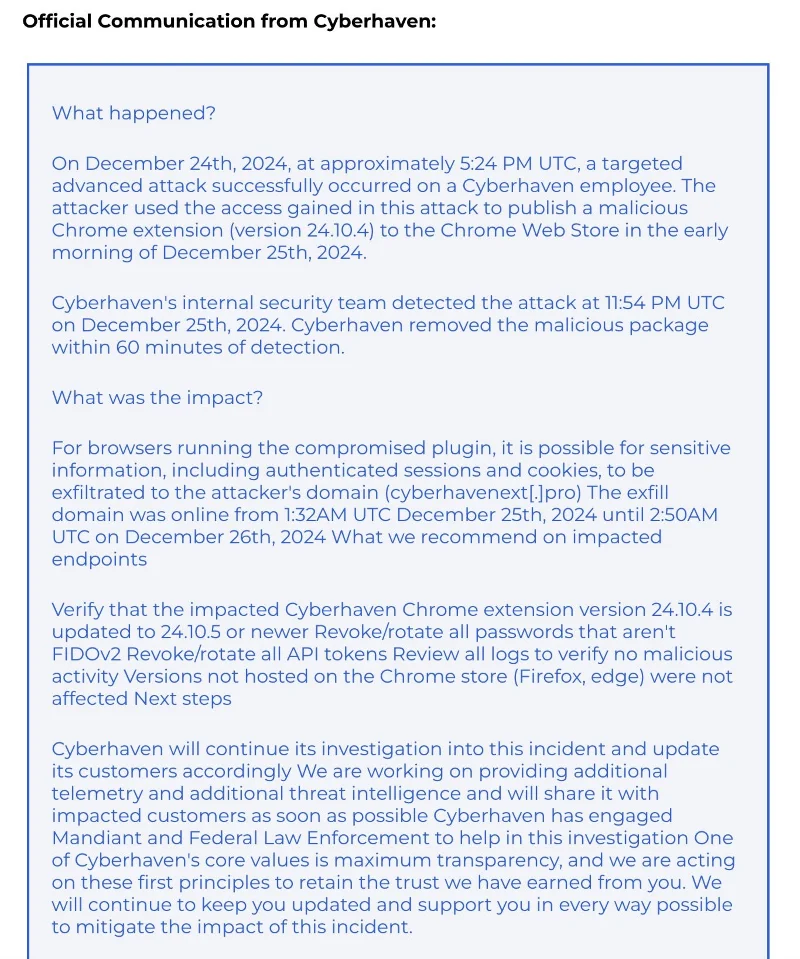
This is according to cybersecurity experts at Cyberhaven. The US-based data security company warned its customers about a breach that occurred on December 24, following a successful phishing campaign targeting the company’s administrator account on the Google Chrome Store.

Prominent among Cyberhaven's clients are popular brands such as Snowflake, Motorola, Canon, Reddit, AmeriHealth, Cooley, IVP, Navan, DBS, Upstart and Kirkland & Ellis.

Hackers took over employee accounts and released a malicious version (24.10.4) of the Cyberhaven extension, which included code that could steal authenticated sessions and cookies to the attacker's domain (cyberhavenext[.]pro).

Cyberhaven's internal security team removed the malware package within an hour of detection, the company said in an email to customers.
Chrome security extension hacked to steal user data

The clean version of the extension is v24.10.5 which was released on December 26. In addition to upgrading to the latest version, Cyberhaven Chrome extension users are advised to revoke non-FIDOv2 passwords, change all API tokens, and review browser logs to assess for malicious activity.

Many Chrome extensions have been hacked

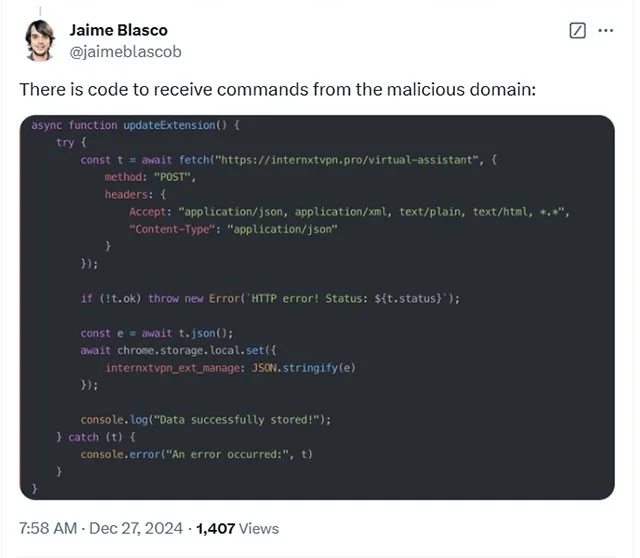
Following Cyberhaven's disclosure, Nudge Security researcher Jaime Blasco conducted a deeper investigation, redirecting from the attacker's IP address and registered domain name.

Chrome security extension hacked to steal user data

According to Blasco, the malicious code that allowed the extension to receive commands from the attacker was also injected into other Chrome extensions at the same time:

  • Internxt VPN – Free, Encrypted, Unlimited VPN for Secure Browsing. (10,000 users)
  • VPNCity – Privacy-focused VPN with 256-bit AES encryption and global server coverage. (50,000 users)
  • Uvoice – Rewards-based service to earn points through surveys and provide PC usage data. (40,000 users)
  • ParrotTalks – A seamless text and note taking information search engine. (40,000 users)
  • Blasco found multiple domains pointing to several other potential victims, but so far only the above extensions have been confirmed to contain malicious code.

Users of these extensions are advised to immediately remove them from their browsers or upgrade to a secure version released after December 26, after ensuring that the publisher is aware of the security issue and has fixed it.

If you are unsure, it is best to uninstall the extension, reset important account passwords, clear browser data, and reset browser settings to factory defaults.

Leave a Comment

Solving Microsoft Teams OneDrive Error File Sync

Solving Microsoft Teams OneDrive Error File Sync

Tired of Microsoft Teams OneDrive Error blocking file sync? Follow our step-by-step guide to solve Microsoft Teams "OneDrive Error" File Sync issues quickly. Proven fixes for smooth collaboration in Teams channels. Get your files syncing error-free today!

How to Fix Microsoft Teams Workflows and Power Automate Errors

How to Fix Microsoft Teams Workflows and Power Automate Errors

Tired of Microsoft Teams workflows and Power Automate errors halting your productivity? Get step-by-step solutions to common issues like authentication failures, timeouts, and flow errors. Fix them in minutes and automate effortlessly!

Troubleshooting Microsoft Teams Download Error on Macbook

Troubleshooting Microsoft Teams Download Error on Macbook

Facing Microsoft Teams "Download Error" on MacBook? Discover proven troubleshooting steps to resolve download failures quickly, from cache clears to reinstalls, and get back to smooth teamwork.

Troubleshooting Microsoft Teams Where is Teams Folder Error

Troubleshooting Microsoft Teams Where is Teams Folder Error

Tired of the frustrating Microsoft Teams "Where is Teams" Folder Error? Discover proven, step-by-step troubleshooting fixes to resolve it quickly and restore smooth teamwork. Latest methods included!

How to Fix Microsoft Teams JavaScript Error on Desktop App

How to Fix Microsoft Teams JavaScript Error on Desktop App

Frustrated by Microsoft Teams JavaScript Error on desktop app? Discover proven steps to fix it fast: clear cache, update, reset, and reinstall. Get back to seamless collaboration in minutes!

How to Fix Microsoft Teams Guest Login Error

How to Fix Microsoft Teams Guest Login Error

Struggling with Microsoft Teams "Guest Login" Error? Discover step-by-step fixes, from quick cache clears to admin settings, to resolve guest access issues fast and collaborate seamlessly. Updated with the latest tips!

How to Fix Microsoft Teams For PC Download Error

How to Fix Microsoft Teams For PC Download Error

Tired of the Microsoft Teams "For PC" download error blocking your work? Follow our proven, step-by-step guide to resolve it quickly and get Teams running smoothly on your PC today.

Solving Microsoft Teams Windows 7 Login Error

Solving Microsoft Teams Windows 7 Login Error

Struggling with Microsoft Teams "Windows 7" login error? Discover step-by-step fixes for this frustrating issue on Windows 10/11. Clear cache, edit registry, and more – get back to seamless collaboration today!

How to Fix Microsoft Teams Error Code 0x80070005 (2026 Guide)

How to Fix Microsoft Teams Error Code 0x80070005 (2026 Guide)

Tired of Microsoft Teams Error Code 0x80070005 blocking your meetings? Follow this 2026 guide with step-by-step fixes for access denied issues. Get Teams running smoothly in minutes!

How to Install the Microsoft Teams Add-in for Outlook 2026

How to Install the Microsoft Teams Add-in for Outlook 2026

Master the installation of the Microsoft Teams Add-in for Outlook 2026 effortlessly. Boost your productivity with seamless scheduling and meetings. Follow our proven, up-to-date steps for instant success!

How to Fix Microsoft Teams License Error 2026

How to Fix Microsoft Teams License Error 2026

Struggling with Microsoft Teams "License Error" 2026? Discover proven, step-by-step solutions to resolve it fast. Clear cache, check licenses, and get back to seamless collaboration—no IT help needed!

The Best Exercises for 50+

The Best Exercises for 50+

Whether youre in your 50s, 60s, or even 70s, its not too late to prioritize your health and put yourself first. Here are the best exercises for people 50 and older.

Solving Microsoft Teams Error Caa50024 on Windows 10/11

Solving Microsoft Teams Error Caa50024 on Windows 10/11

Struggling with Microsoft Teams Error Caa50024 on Windows 10/11? Follow our step-by-step fixes to resolve crashes and launch issues quickly. Latest proven solutions for seamless teamwork.

How to Fix Microsoft Teams Login Error AADSTS50011

How to Fix Microsoft Teams Login Error AADSTS50011

Stuck with Microsoft Teams login error AADSTS50011? Discover proven, step-by-step fixes to resolve the reply URL mismatch issue and log in seamlessly. No tech skills needed!

How to Fix Microsoft Teams Win 7 Compatibility Error

How to Fix Microsoft Teams Win 7 Compatibility Error

Tired of the frustrating Microsoft Teams "Win 7" Compatibility Error blocking your meetings? Get instant fixes with our step-by-step guide, including workarounds for older Windows versions. Resolve it now and stay connected!









