Pop Culture Costume Ideas That Will Dominate Halloween 2026

Plan a recognizable Halloween 2026 look with pop culture costumes inspired by Spider-Man, Supergirl, Toy Story 5, Moana, Mario, and Wednesday.
YouTuber "ChromaLock" turned a Texas Instruments TI-84 graphing calculator into an internet-connected device and accessed OpenAI's ChatGPT, allowing users to type in complex math problems and then receive answers directly from ChatGPT.
ChromaLock posted a video introducing the project, titled "I Made the Ultimate Cheating Device." The video and title immediately raised concerns in the education community because of its potential for cheating on exams.
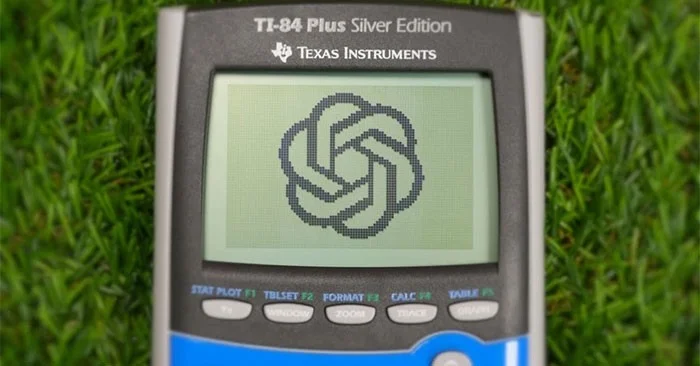
To start the project, ChromaLock hacked the TI-84 calculator's port, which is commonly used to share educational programs between devices. Then, for about $5, the YouTuber designed a custom "TI-32" board that integrates a Seed Studio ESP32-C3 microcontroller with Wi-Fi connectivity. ChromaLock also used a variety of other components to interface with the computer's system.
During the project, ChromaLock repeatedly encountered technical problems such as voltage incompatibility, signal errors, etc. Finally, after many versions, he successfully installed the custom circuit board inside the computer case. The special thing is that if you just look from the outside, it is difficult to recognize the difference.
To complement the hardware, which allows the computer to interact with the microcontroller and load “applets,” such as the ChatGPT interface, ChromaLock also developed custom software to integrate with the TI-32. This system allows students to use the computer’s keyboard to type in questions and receive ChatGPT answers right on the screen.
However, it is still limited and inconvenient to type long questions on a computer keyboard, only useful for answering short questions.
In addition, the device also provides many other cheating tools such as an image browser to access pre-prepared image documents, downloading “cheat sheets” disguised as source code.
ChromaLock claims that its bootable program can be downloaded on demand, avoiding detection if a teacher checks or wipes the computer's memory before an exam, thus bypassing conventional anti-cheating measures.
ChromaLock also equips this hack with the ability to break “Test Mode” – a lock mode used to prevent cheating.
ChromaLock also acknowledges the risk of misuse. However, he insists that the project is for creative purposes, not to encourage cheating. The project's custom circuit board and software source code have been made public by ChromaLock on GitHub.
ChromaLock is also hatching an upcoming camera feature.
Turn teddy bear into ChatGPT (June 17, 2024)
Spiritual_Aside_7859 - a gamer guy recently created a stuffed koala bear powered by Raspberry Pi and supporting ChatGPT complete with motorized animations and some fun LEDs, leaving the online community in awe.
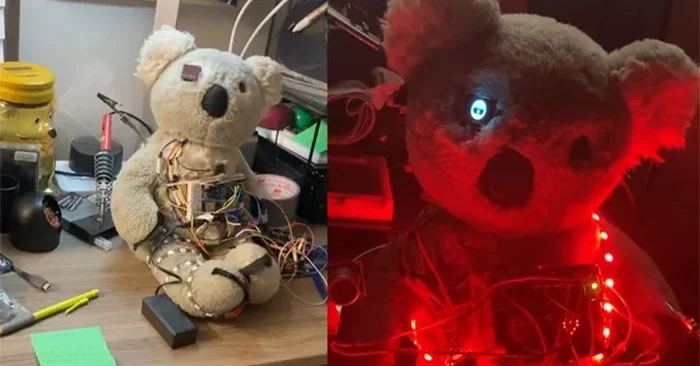
However, along with that surprise is fear because of the real-life appearance of this bear. When seeing this bear at night, when the LED system starts up, gamers can't help but think of the famous horror game Five Night at Freddy's.
Fortunately, this bear is still extremely useful and works well as a real virtual assistant. The gamer uses a Raspberry Pi in parallel with an Arduino Uno R4 so that the bear can communicate with ChatGPT. The bear is also equipped with an ultrasonic sensor to detect when objects are nearby and recognize people in the room. In the eye socket of the bear is a mini OLED screen.
The bear can speak using a text-to-speech application to reply to users via ChatGPT's response to text prompts.
Spiritual_Aside_7859 plans to add movement to this bear in the future. When that happens, this bear will surely make many people excited and terrified.
Plan a recognizable Halloween 2026 look with pop culture costumes inspired by Spider-Man, Supergirl, Toy Story 5, Moana, Mario, and Wednesday.
Sort leftover Halloween candy safely, share or repurpose sealed treats, and choose food use or compost for pumpkins based on their condition.
Compare workplace Halloween costume choices by respect, dress code, mobility, and safety—and learn when a subtle accessory or a policy check is the better option.
Find a couples costume that fits your style, budget, and comfort level, from Addams Family classics to original inside-joke duos.
Need a last-minute high school Halloween costume? Compare 10 easy closet-based ideas by prep time, comfort, school-day practicality, and simple safety checks.
Use a simple 2026 Halloween decorating timeline for indoor décor, outdoor displays, and fresh pumpkins, with practical adjustments for weather and events.
Mix five vivid, approachable Halloween cocktails with measured recipes, simple prep tips, and an alcohol-free option for your party guests.
Find 15 office-friendly Halloween costume ideas for 2026, with practical checks for dress codes, respectful themes, comfort, and workplace safety.
Plan a fun elementary school Halloween party with easy crafts, games, inclusive treats, costume tips, and a sample 75-minute classroom schedule.
Compare realistic side hustles for 2026 by startup cost, fees, flexibility, and income control, with current tax and scam guidance from official sources.








