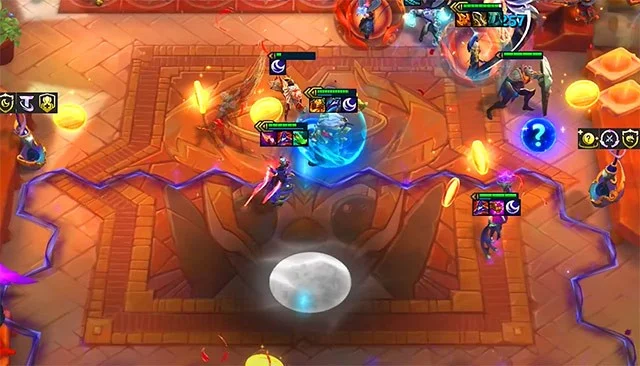
Dark Team DTCL season 11, Dark TFT build season 11

Dark in DTCL season 11 will definitely be a hot pick because of its clan nature. Although Dark is more of a tank than a damage dealer, Yone and Alune will be a threat to other players and will be present in many strong DTCL lineups this season 11.

Just gather the best damage dealers and have the Dark Seal, you will have a large source of damage that can finish off enemy champions below a specific health threshold. Some suggestions below for you about the TFT Dark team season 11 will help the team be able to be in the TOP 4.

See more: Alune TFT standard equipment season 11

Build Dark TFT season 11, play Dark DTCL season 11

Early game

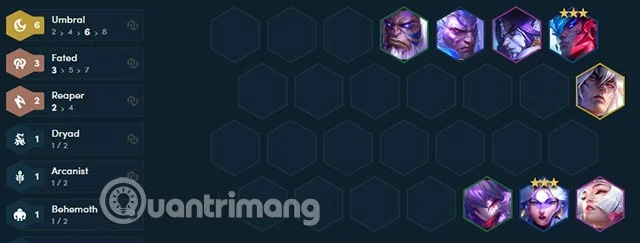
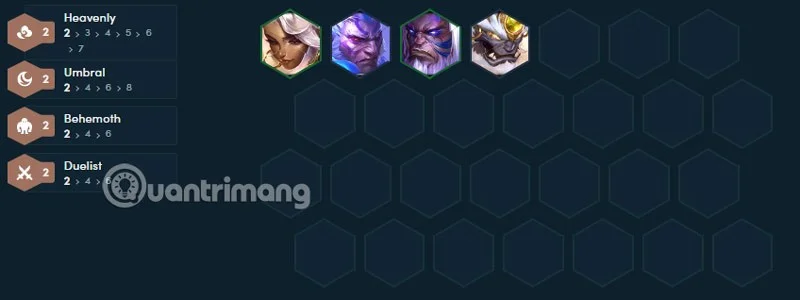
Starting with Darius and Yorick is the basics, with these two champions, you can combine with any champion in the early game to get more clans. Add Qiyana and Malphite to get two more buffs as shown below.
Dark Team DTCL season 11, Dark TFT build season 11

If you have items early in this phase, just combine and give them to Qiyana so she can keep items for Alune/Yone. Level up to 4 in round 2-1.

Mid game

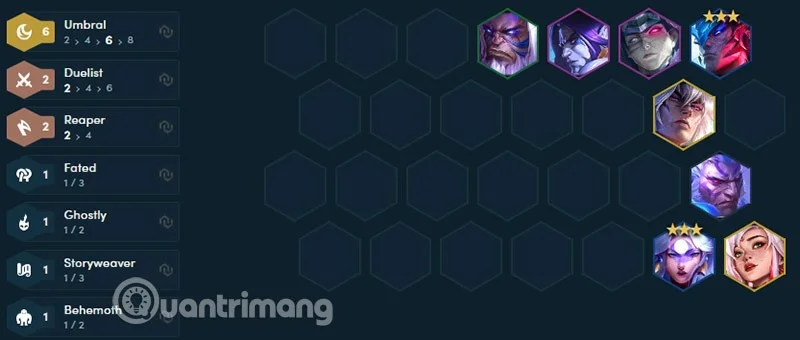
If you are planning to roll Yone and Alune to 3 stars at level 7, save up some money and level up to 6 in round 3-2. Throw all of Qiyana's items at Yone/Alune, depending on who you see early and more.
Dark Team DTCL season 11, Dark TFT build season 11

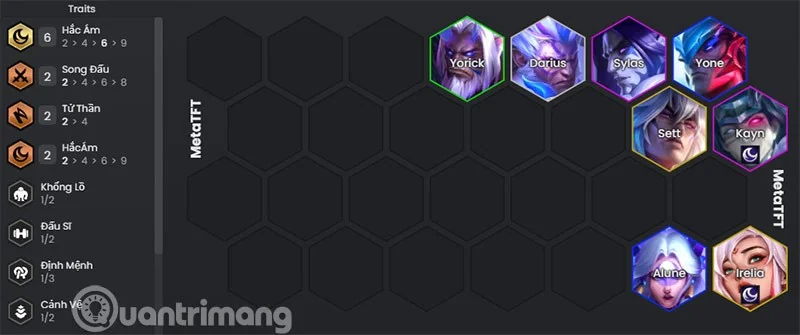
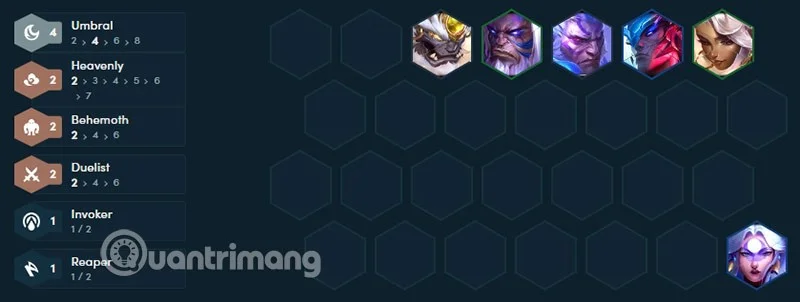
6 Darkness

The basic level at this level is 6 Dark, Sett may appear late so you should keep 4 Dark and keep the other generals to activate the system. After rolling Yone/Alune to 3 stars at level 7, save money to quickly reach 8 to increase the rate of Sett.

Dark Team DTCL season 11, Dark TFT build season 11

The combination to activate more clans when you already have 6 Dark in the team is not much, you can only activate 2-3 more clans at most. Combining with high-cost damage dealers is the way you should aim for in the late game. Don't forget to find items for tank champions standing in the front line like Sett, Sylas. Sett will need items to stay longer on the arena because he is both tanky and effective in attacking a large area.

Dark Team DTCL season 11, Dark TFT build season 11

If you have the Dark Mark, the champion holding it will have to be a champion that deals effective damage in the late game. These champions can be Irelia, Kayn, Syndra... both combining with the main champions and adding a bit of clan power to the team in the late game.

Dark Team DTCL season 11, Dark TFT build season 11

Items for Dark Generals

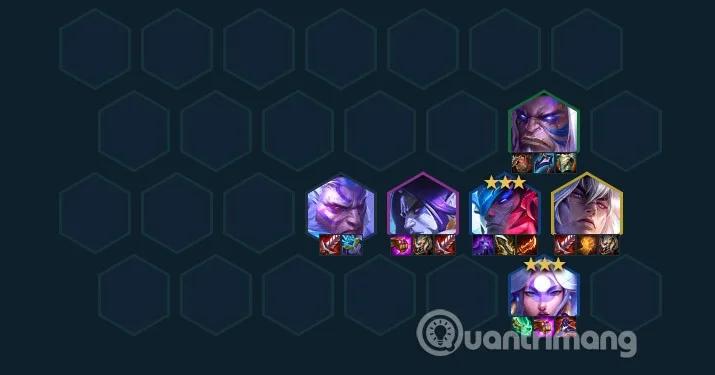
The equipment for Dark generals will mainly be Alune and Yone, and Sett in the late game. As for Sylas, Darius and Yorick, it will be tank or healing support items such as Blood Sword, Gunblade, however, items such as Titan's Power, Lightning Crossbow, Fire Armor, and Hand of Justice can support skill damage in the team.

Dark Team DTCL season 11, Dark TFT build season 11

Alune and Yone have opposite items, Yone uses physical items like Blue Bow, Infinity Edge, Rageblade, Hand of Justice, Titan's Power and some items that prolong the time in the front line like Cloak of Darkness, Cloak of Quicksilver...

The Dark One will use his nature to attract other good damage dealers if you have the Dark One. The Dark One can be built from the Golden Shovel and the Sparring Gloves. So if you decide to go Dark from the start, prioritize getting the Golden Shovel if you have it in the general selection rounds.

Skills of Dark generals season 11 TFT

Dark Team DTCL season 11, Dark TFT build season 11

Darius - Dark/Duel/High

Skill: Massacre

  • Mana: 0/40
  • Deals 150/225/340 magic damage to adjacent enemies. For the next 4 seconds, attacks deal an additional 80/120/180 magic damage.

Yorick - Dark/Giant

  • Skill: Wailing Mist
  • Mana: 40/100
  • Weakens the 2 nearest enemies, gaining 300/360/420 maximum health and dealing 160/240/375 magic damage to them over 3 seconds.

Alune - Dark/Mage (DTCL only)

Skill: Smash the Moon

  • Meteor showers through the row with the highest total health of the enemy. Meteors deal Magic Damage divided equally among all enemies hit. Deals Magic Damage to the current target. All enemies hit have their Magic Resist reduced by 20% for 6 seconds. Increases attack speed by 40% divided among allies in Alune's row for 5 seconds.

Yone - Darkness/Death

Skill: Death Seize

  • Dash in spirit form to the furthest enemy within 3 cells over 3 seconds, dealing physical damage and inflicting Grievous Wounds on enemies for 5 seconds. While in spirit form, gain a shield and 80% attack speed. Afterwards, Yone returns to his starting location. Each use in combat increases Yone's dash range by 1 cell.
  • Deep Wounds: Reduces healing by 33%

Sylas - Dark/Fighter

Skill: Devil's Chains

  • Sylas dashes around his target and slams, dealing magic damage and healing. He then spins his chains, dealing magic damage to nearby enemies.

Sett - Fate/Darkness/Guardian

Skills: Darkness and Light

  • Passive: At the start of combat, Sett crunches around a target in a row. Gain 1% permanent AD for every 1000 HP crunched.
  • Active: Sett stomps on a target in front of him, stunning them and dealing physical damage. He also deals physical damage equal to a percentage of the target's maximum health plus to enemies within 2.5 cells.
  • Fate Reward: Gain 15% total lifesteal.

Leave a Comment

How to Fix Microsoft Teams Error M Memory

How to Fix Microsoft Teams Error M Memory

Tired of Microsoft Teams crashing with "Error M" memory issues? Follow our step-by-step guide to fix Error M in Teams, clear cache, update software, and boost performance—no tech skills required!

Step-by-Step: Setting Up Microsoft Teams Town Hall Events

Step-by-Step: Setting Up Microsoft Teams Town Hall Events

Discover the easiest step-by-step guide to setting up Microsoft Teams Town Hall events. Host massive virtual gatherings effortlessly with pro tips for seamless execution. Perfect for leaders and organizers!

How to Fix Microsoft Teams Download Error for PC

How to Fix Microsoft Teams Download Error for PC

Struggling with Microsoft Teams "Download Error" on PC? Discover proven, step-by-step fixes to resolve download failed issues quickly. Get back to seamless collaboration in minutes—no tech skills needed!

Troubleshooting Microsoft Teams Error L License

Troubleshooting Microsoft Teams Error L License

Stuck with Microsoft Teams "Error L" License error? Follow this step-by-step troubleshooting guide to resolve licensing issues quickly, restore access, and boost productivity without IT hassle. Updated with latest fixes.

Troubleshooting Microsoft Teams Video Call Freezing

Troubleshooting Microsoft Teams Video Call Freezing

Tired of Microsoft Teams video call freezing mid-meeting? Follow this proven troubleshooting Microsoft Teams video call freezing guide with quick fixes, advanced tips, and real solutions to restore smooth video instantly.

How to Fix Microsoft Teams Download Failed Due to Unexpected Error

How to Fix Microsoft Teams Download Failed Due to Unexpected Error

Frustrated by Microsoft Teams 'Download Failed Due to Unexpected Error'? Discover proven, step-by-step solutions to fix this common issue quickly and get back to seamless collaboration. Updated with the latest fixes for peak performance.

Why Did My Microsoft Teams Recording Fail? Common Reasons

Why Did My Microsoft Teams Recording Fail? Common Reasons

Frustrated because your Microsoft Teams recording failed? Uncover the top common reasons like permissions issues, storage limits, and network glitches, plus step-by-step fixes to prevent future failures and record flawlessly every time.

Solving Microsoft Teams Error B Connection

Solving Microsoft Teams Error B Connection

Struggling with Microsoft Teams "Error B" connection? Discover step-by-step fixes for smooth connectivity. Clear cache, check networks, and more in this ultimate guide to resolving Error B instantly.

How to Fix Microsoft Teams Application Is In A Bad State Error

How to Fix Microsoft Teams Application Is In A Bad State Error

Tired of the frustrating Microsoft Teams "Application Is In A Bad State" error crashing your meetings? Discover proven, step-by-step fixes to resolve it quickly and restore smooth teamwork. Updated with the latest solutions.

How to Check Microsoft Teams Version History and Build Number

How to Check Microsoft Teams Version History and Build Number

Discover simple steps to check your Microsoft Teams version history and build number on desktop, web, and mobile. Stay updated with the latest features and fixes effortlessly. Perfect for IT pros and everyday users.

How to Fix Microsoft Teams Uninstall Error Stuck

How to Fix Microsoft Teams Uninstall Error Stuck

Tired of Microsoft Teams "Uninstall Error" Stuck? Discover proven, step-by-step fixes to completely remove Teams from your PC. Works on latest Windows versions – no tech skills needed!

Troubleshooting Microsoft Teams Where is My Team? Error

Troubleshooting Microsoft Teams Where is My Team? Error

Facing the frustrating Microsoft Teams "Where is My Team?" error? Discover step-by-step troubleshooting tips, common causes, and quick fixes to resolve it instantly and resume seamless collaboration. Updated with the latest solutions.

How to Fix Microsoft Teams VDI Error on Virtual Machines

How to Fix Microsoft Teams VDI Error on Virtual Machines

Tired of Microsoft Teams VDI errors crashing your virtual machine calls? Get step-by-step fixes for audio glitches, video freezes, and optimization issues on Citrix, VMware, or RDP setups. Boost productivity now!

How to Fix Microsoft Teams Error AADSTS70011

How to Fix Microsoft Teams Error AADSTS70011

Struggling with Microsoft Teams Error AADSTS70011? Discover step-by-step fixes for invalid scope errors, clear cache tips, and quick authentication resets to get back to seamless collaboration in minutes. Updated with latest Teams patches.

Troubleshooting Microsoft Teams Unknown Error: Something Went Wrong

Troubleshooting Microsoft Teams Unknown Error: Something Went Wrong

Stuck with Microsoft Teams unknown error "Something Went Wrong"? Discover quick, effective troubleshooting steps to resolve it instantly. Updated with the latest fixes for seamless collaboration.









