Dead Butt Syndrome, the Nightmare of Sedentary People

Dead butt syndrome or gluteal myositis is one of the serious consequences of sitting too much but little known.
Dead Butt Syndrome, the Nightmare of Sedentary People

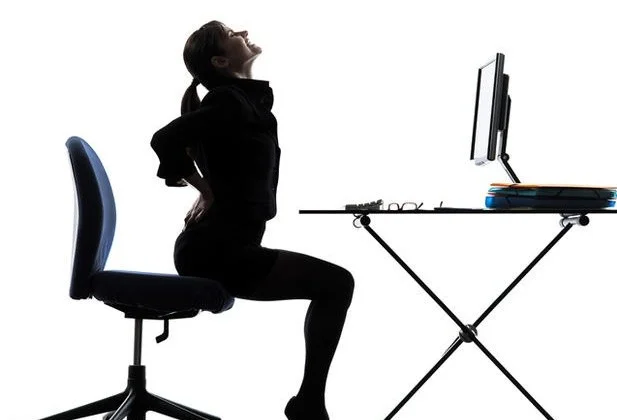
Anyone who has ever sat in a chair for hours has experienced a tingling sensation in one or both buttocks. This feeling disappears during movement, so many people think it is not a big problem, not knowing that it is the premise for a more serious syndrome called "Dead Butt Syndrome" or Fluteal amnesia.

Your butt can actually "die"

Simply put, dead butt syndrome is a phenomenon where your butt "forgets" that it is a butt, and the muscles around the butt become truly paralyzed and can no longer react.

Dead Butt Syndrome, the Nightmare of Sedentary People

According to physiologist Pete McCall, the cause of this phenomenon is that when we sit, the flexor muscles around the hips tighten, causing the gluteal muscles to not function properly.

" It's a muscle balance, where shortening of one muscle (the hip flexors) causes another muscle on the opposite side (the glutes) to lengthen to compensate ," McCall adds.

Specifically, in a sitting position, the hip flexors are tightened and the glutes will stretch to compensate. Sitting for too long, repeatedly over a long period of time, causing the glutes to stay at this level of stretch, causes "dead butt" syndrome. When you need to use the glutes, they will create less force, so other parts of the body have to work harder to compensate for the buttocks. This is the reason why the hips, knees, and spine suffer unnecessary pain.

How to Check if You Have Dead Butt Syndrome

If you work in an office and have to sit too much, check yourself to see if you have "dead butt" syndrome.

If you lie on your back and cannot move each side of your buttocks separately or when you stand up straight, but feel your waist tilt slightly forward, you may have this scary syndrome.

How to avoid dead butt syndrome when sitting too much

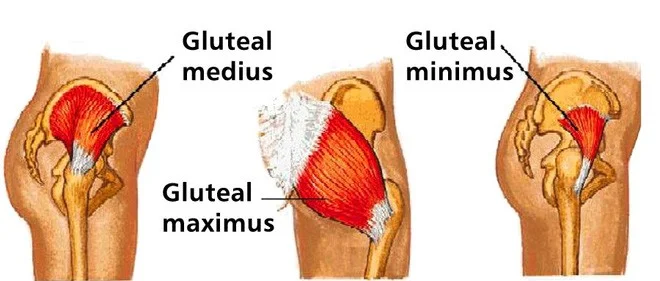
According to Sara Lewis - director of XO fitness company in Los Angeles, to revive your butt, you must constantly exercise all three types of gluteal muscles: gluteal medius, gluteal maximus and gluteal minumus.

Dead Butt Syndrome, the Nightmare of Sedentary People
3 types of gluteal muscles

Don't worry too much, there are still ways to fix this "dead butt" syndrome.

  • Get up from your chair regularly during work hours, preferably set an alarm on your phone to remind you to move. Get up, walk around and do some stretching.
  • Sit in the correct posture, adjusting the height of the chair so that the tip of your big toe touches the floor.
  • Exercise: Squats, lunges, or deadlifts are all exercises that heavily target these muscle groups.
  • If you don't have time to exercise, just stand up straight, tighten your glutes for 5 seconds and then release. Repeat this movement 10 times throughout the day and your butt will come back to life in no time.

Leave a Comment

How to Fix Microsoft Teams Undefined Error (2026)

How to Fix Microsoft Teams Undefined Error (2026)

Struggling with Microsoft Teams 'Undefined Error' (2026)? Discover proven, step-by-step fixes like clearing cache, updating the app, and more. Get back to seamless collaboration fast!

How to Disable Microsoft Teams at Startup for Better PC Performance

How to Disable Microsoft Teams at Startup for Better PC Performance

Discover simple, step-by-step methods to disable Microsoft Teams at startup and unlock better PC performance. Faster boot times, less resource drain—perfect for Windows users seeking smooth operation.

How to Fix Microsoft Teams Network Error Offline

How to Fix Microsoft Teams Network Error Offline

Stuck with Microsoft Teams "Network Error" offline? Discover proven, step-by-step solutions to fix Microsoft Teams network error offline quickly. Get back online fast—no tech skills needed!

Solving Microsoft Teams Error 4oggx

Solving Microsoft Teams Error 4oggx

Struggling with Microsoft Teams Error 4oggx? Discover proven fixes to resolve sign-in failures, crashes, and connectivity issues fast. Get back to productive calls without frustration!

How to Fix Microsoft Teams Remove Account Data Error

How to Fix Microsoft Teams Remove Account Data Error

Encountering the frustrating Microsoft Teams "Remove Account" Data Error? Discover quick, reliable fixes like clearing cache, resetting the app, and more to get back to seamless collaboration without losing data. Updated with the latest solutions.

Troubleshooting Microsoft Teams Layout Error Sidebar

Troubleshooting Microsoft Teams Layout Error Sidebar

Tired of the frustrating Microsoft Teams "Layout Error" Sidebar? Follow our proven, step-by-step troubleshooting guide with the latest fixes to get your Teams sidebar working smoothly again. No tech skills needed!

Troubleshooting Microsoft Teams Offline Error in 2026

Troubleshooting Microsoft Teams Offline Error in 2026

Stuck with Microsoft Teams offline error in 2026? Discover proven troubleshooting steps, common causes, and quick fixes to restore your connection fast. No tech skills required!

How to Fix Microsoft Teams Error M Memory

How to Fix Microsoft Teams Error M Memory

Tired of Microsoft Teams crashing with "Error M" memory issues? Follow our step-by-step guide to fix Error M in Teams, clear cache, update software, and boost performance—no tech skills required!

Step-by-Step: Setting Up Microsoft Teams Town Hall Events

Step-by-Step: Setting Up Microsoft Teams Town Hall Events

Discover the easiest step-by-step guide to setting up Microsoft Teams Town Hall events. Host massive virtual gatherings effortlessly with pro tips for seamless execution. Perfect for leaders and organizers!

How to Fix Microsoft Teams Download Error for PC

How to Fix Microsoft Teams Download Error for PC

Struggling with Microsoft Teams "Download Error" on PC? Discover proven, step-by-step fixes to resolve download failed issues quickly. Get back to seamless collaboration in minutes—no tech skills needed!

Troubleshooting Microsoft Teams Error L License

Troubleshooting Microsoft Teams Error L License

Stuck with Microsoft Teams "Error L" License error? Follow this step-by-step troubleshooting guide to resolve licensing issues quickly, restore access, and boost productivity without IT hassle. Updated with latest fixes.

Troubleshooting Microsoft Teams Video Call Freezing

Troubleshooting Microsoft Teams Video Call Freezing

Tired of Microsoft Teams video call freezing mid-meeting? Follow this proven troubleshooting Microsoft Teams video call freezing guide with quick fixes, advanced tips, and real solutions to restore smooth video instantly.

How to Fix Microsoft Teams Download Failed Due to Unexpected Error

How to Fix Microsoft Teams Download Failed Due to Unexpected Error

Frustrated by Microsoft Teams 'Download Failed Due to Unexpected Error'? Discover proven, step-by-step solutions to fix this common issue quickly and get back to seamless collaboration. Updated with the latest fixes for peak performance.

Why Did My Microsoft Teams Recording Fail? Common Reasons

Why Did My Microsoft Teams Recording Fail? Common Reasons

Frustrated because your Microsoft Teams recording failed? Uncover the top common reasons like permissions issues, storage limits, and network glitches, plus step-by-step fixes to prevent future failures and record flawlessly every time.

Solving Microsoft Teams Error B Connection

Solving Microsoft Teams Error B Connection

Struggling with Microsoft Teams "Error B" connection? Discover step-by-step fixes for smooth connectivity. Clear cache, check networks, and more in this ultimate guide to resolving Error B instantly.









