Effective exercises to remove wrinkles and rejuvenate the skin

Facial exercises are a simple and effective way to reduce wrinkles, offering a natural alternative to expensive treatments. These targeted movements can improve skin elasticity, promote blood circulation and give your face a youthful, radiant look.

Effective exercises to remove wrinkles and rejuvenate the skin

The guide below will introduce 5 effective facial exercises designed to tone muscles, reduce visible signs of aging, and improve the overall appearance of your skin . With just a few minutes a day, these techniques can make a significant difference in maintaining healthy, radiant skin.

Benefits of facial yoga

Facial yoga offers many benefits for aging skin by combining gentle exercises with mindfulness techniques. These exercises help tone and strengthen facial muscles, which can help reduce sagging and create a firmer, more youthful appearance. Regularly practicing facial exercises, such as those that target the cheeks and jawline, can improve muscle tone and even increase skin elasticity over time.

Improved blood circulation is another benefit, as it delivers oxygen and nutrients to the skin, promoting a healthy glow and reducing puffiness. Face yoga supports the lymphatic system, which helps to eliminate toxins and reduce fluid buildup. This can help brighten the skin and reduce signs of stress, such as wrinkles.

By stimulating the production of collagen and elastin, face yoga also addresses the natural decline of these proteins, which are important for maintaining skin elasticity and strength as we age. In addition to the physical changes, this practice promotes relaxation, reduces stress, and improves overall health.

Yoga exercises to remove wrinkles and rejuvenate the face

Lion pose

  1. Sit in a comfortable kneeling position with your knees wide apart and your buttocks resting on your heels. Or you can sit cross-legged if that is more comfortable.
  2. Place your palms on your knees, spreading your fingers to resemble lion claws.
  3. Stretch your spine, lift your chest and pull your shoulders back and down to avoid hunching over.
  4. Open your mouth wide and stick your tongue out, pointing it toward your chin. This stretches the muscles in your neck and jaw.
  5. Raise your eyebrows and look up, focusing on the space between your eyebrows.
  6. Take a deep breath, then exhale forcefully through your mouth, making a roaring "haaaa" sound.
  7. This move simulates a lion's roar and adds intensity to the stretch.
  8. Return to neutral face as you inhale, then repeat the movement for 5–10 sets.
  9. Relax your face and hands after completing the repetitions.

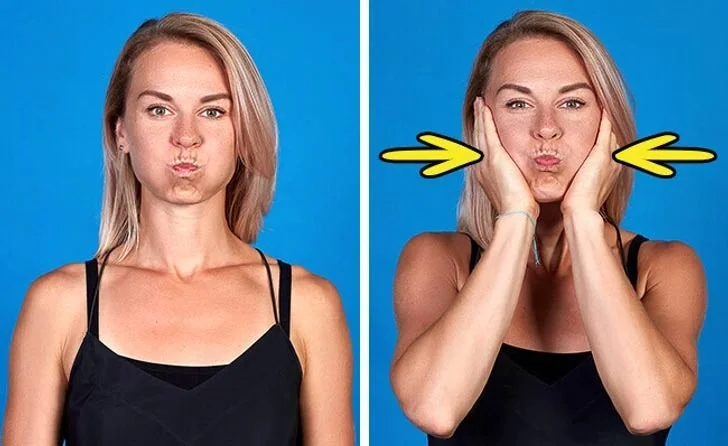
Cheek sucking

Effective exercises to remove wrinkles and rejuvenate the skin

  1. Sit or stand comfortably with your back straight to ensure good alignment.
  2. Gently push your chin out while pulling your head back slightly. This creates a gentle pull on your jawline and cheek area.
  3. Puff out your cheeks by filling them with air. Hold the air firmly in each cheek, like a chipmunk hoarding food.
  4. Move the air from cheek to cheek in a controlled motion, making sure the cheek feels resistance.
  5. Hold the cheek sucking position for about 5 seconds for maximum effect.
  6. Exhale slowly, relax your face and repeat the exercise 10–15 times for best results.

Keep smiling

  1. Start with your face and lips completely relaxed. This ensures that you use the correct muscles during the exercise.
  2. Without opening your lips, gently stretch the corners of your mouth outward. Hold this position for about 10 seconds.
  3. Gradually increase the stretch until the edges of your teeth are visible. Hold this position for another 10 seconds.
  4. Smile wider to reveal half your teeth. Hold for another 10 seconds.
  5. Finally, smile as wide as you can, showing all your teeth. Hold this position for 10 seconds, feeling the stretch in your cheeks. For more control, you can repeat the process in reverse—starting with a wide smile and gradually reducing the stretch until your lips return to a relaxed position.

Effective exercises to remove wrinkles and rejuvenate the skin

Squint

  1. Place your index and middle fingers on the outer corners of your eyes.
  2. Carefully spread your fingers apart, pulling them back at a 45-degree angle. This will cause your eyes to squint slightly.
  3. Find a point in the distance to focus your eyes on. Hold this squinting position for 5 seconds.
  4. Let your eyes and face relax completely.
  5. Perform this entire sequence of movements two more times.

Forehead stroke

  1. Place your hands on your forehead. Spread your fingers so that they are between your hairline and eyebrows.
  2. Gently sweep your fingers out over your forehead using light pressure.
  3. Repeat this scanning motion five more times.
Leave a Comment

Fixing Microsoft Teams Vcruntime140.dll Missing Error

Fixing Microsoft Teams Vcruntime140.dll Missing Error

Tired of the frustrating Microsoft Teams Vcruntime140.dll missing error crashing your meetings? Discover proven, step-by-step fixes to resolve it fast and restore smooth teamwork. No tech skills needed!

How to Fix Microsoft Teams Undefined Error (2026)

How to Fix Microsoft Teams Undefined Error (2026)

Struggling with Microsoft Teams 'Undefined Error' (2026)? Discover proven, step-by-step fixes like clearing cache, updating the app, and more. Get back to seamless collaboration fast!

How to Disable Microsoft Teams at Startup for Better PC Performance

How to Disable Microsoft Teams at Startup for Better PC Performance

Discover simple, step-by-step methods to disable Microsoft Teams at startup and unlock better PC performance. Faster boot times, less resource drain—perfect for Windows users seeking smooth operation.

How to Fix Microsoft Teams Network Error Offline

How to Fix Microsoft Teams Network Error Offline

Stuck with Microsoft Teams "Network Error" offline? Discover proven, step-by-step solutions to fix Microsoft Teams network error offline quickly. Get back online fast—no tech skills needed!

Solving Microsoft Teams Error 4oggx

Solving Microsoft Teams Error 4oggx

Struggling with Microsoft Teams Error 4oggx? Discover proven fixes to resolve sign-in failures, crashes, and connectivity issues fast. Get back to productive calls without frustration!

How to Fix Microsoft Teams Remove Account Data Error

How to Fix Microsoft Teams Remove Account Data Error

Encountering the frustrating Microsoft Teams "Remove Account" Data Error? Discover quick, reliable fixes like clearing cache, resetting the app, and more to get back to seamless collaboration without losing data. Updated with the latest solutions.

Troubleshooting Microsoft Teams Layout Error Sidebar

Troubleshooting Microsoft Teams Layout Error Sidebar

Tired of the frustrating Microsoft Teams "Layout Error" Sidebar? Follow our proven, step-by-step troubleshooting guide with the latest fixes to get your Teams sidebar working smoothly again. No tech skills needed!

Troubleshooting Microsoft Teams Offline Error in 2026

Troubleshooting Microsoft Teams Offline Error in 2026

Stuck with Microsoft Teams offline error in 2026? Discover proven troubleshooting steps, common causes, and quick fixes to restore your connection fast. No tech skills required!

How to Fix Microsoft Teams Error M Memory

How to Fix Microsoft Teams Error M Memory

Tired of Microsoft Teams crashing with "Error M" memory issues? Follow our step-by-step guide to fix Error M in Teams, clear cache, update software, and boost performance—no tech skills required!

Step-by-Step: Setting Up Microsoft Teams Town Hall Events

Step-by-Step: Setting Up Microsoft Teams Town Hall Events

Discover the easiest step-by-step guide to setting up Microsoft Teams Town Hall events. Host massive virtual gatherings effortlessly with pro tips for seamless execution. Perfect for leaders and organizers!

How to Fix Microsoft Teams Download Error for PC

How to Fix Microsoft Teams Download Error for PC

Struggling with Microsoft Teams "Download Error" on PC? Discover proven, step-by-step fixes to resolve download failed issues quickly. Get back to seamless collaboration in minutes—no tech skills needed!

Troubleshooting Microsoft Teams Error L License

Troubleshooting Microsoft Teams Error L License

Stuck with Microsoft Teams "Error L" License error? Follow this step-by-step troubleshooting guide to resolve licensing issues quickly, restore access, and boost productivity without IT hassle. Updated with latest fixes.

Troubleshooting Microsoft Teams Video Call Freezing

Troubleshooting Microsoft Teams Video Call Freezing

Tired of Microsoft Teams video call freezing mid-meeting? Follow this proven troubleshooting Microsoft Teams video call freezing guide with quick fixes, advanced tips, and real solutions to restore smooth video instantly.

How to Fix Microsoft Teams Download Failed Due to Unexpected Error

How to Fix Microsoft Teams Download Failed Due to Unexpected Error

Frustrated by Microsoft Teams 'Download Failed Due to Unexpected Error'? Discover proven, step-by-step solutions to fix this common issue quickly and get back to seamless collaboration. Updated with the latest fixes for peak performance.

Why Did My Microsoft Teams Recording Fail? Common Reasons

Why Did My Microsoft Teams Recording Fail? Common Reasons

Frustrated because your Microsoft Teams recording failed? Uncover the top common reasons like permissions issues, storage limits, and network glitches, plus step-by-step fixes to prevent future failures and record flawlessly every time.