Pop Culture Costume Ideas That Will Dominate Halloween 2026

Plan a recognizable Halloween 2026 look with pop culture costumes inspired by Spider-Man, Supergirl, Toy Story 5, Moana, Mario, and Wednesday.
Below is a video of the newly released Nothing Phone 1.
Nothing Phone 1 launched, transparent back, super cool LED lights, price from 11 million VND
Nothing Phone 1 has officially launched, featuring a minimalist design, a transparent back with a unique light strip. Nothing Phone 1 will be available from July 21st with prices starting at £399.
Phone 1 has a 6"55 inch Full-HD screen with OLED panel for 1200 nits brightness and 120Hz refresh rate. The device is equipped with a fingerprint sensor under the screen.
Configuration
The device's dual rear camera cluster includes a main camera with optical image stabilization, electronic image stabilization with modes such as night shooting, portrait, document scanning; an ultra-wide-angle lens with a 114-degree viewing angle and can take macro shots at a distance of 4cm. Both rear cameras have a resolution of 50MP. The front camera has a resolution of 16MP.
The power of the device comes from the Snapdragon 778G CPU, 8GB or 12GB RAM and 128GB or 256GB ROM. The battery has a capacity of 4500mAh, supports 33W fast charging, 15W wireless charging and 5W reverse wireless charging.
Unique transparent back design
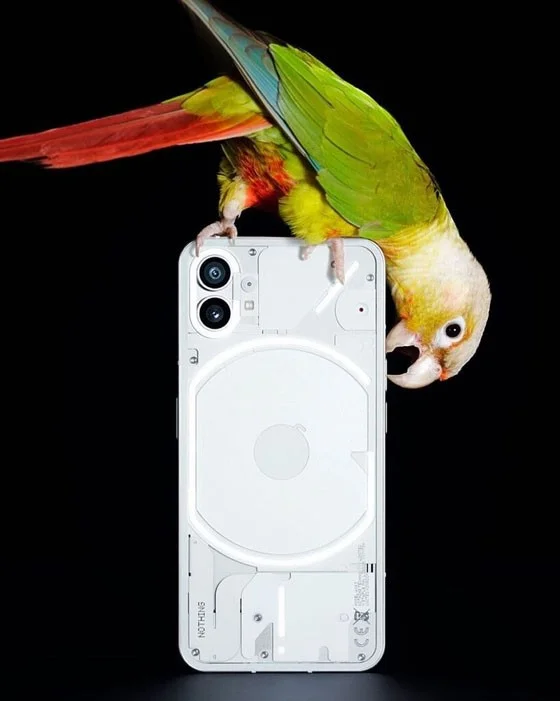
Nothing Phone 1 has a transparent back that allows you to see through the interior. Users can see some internal components such as wireless charging, the fairly basic dual camera module in the upper left corner, the cables connecting to the circuit board... But the design details are still covered by a gray coating.
The main highlight in the design of this phone comes from the wireless charging coil on the back, the volume rocker on the left side and the power button on the right side.
Nothing Tech further revealed that they use many different types of materials, but are selected according to separate standards to create this unique phone.
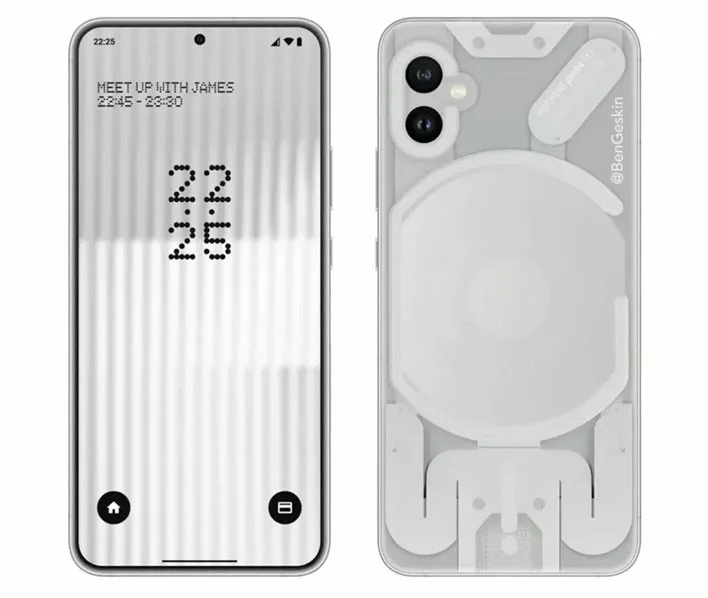
The back of Nothing Phone 1 is equipped with up to 900 independently operating LED lights including an LED strip around the rear camera cluster, a circular LED strip in the middle and two other LED strips above and below.
Nothing Phone 1 allows users to set up these LED strips according to their preferences and purposes in the settings section.
The LED strip on the Nothing Phone 1 has multiple functions including
Price of Nothing Phone 1
Nothing Phone 1 comes in black and white.
The standard version of the Phone 1 costs £399. The version with 12GB of RAM and 256GB of internal storage costs £499.
Nothing Phone 1 distribution markets include Denmark, Finland, France, Germany, Hong Kong, Hungary, Malaysia, Netherlands, Norway, Philippines, India, Israel, Italy, Macau, Poland, Portugal, Spain, Singapore, Romania, Saudi Arabia, Sweden, Switzerland, Taiwan, Thailand and UAE.
Plan a recognizable Halloween 2026 look with pop culture costumes inspired by Spider-Man, Supergirl, Toy Story 5, Moana, Mario, and Wednesday.
Sort leftover Halloween candy safely, share or repurpose sealed treats, and choose food use or compost for pumpkins based on their condition.
Compare workplace Halloween costume choices by respect, dress code, mobility, and safety—and learn when a subtle accessory or a policy check is the better option.
Find a couples costume that fits your style, budget, and comfort level, from Addams Family classics to original inside-joke duos.
Need a last-minute high school Halloween costume? Compare 10 easy closet-based ideas by prep time, comfort, school-day practicality, and simple safety checks.
Use a simple 2026 Halloween decorating timeline for indoor décor, outdoor displays, and fresh pumpkins, with practical adjustments for weather and events.
Mix five vivid, approachable Halloween cocktails with measured recipes, simple prep tips, and an alcohol-free option for your party guests.
Find 15 office-friendly Halloween costume ideas for 2026, with practical checks for dress codes, respectful themes, comfort, and workplace safety.
Plan a fun elementary school Halloween party with easy crafts, games, inclusive treats, costume tips, and a sample 75-minute classroom schedule.
Compare realistic side hustles for 2026 by startup cost, fees, flexibility, and income control, with current tax and scam guidance from official sources.








