Far Manager 2024 - Document Management Software

Far Manager is a powerful document management and file storage software tailored for the Windows operating system.

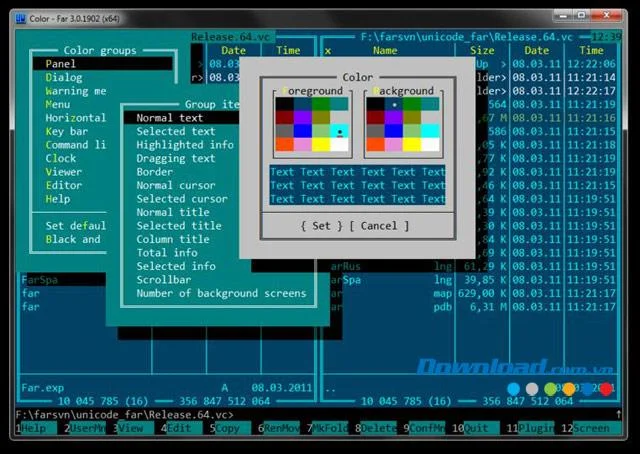
Just like a room, your computer requires regular tidying, whether that involves organizing or moving files and folders. Far Manager is a fully equipped file management tool, combining essential features for effective file management while also supporting various plug-ins that extend its functionality.

Operating in text mode, Far Manager offers a user-friendly interface that simplifies common tasks such as:

Task Description
View files and folders Efficiently browse through your file hierarchy.
Edit, copy, and rename files Perform basic file operations seamlessly.
Other activities Engage in a variety of file-related tasks.

Far Manager 2024 - Document management software

Download Far Manager to simplify your document and file management processes.

Far Manager provides extensive customization options, allowing users to configure shortcuts for various functions through an intuitive dialog box. It also supports mouse input and integrates default Windows programs for opening certain file formats. Key features include:

Feature Description
Long file names Handle files with extended naming conventions effortlessly.
File color coding Easily distinguish files using different colors.
Advanced file search Locate files quickly with an enhanced search function.
To-do lists Organize tasks and manage schedules effectively.
File history Keep track of file modifications and accesses.

One of the standout advantages of Far Manager is its compatibility with numerous plug-ins, enabling users to download and integrate additional features as needed. Some notable functionalities provided through plug-ins include:

  1. Working with FTP servers (including proxy access).
  2. Batch search and replace across multiple files using standard methods.
  3. Group file renaming with support for templates and alternate icons.
  4. Mail protocols (NNTP, SMTP, POP3, IMAP4) and pager messaging.
  5. Support for non-standard resolution monitors.
  6. Operations with files in the Recycle Bin.
  7. Word completion in the text editor and template usage.
  8. Windows registry modifications.
  9. Creation and modification of Windows shortcuts.
  10. Printer connection management.
  11. Connection and debugging of ODBC database queries.
  12. Remote Access Service (RAS) control.
  13. Execution of external programs (compilers, converters, etc.) in the text editor.
  14. Viewing Windows Help files (.hlp and .chm).
  15. Built-in multi-function calculator.
  16. Various games and utilities.
  17. Spelling check during text editing.
  18. Portable drive cataloging and more.

The features and capabilities of Far Manager and its plug-ins are constantly evolving. The best way to discover its full potential is to download Far Manager and explore its offerings.

In summary, Far Manager stands as one of the premier file management software choices available today. With high customization, extensive options to adjust layouts, shortcuts, and colors, along with being open-source and supporting multiple languages, users can seamlessly adopt and master its functionality.

If you're looking for alternative file management solutions, consider:

Leave a Comment

How to Fix Microsoft Teams Error M Memory

How to Fix Microsoft Teams Error M Memory

Tired of Microsoft Teams crashing with "Error M" memory issues? Follow our step-by-step guide to fix Error M in Teams, clear cache, update software, and boost performance—no tech skills required!

Step-by-Step: Setting Up Microsoft Teams Town Hall Events

Step-by-Step: Setting Up Microsoft Teams Town Hall Events

Discover the easiest step-by-step guide to setting up Microsoft Teams Town Hall events. Host massive virtual gatherings effortlessly with pro tips for seamless execution. Perfect for leaders and organizers!

How to Fix Microsoft Teams Download Error for PC

How to Fix Microsoft Teams Download Error for PC

Struggling with Microsoft Teams "Download Error" on PC? Discover proven, step-by-step fixes to resolve download failed issues quickly. Get back to seamless collaboration in minutes—no tech skills needed!

Troubleshooting Microsoft Teams Error L License

Troubleshooting Microsoft Teams Error L License

Stuck with Microsoft Teams "Error L" License error? Follow this step-by-step troubleshooting guide to resolve licensing issues quickly, restore access, and boost productivity without IT hassle. Updated with latest fixes.

Troubleshooting Microsoft Teams Video Call Freezing

Troubleshooting Microsoft Teams Video Call Freezing

Tired of Microsoft Teams video call freezing mid-meeting? Follow this proven troubleshooting Microsoft Teams video call freezing guide with quick fixes, advanced tips, and real solutions to restore smooth video instantly.

How to Fix Microsoft Teams Download Failed Due to Unexpected Error

How to Fix Microsoft Teams Download Failed Due to Unexpected Error

Frustrated by Microsoft Teams 'Download Failed Due to Unexpected Error'? Discover proven, step-by-step solutions to fix this common issue quickly and get back to seamless collaboration. Updated with the latest fixes for peak performance.

Why Did My Microsoft Teams Recording Fail? Common Reasons

Why Did My Microsoft Teams Recording Fail? Common Reasons

Frustrated because your Microsoft Teams recording failed? Uncover the top common reasons like permissions issues, storage limits, and network glitches, plus step-by-step fixes to prevent future failures and record flawlessly every time.

Solving Microsoft Teams Error B Connection

Solving Microsoft Teams Error B Connection

Struggling with Microsoft Teams "Error B" connection? Discover step-by-step fixes for smooth connectivity. Clear cache, check networks, and more in this ultimate guide to resolving Error B instantly.

How to Fix Microsoft Teams Application Is In A Bad State Error

How to Fix Microsoft Teams Application Is In A Bad State Error

Tired of the frustrating Microsoft Teams "Application Is In A Bad State" error crashing your meetings? Discover proven, step-by-step fixes to resolve it quickly and restore smooth teamwork. Updated with the latest solutions.

How to Check Microsoft Teams Version History and Build Number

How to Check Microsoft Teams Version History and Build Number

Discover simple steps to check your Microsoft Teams version history and build number on desktop, web, and mobile. Stay updated with the latest features and fixes effortlessly. Perfect for IT pros and everyday users.

How to Fix Microsoft Teams Uninstall Error Stuck

How to Fix Microsoft Teams Uninstall Error Stuck

Tired of Microsoft Teams "Uninstall Error" Stuck? Discover proven, step-by-step fixes to completely remove Teams from your PC. Works on latest Windows versions – no tech skills needed!

Troubleshooting Microsoft Teams Where is My Team? Error

Troubleshooting Microsoft Teams Where is My Team? Error

Facing the frustrating Microsoft Teams "Where is My Team?" error? Discover step-by-step troubleshooting tips, common causes, and quick fixes to resolve it instantly and resume seamless collaboration. Updated with the latest solutions.

How to Fix Microsoft Teams VDI Error on Virtual Machines

How to Fix Microsoft Teams VDI Error on Virtual Machines

Tired of Microsoft Teams VDI errors crashing your virtual machine calls? Get step-by-step fixes for audio glitches, video freezes, and optimization issues on Citrix, VMware, or RDP setups. Boost productivity now!

How to Fix Microsoft Teams Error AADSTS70011

How to Fix Microsoft Teams Error AADSTS70011

Struggling with Microsoft Teams Error AADSTS70011? Discover step-by-step fixes for invalid scope errors, clear cache tips, and quick authentication resets to get back to seamless collaboration in minutes. Updated with latest Teams patches.

Troubleshooting Microsoft Teams Unknown Error: Something Went Wrong

Troubleshooting Microsoft Teams Unknown Error: Something Went Wrong

Stuck with Microsoft Teams unknown error "Something Went Wrong"? Discover quick, effective troubleshooting steps to resolve it instantly. Updated with the latest fixes for seamless collaboration.