Pop Culture Costume Ideas That Will Dominate Halloween 2026

Plan a recognizable Halloween 2026 look with pop culture costumes inspired by Spider-Man, Supergirl, Toy Story 5, Moana, Mario, and Wednesday.
Let's learn what a truncated pyramid is, how to calculate the volume of a truncated pyramid, the lateral area and total area of a truncated pyramid in the article below.
Table of Contents
A truncated pyramid is a part of a polyhedron, located between the base and the cross-section cut by a plane parallel to the base of the pyramid.
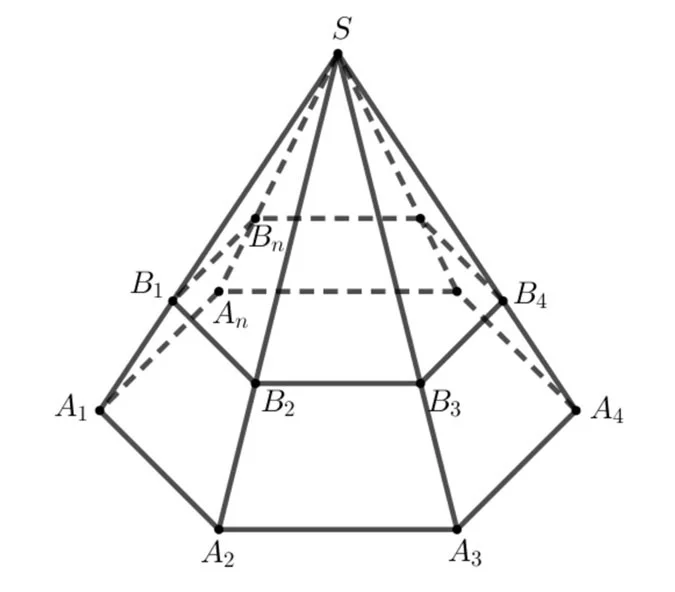
+ The polygons A1A2...An,B1B2...BnA1A2...An,B1B2...Bn are called the two bases,
+ Trapezoids A1A2B2B1,A2A3B3B2,...,AnA1B1BnA1A2B2B1,A2A3B3B2,...,AnA1B1Bn are called lateral faces.
+ The line segments A1B1,A2B2,...,AnBnA1B1,A2B2,...,AnBn are called the side edges, the edges of the base surface are called the base edges.
+ The distance between the two bases is called the height of the truncated pyramid.
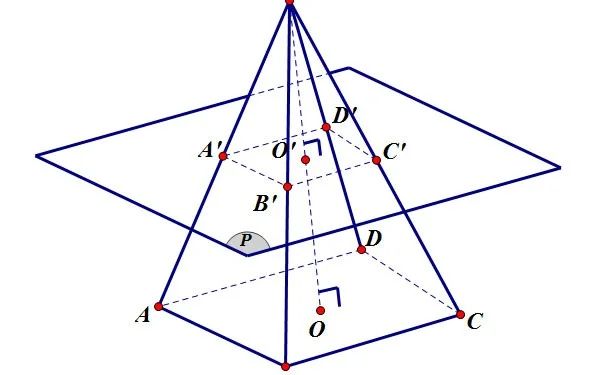
The lateral area of a truncated pyramid is the area of the surrounding faces, the part surrounding the truncated pyramid, excluding the area of the two bases.
How to calculate the lateral area of a truncated pyramid: Calculate the area of each side face (trapezoids) of the truncated pyramid according to the formula for calculating the area of a normal trapezoid , then calculate the total area.
Formula for calculating the area of a regular truncated pyramid:
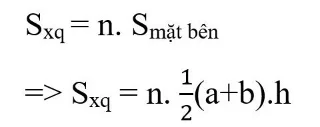
In there:
Example 1:
Calculate the lateral area of a regular quadrilateral truncated pyramid with base edges of 10cm and 15cm and side height of 12cm.
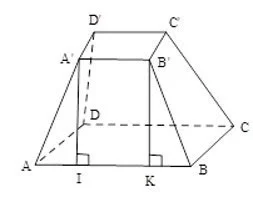
Prize:
The side face of a regular quadrilateral truncated pyramid is an isosceles trapezoid, so the area of one side face is:
A regular quadrilateral truncated pyramid has 4 equal sides, so its lateral area is:
150 x 4 = 600 (cm2)
Example 2: Calculate the lateral area of a regular quadrilateral truncated pyramid with base edges of 6cm and 8cm and side height of 5cm. Calculate the lateral area of a regular quadrilateral truncated pyramid with base edges of 6cm and 8cm.
Prize:
The side face of a regular quadrilateral truncated pyramid is an isosceles trapezoid, so the area of one side face is equal to
A regular quadrilateral truncated pyramid has four equal sides so its lateral area is equal to
35 x 4 = 140 (cm2)
The total area of a truncated pyramid is equal to the sum of the lateral area and the area of the two bases.
Formula: Stp = Sxq + Big bottom + Small bottom
In there:
For example:
Calculate the total area of a regular truncated pyramid according to the dimensions given in the figure.
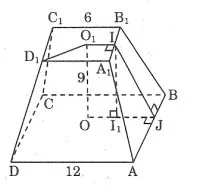
Prize:
We have:
AD = 12 ⇒ OJ = 6
Draw II1 ⊥ OJ we have: I1J = 3
Applying the Pythagorean theorem to right triangle II1J we have:
IJ2 = II12 + I1J2 = 92 + 32 = 90
Hence:
The area of one side of a trapezoid is:
The surrounding area is equal to:
The area of the upper base is: S = 6 x 6 = 36 (units)
The area of the bottom base is: S = 12 x 12 = 144 (units)
The total area of a truncated pyramid is equal to:
Recipe:
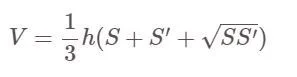
In there:
Is a truncated pyramid a square (regular quadrilateral):
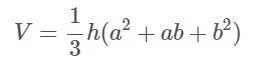
In there:
Plan a recognizable Halloween 2026 look with pop culture costumes inspired by Spider-Man, Supergirl, Toy Story 5, Moana, Mario, and Wednesday.
Sort leftover Halloween candy safely, share or repurpose sealed treats, and choose food use or compost for pumpkins based on their condition.
Compare workplace Halloween costume choices by respect, dress code, mobility, and safety—and learn when a subtle accessory or a policy check is the better option.
Find a couples costume that fits your style, budget, and comfort level, from Addams Family classics to original inside-joke duos.
Need a last-minute high school Halloween costume? Compare 10 easy closet-based ideas by prep time, comfort, school-day practicality, and simple safety checks.
Use a simple 2026 Halloween decorating timeline for indoor décor, outdoor displays, and fresh pumpkins, with practical adjustments for weather and events.
Mix five vivid, approachable Halloween cocktails with measured recipes, simple prep tips, and an alcohol-free option for your party guests.
Find 15 office-friendly Halloween costume ideas for 2026, with practical checks for dress codes, respectful themes, comfort, and workplace safety.
Plan a fun elementary school Halloween party with easy crafts, games, inclusive treats, costume tips, and a sample 75-minute classroom schedule.
Compare realistic side hustles for 2026 by startup cost, fees, flexibility, and income control, with current tax and scam guidance from official sources.








