When to Start Decorating for Halloween in 2026

Use a simple 2026 Halloween decorating timeline for indoor décor, outdoor displays, and fresh pumpkins, with practical adjustments for weather and events.
As one of the most powerful text-to-image AI models, Google's Imagen 3 is available on Gemini apps , but only to a certain extent. Human-generated images have been a luxury only available to paying users — until now.
Users can now create images of people using Gemini's free app
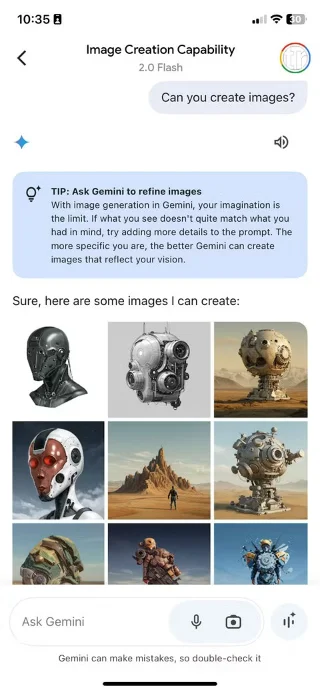
If you use the Gemini app on the web, desktop, or mobile, you may have already experimented with its image-generating capabilities, powered by Google's Imagen 3 model. Google released the tool to all users in August 2024, with options ranging from "realistic landscapes" to "eerie clay scenes," according to an announcement in Google's The Keyword.
Creating images of people, however, is a different story. Google is limiting the rollout of this particular feature to paid subscribers, including Gemini Advanced, Business, and Enterprise users. If you have a free account, asking Gemini to create an image of people will result in the following message:
"Available only in early access with Gemini Advanced. Get early access to new Gemini features when you sign up for Advanced here."
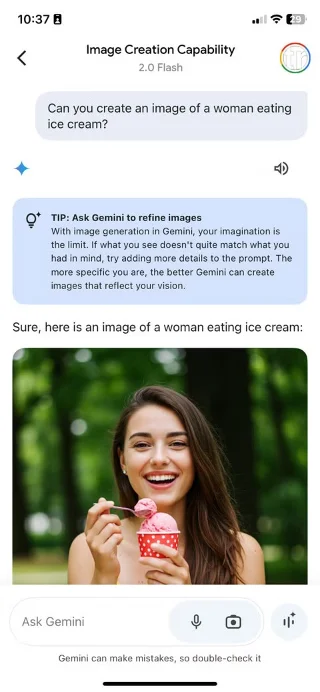
As of February 2025, most free Gemini users can successfully create images with people on Gemini. However, if you are still getting an error message, it may be because the feature is still being rolled out. It appears that the feature will be rolled out gradually, starting with US users using Gemini in English.
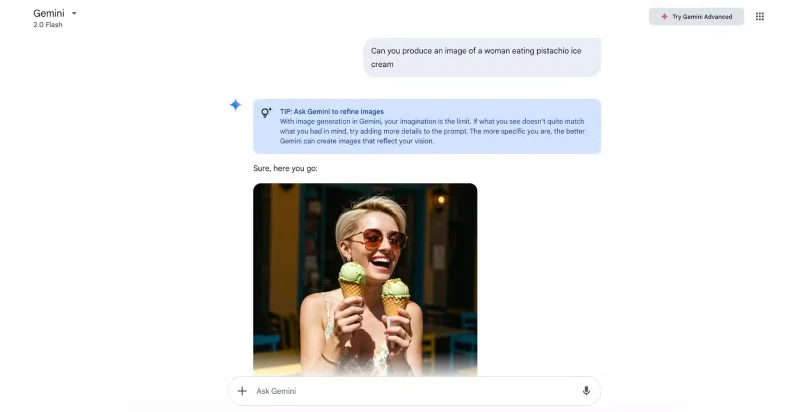
Note : According to Gemini's instructions, you still cannot create realistic images of recognizable people or children.
How does Imagen 3 work on Gemini Flash 2.0?
Also in February 2025, Google released its fastest Gemini model to the general public for free. Google describes the model, called Gemini 2.0 Flash, as “a highly efficient machine,” which can only bode well for image generation. Traditionally more energy- and time-consuming than regular text generation, AI images can theoretically achieve higher quality with a more powerful model at their disposal.
Quality seems to be especially important when it comes to depicting people. We’ve all seen the first AI-generated images of people, from crooked hands with lots of extra detail to dark, sunken eyes. So you can understand the hesitation many people have about trusting Google’s AI-powered image generator, as a free user.
Contrary to the above fears, many people were impressed with Gemini's ability to handle image generation prompts including humans. The first few image tests produced high-end, realistic results that matched the provided prompts, which is impressive for a free tool.
Tip : You can ask Gemini to continue editing the image without having to start from scratch every time.
Being able to access Imagen 3 via Gemini for free is certainly a nice touch, but having to avoid everyone is a significant limitation. Google's latest update opens up the playing field, making Gemini's free service a worthy competitor to paid services like Midjourney .
While the paid services will have more advanced options, like custom image sizes, Gemini’s approach is easy and straightforward. With so much for free, one has to wonder if early access is enough to get people to pay for Gemini Advanced.
Use a simple 2026 Halloween decorating timeline for indoor décor, outdoor displays, and fresh pumpkins, with practical adjustments for weather and events.
Mix five vivid, approachable Halloween cocktails with measured recipes, simple prep tips, and an alcohol-free option for your party guests.
Find 15 office-friendly Halloween costume ideas for 2026, with practical checks for dress codes, respectful themes, comfort, and workplace safety.
Plan a fun elementary school Halloween party with easy crafts, games, inclusive treats, costume tips, and a sample 75-minute classroom schedule.
Compare realistic side hustles for 2026 by startup cost, fees, flexibility, and income control, with current tax and scam guidance from official sources.
Upgrade your home office ergonomics with current OSHA and NIOSH guidance on chair fit, monitor height, laptop setup, lighting, and movement.
Learn why emotional intelligence matters in leadership, where it helps most, how to strengthen it, and how to tell whether your approach is working.
A practical roadmap for moving into tech without a degree: choose an accessible role, build job-ready skills, prove them with projects, and use hiring feedback to improve.
Build a credible LinkedIn personal brand in 2026 with current profile, content, newsletter, analytics, verification, and visibility guidance from LinkedIn.
Quiet quitting and quiet firing are catchy labels, not diagnoses. Learn what is verified, what depends on context, and what employees and managers can do next.








