Desk Decorating Ideas for a Spooky Office Cubicle

Create a spooky office cubicle with Halloween desk decor ideas that keep your workspace usable, tidy, and mindful of workplace safety.
Last May, Google introduced AI Overviews, a new way to help users get answers to specific search queries. AI Overviews provides a quick overview of a topic and links to help users get quick, accurate information. Then, in October, Google expanded the AI Overviews test to more than 100 countries and supported more language options, including English, Hindi, Indonesian, Japanese, Portuguese, and Spanish.
Today, Google announced that AI Overviews in the US is now using the Gemini 2.0 model to provide higher-quality responses to users on difficult questions related to programming, advanced mathematics, and multimodal queries. Google also announced that AI Overviews is now available to users under 18, without even requiring a login.
Along with expanding AI Overviews, Google today announced an early Labs experiment called AI Mode. This new AI Mode is built using a custom version of the Gemini 2.0 model. Google claims that this new feature will be more useful for questions that require deeper exploration, comparison, and inference.
When users post their questions, AI Mode uses a “query fan-out” technique, performing multiple related searches across subtopics and multiple data sources at once, then using AI to aggregate those results and provide a comprehensive response. This makes it easier for users to access more in-depth information than a regular web search on Google. Users can also ask follow-up questions and receive responses.
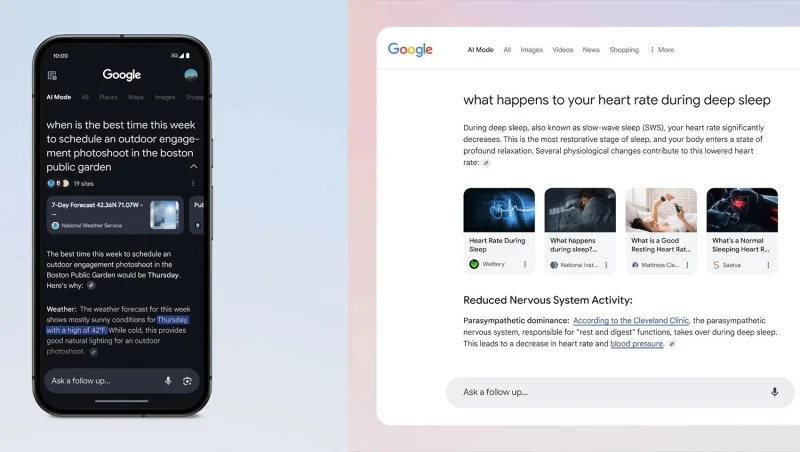
Google is also working to improve AI Mode with features like adding visual feedback to images and videos, richer formatting, and more.
AI Mode will exist as its own tab alongside the existing Google Search tabs we know and love, including All, Images, News, Shopping, and more. In the AI tab, you'll see related web links like in All, but they'll come with conversational answers and a search bar for follow-up questions, similar to the Gemini app.
AI Mode aims to provide direct answers to users, but this could significantly reduce website traffic for publishers and content creators. The long-term impact of AI Mode on website traffic remains to be determined. To address feedback about potential traffic loss from AI Overviews, Google is testing the inclusion of direct links in AI-generated responses.
Create a spooky office cubicle with Halloween desk decor ideas that keep your workspace usable, tidy, and mindful of workplace safety.
Plan a recognizable Halloween 2026 look with pop culture costumes inspired by Spider-Man, Supergirl, Toy Story 5, Moana, Mario, and Wednesday.
Sort leftover Halloween candy safely, share or repurpose sealed treats, and choose food use or compost for pumpkins based on their condition.
Compare workplace Halloween costume choices by respect, dress code, mobility, and safety—and learn when a subtle accessory or a policy check is the better option.
Find a couples costume that fits your style, budget, and comfort level, from Addams Family classics to original inside-joke duos.
Need a last-minute high school Halloween costume? Compare 10 easy closet-based ideas by prep time, comfort, school-day practicality, and simple safety checks.
Use a simple 2026 Halloween decorating timeline for indoor décor, outdoor displays, and fresh pumpkins, with practical adjustments for weather and events.
Mix five vivid, approachable Halloween cocktails with measured recipes, simple prep tips, and an alcohol-free option for your party guests.
Find 15 office-friendly Halloween costume ideas for 2026, with practical checks for dress codes, respectful themes, comfort, and workplace safety.
Plan a fun elementary school Halloween party with easy crafts, games, inclusive treats, costume tips, and a sample 75-minute classroom schedule.








