Pop Culture Costume Ideas That Will Dominate Halloween 2026

Plan a recognizable Halloween 2026 look with pop culture costumes inspired by Spider-Man, Supergirl, Toy Story 5, Moana, Mario, and Wednesday.
In a somewhat surprising move, it appears that Google is dropping the “Bard” branding entirely on its upcoming web app and mobile experience, in favor of “Gemini” entirely.
During its Pixel 8 event in October, Google revealed plans to combine Assistant’s existing helpful capabilities with the company’s powerful and ever-improving AI chatbot, Bard . While initially named simply “Assistant with Bard,” Google has a number of alternative names in mind for its next-generation mobile AI.
First, in mid-January, Google shortened everything to “Bard,” noting that certain tasks would be assigned to “Assistant.” The change helped clear up some confusion about Google Assistant (classic) versus Assistant with Bard. Then, earlier this week, the entire Bard phone experience was renamed “Gemini.”
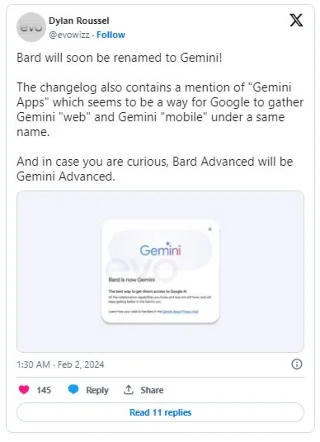
Now, as Dylan Roussel shared on Twitter/X, Google is set to completely rename Bard, as new evidence in the web app shows that “Bard is now Gemini” on mobile and web.
The best way to get direct access to Google AI
All the collaboration you know and love is still here and will only get better in the Gemini era.
Accordingly, 9to5google's APK Insights team discovered that the latest update to the dedicated “Assistant Google” shortcut app also calls Bard “Gemini.”
GeminiIn a way, the name change serves as a consolidation of Google’s AI branding. First introduced at I/O 2023, “Gemini” originally referred to the company’s latest line of AI models, from the device-ready “Gemini Nano” to the top-of-the-line “Gemini Ultra.”
Bard as we know it today is powered by the middle option, the “Gemini Pro,” while the chatbot’s much-anticipated Bard Advanced upgrade — now rebranded as the “Gemini Advanced” — will run on the Gemini Ultra model. Behind the scenes, the Pixel 8 Pro and Galaxy S24 series’ AI features both use a combination of the Gemini Nano and Pro, depending on the task at hand.
Rather than maintain separate naming for its models and the products they create, it seems Google intends to group them all under the Gemini name. It's an atypical move for Google, as the company has a long history of naming its software products according to their functionality, like Docs, Sheets, Slides, Assistant, etc.
Even the name “Bard” illustrates its purpose as a multi-talented writer of words. By comparison, “Gemini” has no direct meaning outside of astrology. It remains to be seen what Google plans to do with this unique brand in what it calls the “Gemini era.”
Of course, given the number of changes over the past few weeks, it's entirely possible that Google could rename its AI chatbot again before making a final decision.
Plan a recognizable Halloween 2026 look with pop culture costumes inspired by Spider-Man, Supergirl, Toy Story 5, Moana, Mario, and Wednesday.
Sort leftover Halloween candy safely, share or repurpose sealed treats, and choose food use or compost for pumpkins based on their condition.
Compare workplace Halloween costume choices by respect, dress code, mobility, and safety—and learn when a subtle accessory or a policy check is the better option.
Find a couples costume that fits your style, budget, and comfort level, from Addams Family classics to original inside-joke duos.
Need a last-minute high school Halloween costume? Compare 10 easy closet-based ideas by prep time, comfort, school-day practicality, and simple safety checks.
Use a simple 2026 Halloween decorating timeline for indoor décor, outdoor displays, and fresh pumpkins, with practical adjustments for weather and events.
Mix five vivid, approachable Halloween cocktails with measured recipes, simple prep tips, and an alcohol-free option for your party guests.
Find 15 office-friendly Halloween costume ideas for 2026, with practical checks for dress codes, respectful themes, comfort, and workplace safety.
Plan a fun elementary school Halloween party with easy crafts, games, inclusive treats, costume tips, and a sample 75-minute classroom schedule.
Compare realistic side hustles for 2026 by startup cost, fees, flexibility, and income control, with current tax and scam guidance from official sources.








