Pop Culture Costume Ideas That Will Dominate Halloween 2026

Plan a recognizable Halloween 2026 look with pop culture costumes inspired by Spider-Man, Supergirl, Toy Story 5, Moana, Mario, and Wednesday.
Dating app users aren't the only ones who face "scams." Sadly, it's easy to fall for online scams. While Google is cracking down on fake Google Maps listings , it's important to know how to spot these scams yourself.
Table of Contents
This week, CBS News reported that Google has filed a lawsuit against a fraud network behind tens of thousands of fraudulent listings on its Maps app. The company launched an investigation after a locksmith in Texas reported that another business was impersonating them on Google Maps and scamming their customers.
The crime led Google to discover more than 10,000 other illegal Maps listings, which the company has since shut down. These listings range from hijacked accounts to outright fake operations.
While it’s certainly a relief to know that the app has been cleaned up, the sad reality is that scammers will continue their tricks. The fact that thousands of fraudulent entities can appear right under Google’s nose is a reminder to always be vigilant when ordering services online.
There aren’t always clear signs of a fake business on Google Maps, but there are some factors to consider when hiring a service through the app. While one sign in one category isn’t necessarily a deal breaker, signs in multiple categories are suspicious.
The report sparked Google’s latest crusade. It’s a prime example of a common scam. CBS News reports that services you need quickly in stressful or urgent situations are where Google finds most of the fraudulent activity.
Some examples of these types of services are:
There are many honest businesses in these areas; it is important to exercise caution when hiring in these sensitive industries.
A business will usually list its website in its Google Maps profile under Overview . If you don't see it, check the About tab . If a website is provided, make sure it matches the business name. You can also look for spelling errors in the URL and check to see if the website is active.
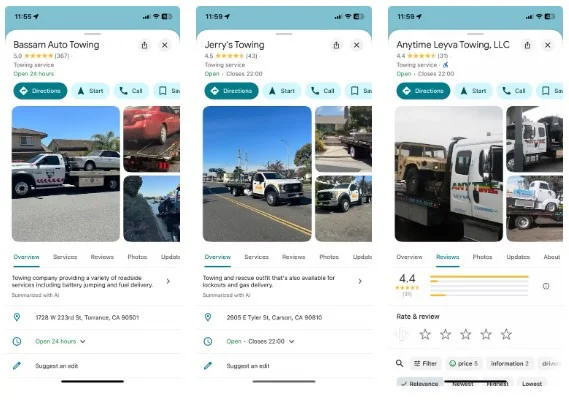
However, some legitimate businesses won't have a website; instead, they may rely on word of mouth, including reviews on Google or Yelp.
Reviews are another way to rate a new service. Unfortunately, fake reviews are common, so a business with a 5-star rating may not be legitimate. Similar to fake Amazon reviews, some signs of fake Google Maps reviews include:
These characteristics alone may not necessarily signal a scam, but when combined with other factors, it's a different story.
Tip : Cross-check your Google reviews with another source, like Yelp.
One of the oldest scams is asking for money up front. If you’ve contacted a service that asks you to pay up front, you should at least check for these other warning signs before proceeding. Another suspicious move is if a business asks for unconventional payment, such as a wire transfer or gift card.
Mobile payment services like Zelle or PayPal aren't necessarily suspicious. Many legitimate vendors are businesses that use these apps.
Meanwhile, Google is doing everything it can to restore trust in its Maps ecosystem. The company recently recovered from a spate of malicious ads in its search results. According to a spokesperson who spoke to CBS News, Google has partnered with cybercrime support network ScamSpotter.org, which regularly updates its site with the latest scams to keep people on their toes.
Plan a recognizable Halloween 2026 look with pop culture costumes inspired by Spider-Man, Supergirl, Toy Story 5, Moana, Mario, and Wednesday.
Sort leftover Halloween candy safely, share or repurpose sealed treats, and choose food use or compost for pumpkins based on their condition.
Compare workplace Halloween costume choices by respect, dress code, mobility, and safety—and learn when a subtle accessory or a policy check is the better option.
Find a couples costume that fits your style, budget, and comfort level, from Addams Family classics to original inside-joke duos.
Need a last-minute high school Halloween costume? Compare 10 easy closet-based ideas by prep time, comfort, school-day practicality, and simple safety checks.
Use a simple 2026 Halloween decorating timeline for indoor décor, outdoor displays, and fresh pumpkins, with practical adjustments for weather and events.
Mix five vivid, approachable Halloween cocktails with measured recipes, simple prep tips, and an alcohol-free option for your party guests.
Find 15 office-friendly Halloween costume ideas for 2026, with practical checks for dress codes, respectful themes, comfort, and workplace safety.
Plan a fun elementary school Halloween party with easy crafts, games, inclusive treats, costume tips, and a sample 75-minute classroom schedule.
Compare realistic side hustles for 2026 by startup cost, fees, flexibility, and income control, with current tax and scam guidance from official sources.








