In addition to the new changes mentioned earlier, iOS 13 also brings a lot of new features to Safari, one of which hides the address bar and toolbar on iOS 13's Safari to make you feel more comfortable when reading. books, surf the web.
 Hide the toolbar and the address makes the screen experience more full
On a side note, this new feature is only valid for the current tab and all tabs you open from websites on tabs.
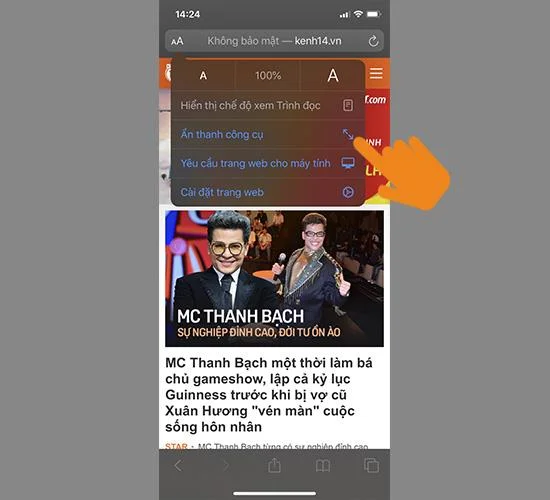
Step 1 : To use first, you open a website in Safari, click the 2 letter A button .
![Hide the address bar and toolbar on iOS 13 Safari]() At a certain website, choose the image 2 letter A
Step 2 : Select Hide toolbar .
![Hide the address bar and toolbar on iOS 13 Safari]() Hide toolbar
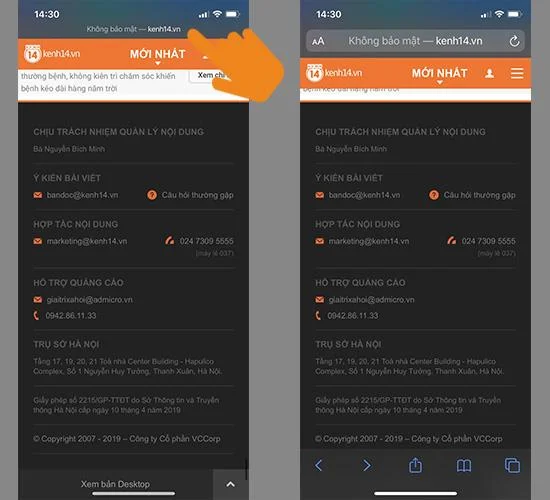
Step 3 : To reappear the toolbar and address, you swipe down the bottom of the web page then click the URL (website address above), automatically they will reappear.
![Hide the address bar and toolbar on iOS 13 Safari]() Click on the web page URL to reappear the toolbar
There are many other features that the Safari browser on iOS 13 nights let me explore again.
See more
>>> Benefits of Dark Mode of iOS 13
>>> How to add the Dark Mode button to the control center on iOS 13
>>> How to quickly delete and organize apps on iOS 13
>>> Save 3G 4G data on iOS 13
>>> How to save Live Photo as video on iOS 13
 At a certain website, choose the image 2 letter A
 Hide toolbar
 Click on the web page URL to reappear the toolbar





