Pop Culture Costume Ideas That Will Dominate Halloween 2026

Plan a recognizable Halloween 2026 look with pop culture costumes inspired by Spider-Man, Supergirl, Toy Story 5, Moana, Mario, and Wednesday.
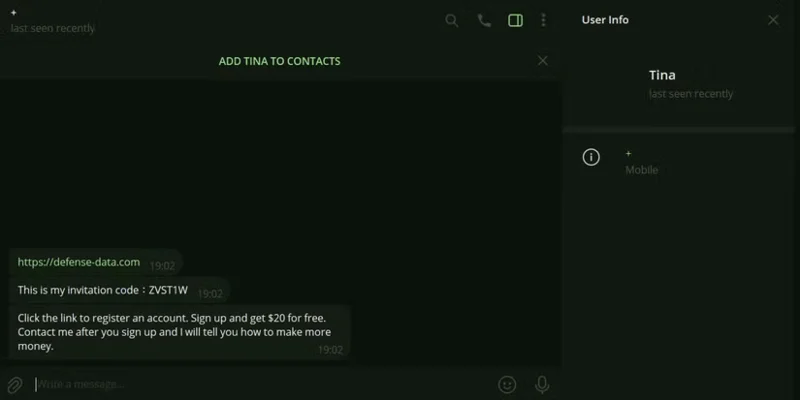
Social media is a prime target for scammers. By understanding their tactics, you can protect yourself from becoming a victim. Let’s take a look at how scammers often use your social media profile to lure you into scams.

The most tried and tested tactic used by scammers is a social engineering tactic called Phishing. Phishing involves using deceptive behavior, such as imitating a trustworthy person, website, or organization, to steal a victim's personal information.
For example, you may receive a message on a social media site with an attractive offer and an accompanying link. But when you click on it, you are redirected to a malicious website that appears legitimate and asks for your personal or financial information. When you enter your details, the scammer intercepts them on the other end to use them fraudulently.
Since these sites may seem legitimate, it's best to familiarize yourself with the signs of a scam site and report it. But before you go any further, it's best not to respond to unsolicited messages or click on suspicious links.
1. Impersonating an acquaintance
Some scammers are crafty enough to create fake profiles that impersonate friends or family members. This usually happens in two ways: They hack into the person's account or create a completely new profile with their personal information and photos.
Once their profile is ready, they will send you a friend request. If they are already your friend, they will send you a message to trick you into revealing personal information or clicking on a malicious link. They may even ask you to send them money.
If you receive a suspicious message from a friend or family member, try contacting them directly through other means to find out if it really is them. You can alert them to potential fraud if it isn't them.
Be careful about the information you share on your public profile. This information can be used to make a scam seem more convincing.
2. Fake gifts and promotions
Everyone loves free stuff, and scammers know this. They create convincing ads to entice unsuspecting victims to click and fill out a form to claim a prize. It’s an easy way to capitalize on the excitement, promise of rewards, and trust people have when spending money on ads.
Before you jump into any offer, you should learn how to spot fake social media ads. You'll be able to tell right away by seeing warning signs like offers that seem too good to be true, ads from unverified accounts or pages, and - as is common with any scam - lots of grammatical errors.
You should also check the comments section of these ads; they are often filled with negative reviews and warnings from other users.
3. Fake job offer
It’s not hard to imagine people having their accounts hacked through fake job offers in this way. So if you receive a job offer on social media, check the URL, research the company offering the offer, and always trust your instincts if something doesn’t seem right.
4. Romance fraud
Romance scams are usually a long-term scam. The scammer creates a fake social media profile and begins a romantic relationship with the victim. Once they have gained the victim’s complete trust, they suddenly start asking for money to cover various unexpected expenses.
The victim then begins paying for groceries, rent, trips, and medical bills. The scammer may even ask them to provide financial information, such as credit card details, so they can spend freely before disappearing.
To avoid falling for a social media romance scam, always be wary of people who express their intense love too early. Try to verify the person’s identity through other means. Also, don’t send them any money unless you have met them in person and have known them for a while.
6. Cryptocurrency and other investment scams
Investment scams may lure you in by claiming to make $100 a week trading cryptocurrencies or forex. Low-risk, high-return investments are often scams. If you research the types of investments these scammers advertise, such as cryptocurrencies or forex, you will find that they are not something that will make someone rich overnight.
This is not a complete list of all the scams you will encounter on social media. There are many variations of these scams and new ones appear all the time. It is best to stay vigilant and protect yourself from social media scams.
Plan a recognizable Halloween 2026 look with pop culture costumes inspired by Spider-Man, Supergirl, Toy Story 5, Moana, Mario, and Wednesday.
Sort leftover Halloween candy safely, share or repurpose sealed treats, and choose food use or compost for pumpkins based on their condition.
Compare workplace Halloween costume choices by respect, dress code, mobility, and safety—and learn when a subtle accessory or a policy check is the better option.
Find a couples costume that fits your style, budget, and comfort level, from Addams Family classics to original inside-joke duos.
Need a last-minute high school Halloween costume? Compare 10 easy closet-based ideas by prep time, comfort, school-day practicality, and simple safety checks.
Use a simple 2026 Halloween decorating timeline for indoor décor, outdoor displays, and fresh pumpkins, with practical adjustments for weather and events.
Mix five vivid, approachable Halloween cocktails with measured recipes, simple prep tips, and an alcohol-free option for your party guests.
Find 15 office-friendly Halloween costume ideas for 2026, with practical checks for dress codes, respectful themes, comfort, and workplace safety.
Plan a fun elementary school Halloween party with easy crafts, games, inclusive treats, costume tips, and a sample 75-minute classroom schedule.
Compare realistic side hustles for 2026 by startup cost, fees, flexibility, and income control, with current tax and scam guidance from official sources.








