Latest KMPlayer Shortcuts in 2024 and Beyond
Explore the latest keyboard shortcuts for KMPlayer. KMPlayer is one of the most popular software for listening to music and watching movies today.
KMPlayer is a robust multimedia player designed to handle a wide range of audio and video formats, including VCDs, DVDs, and more, without requiring additional codec installations.
You might have installed and enjoyed KMPlayer, but there may be times when you need to alter the playback speed of a video either to speed it up or slow it down. So, how can you achieve this?
Follow the tutorial below to learn how to change the video playback speed on KMPlayer:
Download KMPlayer for free here.
| Step | Action | Description |
|---|---|---|
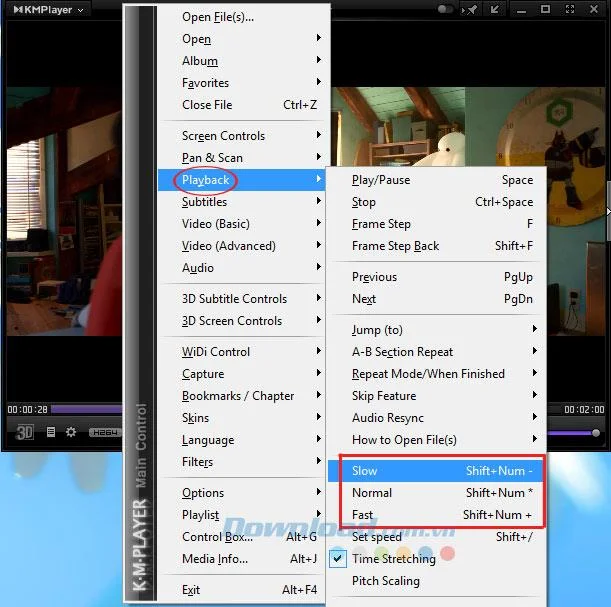
| 1 | Open KMPlayer | Launch KMPlayer and play any video. Right-click on the interface, go to Playback to see video speed settings. |
| 2 | Select Speed Options | Choose one of the following modes to adjust video playback speed: |
| Mode | Action | Shortcut Key |
|---|---|---|
| Slow | Reduce playback speed by 5% | Shift + Num- |
| Fast | Increase playback speed by 5% | Shift + Num+ |
| Normal | Revert back to normal playback speed | Shift + Num* |
Utilize these modes according to your viewing needs. After adjusting, the displayed Playback Speed will change accordingly, showing the current speed percentage on the video.
Step 3: For example, if you select the speed reduction mode twice, you will see Playback Speed: 90% on the video screen.
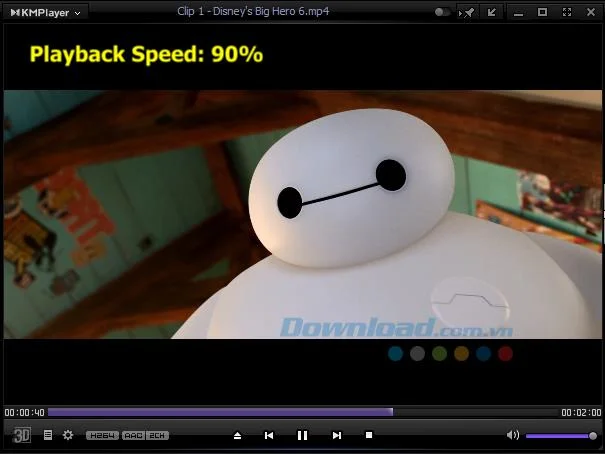
Continue this process to reach your desired playback speed. With these adjustments, you can tailor the video playback to your liking, whether the content is playing too quickly or slowly.
Furthermore, you can explore other free software options for watching movies and listening to music, such as Windows Media Player, FLV Media Player, and Media Player Classic.
We wish you all the best with your video playback experience!
Explore the latest keyboard shortcuts for KMPlayer. KMPlayer is one of the most popular software for listening to music and watching movies today.
Learn how to change the video playback speed of KMPlayer, a multifunctional media player that supports all audio and video formats. Optimize your video watching experience!
Discover essential keyboard shortcuts for KMPlayer to enhance your music and movie experience. Maximize your efficiency with these practical tips.
Learn how to watch Blu-ray files using KMPlayer, one of the best media player software for Windows, packed with essential features and capabilities for multimedia enjoyment.
Learn how to fix the Access violation at address error in KMPlayer, a common issue during installation and usage of the software.
KMPlayer - High-quality video player, editing, and music player. KMPlayer is an application that plays videos and music, helps users to play back videos and music available from the phone or listen online from any links (URL) even when the phone screen is turned off. The application also allows to customize playback speed, rotate or reverse video during monitoring, zoom screen and repeat video settings according to users.
Clearing history viewed on KMPlayer is like deleting browsing history on browsers, it will help us avoid the eyes of those who are curious or want to keep their privacy.
One of the benefits of watching two subtitles on a video is to help you improve your language skills. You can put your native language and another language or insert both different languages you know into the same video in several simple ways.
KMPlayer is a software for listening to music and watching movies that can support many different formats with high image quality. However, few people know that this tool has another very handy feature, that is, shutdown timer.
KMPlayer has a similar interface to Winamp, supports a lot of unique features that can view most popular Video and Audio formats today. So please refer to the following article to install and use KMPlayer more effectively.
As you can see, KMPlayer often comes with ads and the most viewed videos on the Internet, both occupying a lot of space and it takes you to turn off these ads to create discomfort.
KMPlayer is the most powerful music and movie player currently used by many people. This software supports most of the most popular Video and Audio formats today.
With just a few simple steps, you can change the language KMPlayer to be more convenient in the process of using software to support watching movies, listening to this music.
KMPlayer software is a software that supports listening to music, watching movies, watching high quality videos, supporting watching various video formats, music and DVD and VCD without having to install any additional codecs for the computer. With KMPlayer on your computer you can comfortably listen to
Tired of Microsoft Teams "Time Limit" Error crashing your meetings? Follow our proven, step-by-step guide to fix it quickly—update app, clear cache, and more for seamless collaboration. Works on latest versions!
Facing Microsoft Teams Layout Error after the latest update? Discover proven step-by-step fixes to resolve layout glitches, restore perfect UI, and boost productivity fast. No tech skills needed!
Struggling with Microsoft Teams "Error K" Security? Follow our step-by-step guide to fix it quickly—no tech expertise needed. Get back to seamless collaboration today!
Struggling with Microsoft Teams Update Error 0x80070002? Discover step-by-step fixes to resolve it quickly. Clear cache, repair files, and get back to seamless updates today!
Tired of Microsoft Teams "Web Error" blocking your browser login? Follow our step-by-step guide with proven fixes to resolve Teams web login issues fast and securely. Get back to work!
Stuck with Microsoft Teams "Error O" Offline? Discover proven, step-by-step fixes to get back online fast. Clear cache, restart, and more – no tech skills needed!
Frustrated by the missing Microsoft Teams icon in Outlook? Learn exactly where to find it, why it disappears, and proven steps to restore it for effortless meetings. Updated for the latest versions!
Struggling with Microsoft Teams "Windows 10 Error" login issues? Get instant fixes for cache clears, updates, and more. Step-by-step solutions to solve Microsoft Teams login error on Windows 10 fast and frustration-free.
Tired of the frustrating Microsoft Teams "Website Error" where tabs won’t load? Get step-by-step fixes to resolve it quickly and boost your productivity. Essential troubleshooting for seamless Teams experience.
Tired of the frustrating Microsoft Teams "Web Error" 503 Service Unavailable? Discover proven, step-by-step fixes for Teams 503 error on web. Get back online fast with our expert guide. Works on all browsers!
Struggling with Microsoft Teams "Win 7 Error" compatibility? Discover step-by-step fixes to restore seamless video calls and chats on unsupported Windows versions. Quick, reliable solutions inside!
Master troubleshooting Microsoft Teams Breakout Rooms license errors with this step-by-step guide. Quick fixes for common license issues, admin checks, and prevention tips to get your meetings running smoothly.
Struggling with Microsoft Teams "Version History" Error? Discover proven, step-by-step fixes to restore access instantly. Clear cache, update Teams, and more—no tech skills needed!
Tired of the frustrating Microsoft Teams Joining Error: Meeting ID Not Found? Get step-by-step fixes to rejoin meetings fast. Updated with the latest Teams patches for seamless collaboration. Solve it now!
Struggling with Microsoft Teams "Video Error" green screen? Discover proven, step-by-step troubleshooting fixes for seamless video calls. Quick solutions inside!









