How to complete Fish Hunt quest

Fisch is known for its frequent updates and variety of quests, but this one is a little different. Roblox Hunt Mega Edition is out, bringing a new quest for Fisch. Unlike other quests in the game, Hunt will reward you with a token that is important for progressing in Roblox events . So, if you want to complete the Fisch Hunt quest , read the guide below.
How to complete Fish Hunt quest

How to start the Fisch Hunt quest

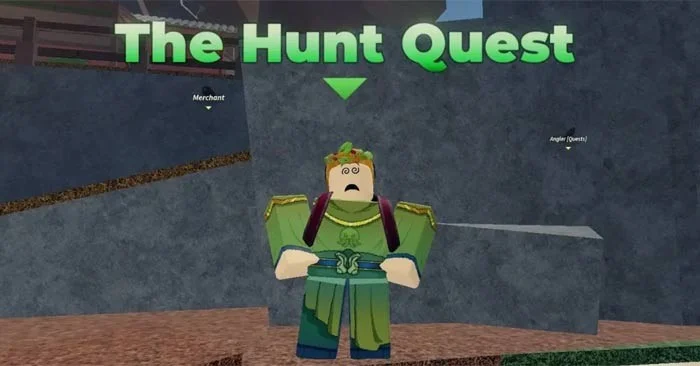
Before you can continue with the quest, you must first activate the Hunt quest. To start the Fisch Hunt, go to Moosewood and talk to Ringo. Ringo is the hippie guy who appears at the entrance to Moosewood Village. If you are using GPS in Fisch, use the following coordinates to find him quickly: X= 406.7, Y= 134.5, Z= 233.9.

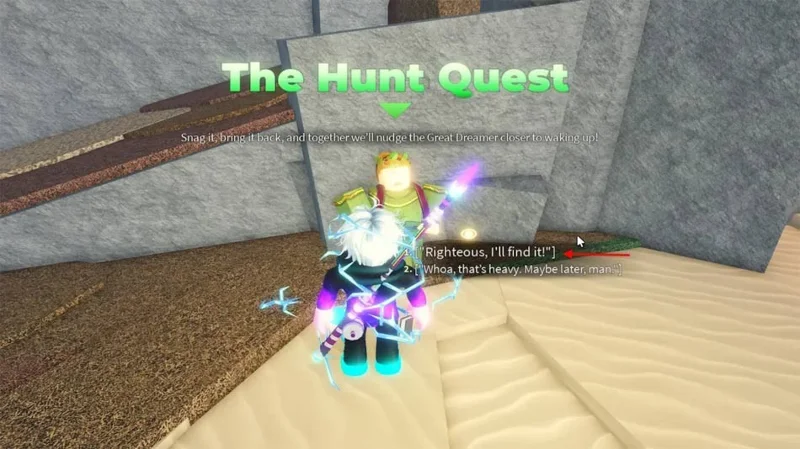
Once you find the hippie in Fisch, go there and press E to talk to him. Select all the top options from the dialogue prompt. Finally, select “Righteous, I'll find it!”. This will take him to the Fisch Hunt quest.
How to complete Fish Hunt quest

How to complete the Fisch Hunt quest

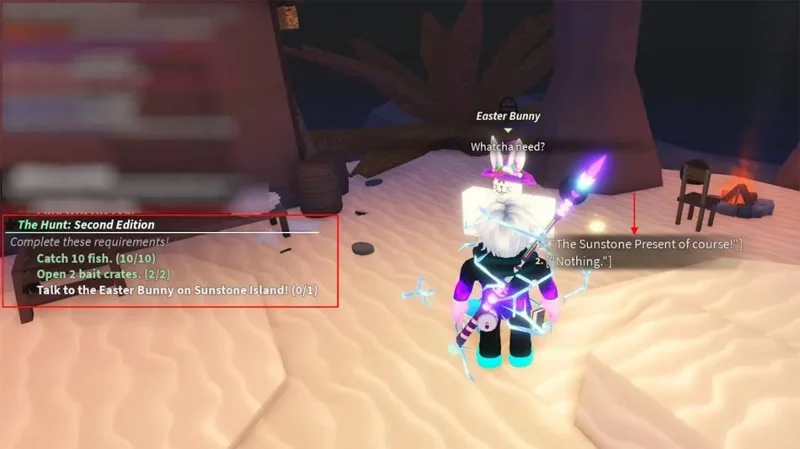
After receiving the quest from the hippie in Fisch, you will have to complete three quests. Here are all three quests in the Fisch Hunt quest along with tips to conquer them quickly:

  • Catch 10 Fish: The first and easiest step is to catch 10 fish. You should do this right in Moosewood. With the dock area in Moosewood being full of regular fish, this shouldn’t be much of a problem. If you’re new to the game, use the Fisch code, collect some cash, and buy yourself a good beginner fishing rod to complete this quest.
  • Open 2 Bait Crates: If you don't have any bait crates, you can get two crates from Moosewood or Sunstone Island. Once you get the two bait crates, open them to complete the second quest.
  • Talk to the Easter Bunny: To proceed with the final quest of the Fisch Hunt, you must complete the first two quests. Then, go to Sunstone Island near Merlin’s hut. You can follow these coordinates to locate the Easter Bunny: X= -958.7, Y= 222, Z= -983.6. After meeting the Easter Bunny in Fisch, talk to him & click on the option “The Sunstone Present of course!” (With Sunstone of course!).

After talking to the bunny, a cut scene will play and you will receive the current Sunstone in Fisch. However, to get the token, you must first return to the hippie. When you get to Moosewood and talk to Ringo, he will give you the Roblox Hunt Mega edition token and your quest is complete.
How to complete Fish Hunt quest

All Fisch Hunt quest rewards

After completing the quest, you will receive some rewards. Here is a list of rewards you will receive after completing the Fisch Hunt quest and talking to the hippie again:

  • 500 Cash
  • Title Oceanborn
  • “The Weighted Truth” – Roblox badge
  • Hunt Badge
  • Sunstone Present

Token Hunt will help you continue your Roblox Hunt Mega Edition event progress. So you can watch other games and hunt for tokens in the event games and try to win the $1 million prize. Sunstone, on the other hand, will remain in your inventory and it looks like it might be valuable for the upcoming Dreamer update in Fisch.

Leave a Comment

Troubleshooting Microsoft Teams Proxy Error Settings Fix

Troubleshooting Microsoft Teams Proxy Error Settings Fix

Struggling with Microsoft Teams Proxy Error? Discover proven Troubleshooting Microsoft Teams "Proxy Error" Settings Fix steps. Clear cache, adjust proxy settings, and get back to seamless calls in minutes with our expert guide.

Solving Microsoft Teams OneDrive Error File Sync

Solving Microsoft Teams OneDrive Error File Sync

Tired of Microsoft Teams OneDrive Error blocking file sync? Follow our step-by-step guide to solve Microsoft Teams "OneDrive Error" File Sync issues quickly. Proven fixes for smooth collaboration in Teams channels. Get your files syncing error-free today!

How to Fix Microsoft Teams Workflows and Power Automate Errors

How to Fix Microsoft Teams Workflows and Power Automate Errors

Tired of Microsoft Teams workflows and Power Automate errors halting your productivity? Get step-by-step solutions to common issues like authentication failures, timeouts, and flow errors. Fix them in minutes and automate effortlessly!

Troubleshooting Microsoft Teams Download Error on Macbook

Troubleshooting Microsoft Teams Download Error on Macbook

Facing Microsoft Teams "Download Error" on MacBook? Discover proven troubleshooting steps to resolve download failures quickly, from cache clears to reinstalls, and get back to smooth teamwork.

Troubleshooting Microsoft Teams Where is Teams Folder Error

Troubleshooting Microsoft Teams Where is Teams Folder Error

Tired of the frustrating Microsoft Teams "Where is Teams" Folder Error? Discover proven, step-by-step troubleshooting fixes to resolve it quickly and restore smooth teamwork. Latest methods included!

How to Fix Microsoft Teams JavaScript Error on Desktop App

How to Fix Microsoft Teams JavaScript Error on Desktop App

Frustrated by Microsoft Teams JavaScript Error on desktop app? Discover proven steps to fix it fast: clear cache, update, reset, and reinstall. Get back to seamless collaboration in minutes!

How to Fix Microsoft Teams Guest Login Error

How to Fix Microsoft Teams Guest Login Error

Struggling with Microsoft Teams "Guest Login" Error? Discover step-by-step fixes, from quick cache clears to admin settings, to resolve guest access issues fast and collaborate seamlessly. Updated with the latest tips!

How to Fix Microsoft Teams For PC Download Error

How to Fix Microsoft Teams For PC Download Error

Tired of the Microsoft Teams "For PC" download error blocking your work? Follow our proven, step-by-step guide to resolve it quickly and get Teams running smoothly on your PC today.

Solving Microsoft Teams Windows 7 Login Error

Solving Microsoft Teams Windows 7 Login Error

Struggling with Microsoft Teams "Windows 7" login error? Discover step-by-step fixes for this frustrating issue on Windows 10/11. Clear cache, edit registry, and more – get back to seamless collaboration today!

How to Fix Microsoft Teams Error Code 0x80070005 (2026 Guide)

How to Fix Microsoft Teams Error Code 0x80070005 (2026 Guide)

Tired of Microsoft Teams Error Code 0x80070005 blocking your meetings? Follow this 2026 guide with step-by-step fixes for access denied issues. Get Teams running smoothly in minutes!

How to Install the Microsoft Teams Add-in for Outlook 2026

How to Install the Microsoft Teams Add-in for Outlook 2026

Master the installation of the Microsoft Teams Add-in for Outlook 2026 effortlessly. Boost your productivity with seamless scheduling and meetings. Follow our proven, up-to-date steps for instant success!

How to Fix Microsoft Teams License Error 2026

How to Fix Microsoft Teams License Error 2026

Struggling with Microsoft Teams "License Error" 2026? Discover proven, step-by-step solutions to resolve it fast. Clear cache, check licenses, and get back to seamless collaboration—no IT help needed!

The Best Exercises for 50+

The Best Exercises for 50+

Whether youre in your 50s, 60s, or even 70s, its not too late to prioritize your health and put yourself first. Here are the best exercises for people 50 and older.

Solving Microsoft Teams Error Caa50024 on Windows 10/11

Solving Microsoft Teams Error Caa50024 on Windows 10/11

Struggling with Microsoft Teams Error Caa50024 on Windows 10/11? Follow our step-by-step fixes to resolve crashes and launch issues quickly. Latest proven solutions for seamless teamwork.

How to Fix Microsoft Teams Login Error AADSTS50011

How to Fix Microsoft Teams Login Error AADSTS50011

Stuck with Microsoft Teams login error AADSTS50011? Discover proven, step-by-step fixes to resolve the reply URL mismatch issue and log in seamlessly. No tech skills needed!









