
Pop Culture Costume Ideas That Will Dominate Halloween 2026

Plan a recognizable Halloween 2026 look with pop culture costumes inspired by Spider-Man, Supergirl, Toy Story 5, Moana, Mario, and Wednesday.
Did you know that there are several ways to control your Android phone without touching the screen and browsing through various apps?
This is especially useful when you have trouble getting your phone out of your pocket, are wearing gloves and can’t navigate the touchscreen, or simply need to access frequently used functions in an emergency. These shortcuts have made your phone a lot easier to use – let’s show you how to set it all up on your device.
Control audio playback with volume buttons
A clever little app called Volumee lets you configure press-and-hold actions for the volume buttons when music or other media is playing.
For example, you can press and hold each volume button to skip forward or backward, and you can press both buttons at the same time to pause and resume playback.
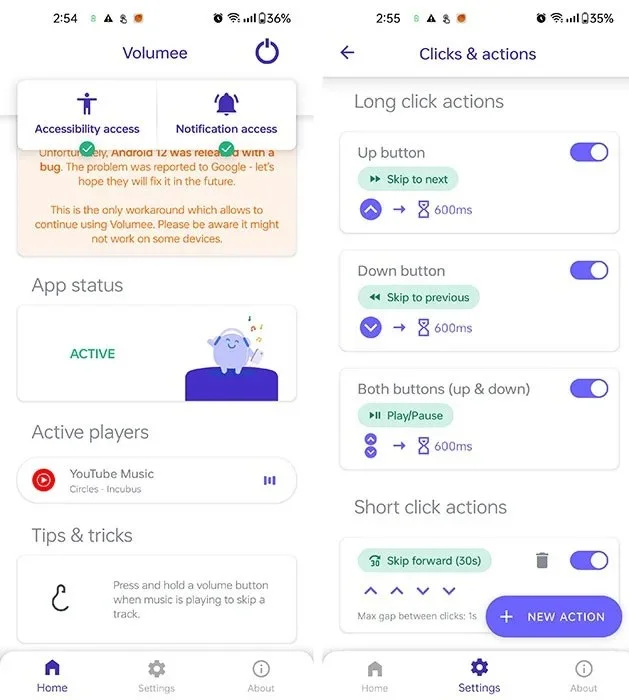
You can also avoid accidental taps by setting the app to only run when the screen is off. If you feel like it, you can unlock the Pro version to favorite your Spotify tracks with a shortcut of your choice.
Launch apps with volume buttons
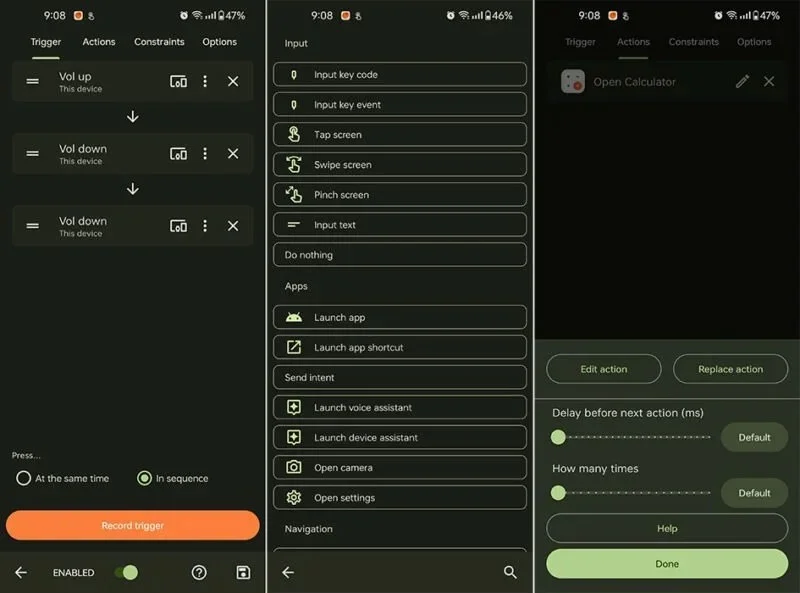
Volumee is great for controlling audio, but Key Mapper goes several steps further by allowing you to launch any app, enable or disable quick settings, etc. using the volume buttons.
Before we move on, let’s talk about app shortcuts. These are functions within an app that you can access directly. For example, updating your weight in Google Fit usually takes a few taps in the app, but you can jump straight to entering your weight using an app shortcut. You can usually access these shortcuts through home screen launchers and tools like Key Mapper.
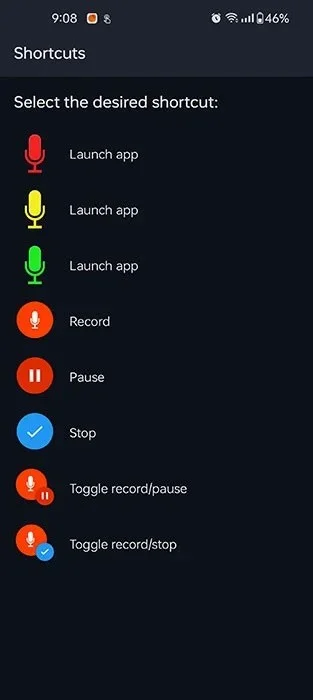
Now that you know about app shortcuts, let’s try them out. There’s a simple volume button combination to quickly open Google Pay; that’s volume up and down. I have another shortcut to start recording a voice memo for brainstorming on the go – thanks to the app shortcut in Easy Voice Recorder Pro that can be configured for this button combination.
If there are applications that you use every day, you will want to check to see if they provide shortcuts that you can use with Key Mapper in the configuration menu for the button presses. This may take a bit of experimentation as some shortcuts may not be labeled descriptively.
Tap the back of the phone
If you're using a Pixel or Samsung Galaxy phone, you can simply double-tap the back of your phone to launch an app or activate quick settings. Google calls this Quick Tap, and Samsung has a Back Tap feature in its Good Lock app for Galaxy handsets.
If you have a different brand of Android phone or want more control over how this gesture works, try Tap Tap . This free app lets you configure shortcuts for double and triple tapping the back of your device.
In addition to the usual array of options like launching apps and shortcuts, it can also trigger Tasker actions, emulating gestures like swiping up or down on the screen and switching to the most recently used app.
I’ve set up double-tapping to open the Kindle app, so I can read a few pages of a book instead of mindlessly scrolling through social media. Triple-tapping is set to launch Google Keep, where I can jot down to-dos and short notes. You can also have Google Maps guide you home without having to tap anything.
Touch the Notch
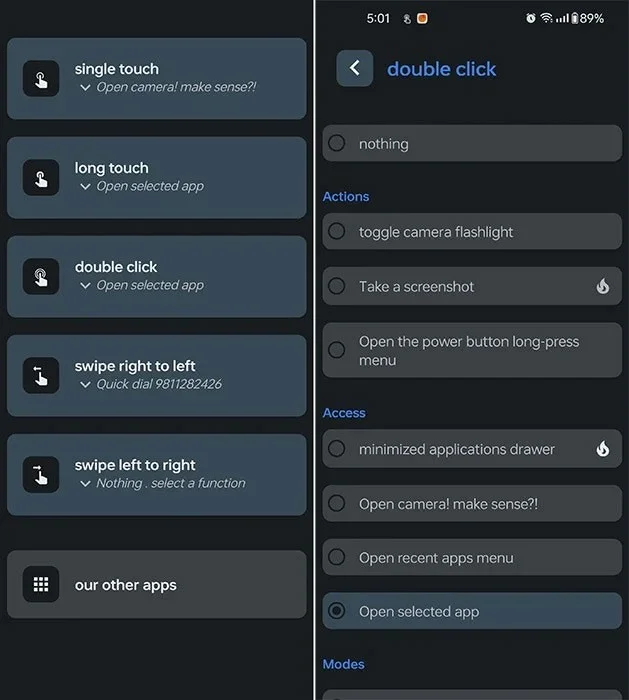
If, like most phones, your phone has a front-facing camera or notch, you can use the Touch the Notch app to turn it into a button. By default, it’s set to launch the Camera app. Of course, you can configure this to open anything else you like.
You can also add tap-and-hold, double-tap, and horizontal swipe actions to it. There's also support for setting up automated tasks, dialing phone numbers, and switching between ringer modes.
So there you have it, a bunch of clever ways to control your Android phone without touching the screen. Which one is the most useful to you and how do you set it up? Share your thoughts in the comments below!
Plan a recognizable Halloween 2026 look with pop culture costumes inspired by Spider-Man, Supergirl, Toy Story 5, Moana, Mario, and Wednesday.
Sort leftover Halloween candy safely, share or repurpose sealed treats, and choose food use or compost for pumpkins based on their condition.
Compare workplace Halloween costume choices by respect, dress code, mobility, and safety—and learn when a subtle accessory or a policy check is the better option.
Find a couples costume that fits your style, budget, and comfort level, from Addams Family classics to original inside-joke duos.
Need a last-minute high school Halloween costume? Compare 10 easy closet-based ideas by prep time, comfort, school-day practicality, and simple safety checks.
Use a simple 2026 Halloween decorating timeline for indoor décor, outdoor displays, and fresh pumpkins, with practical adjustments for weather and events.
Mix five vivid, approachable Halloween cocktails with measured recipes, simple prep tips, and an alcohol-free option for your party guests.
Find 15 office-friendly Halloween costume ideas for 2026, with practical checks for dress codes, respectful themes, comfort, and workplace safety.
Plan a fun elementary school Halloween party with easy crafts, games, inclusive treats, costume tips, and a sample 75-minute classroom schedule.
Compare realistic side hustles for 2026 by startup cost, fees, flexibility, and income control, with current tax and scam guidance from official sources.








