
Desk Decorating Ideas for a Spooky Office Cubicle

Create a spooky office cubicle with Halloween desk decor ideas that keep your workspace usable, tidy, and mindful of workplace safety.
The Messenger message deletion feature has been completely updated with the message encryption feature, the message automatically deletes after a period of time selected by the user. After the time we set, when the other person reads the message, all the content will disappear. This makes Messenger messages much safer and more secure. This feature is quite similar to the secret message feature on Messenger . The following article will guide you on how to delete Messenger messages using the temporary message feature.
Instructions to enable temporary Messenger messages
Quick Guide
At the Messenger interface, click on the pen icon > Turn on the lock icon > Create a new message on Messenger > Select the information icon > Receive Temporary Messages > Select the time to automatically delete Messenger messages.
Video tutorial on how to delete Messenger messages
Detailed instructions
Step 1:
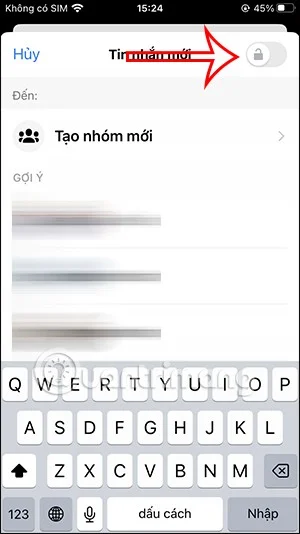
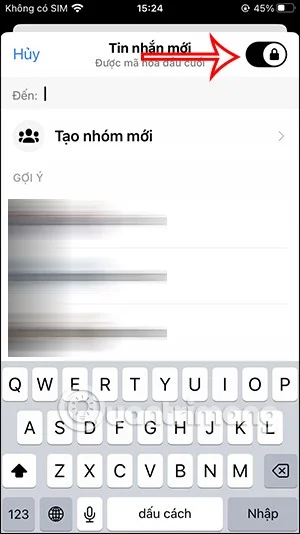
At the Messenger messaging application interface, click on the pen icon in the upper right corner. Then we turn on the lock icon in the upper right corner to enable end-to-end Messenger message encryption mode.

Step 2:
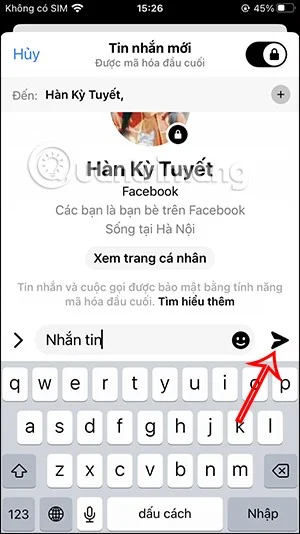
Then you select the Messenger account name you want to message. This feature is not currently available for Messenger chat groups . Next, you text and send messages as usual.
Step 3:
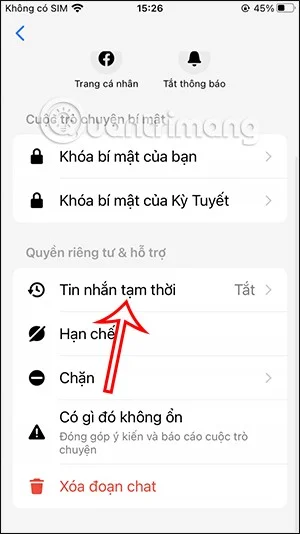
Then in the messaging interface on Messenger, we click on the Messenger account name on iPhone, or the i icon on Messenger Android.
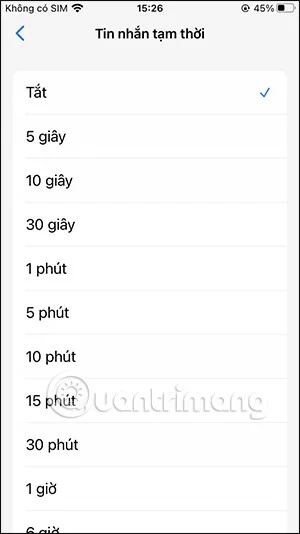
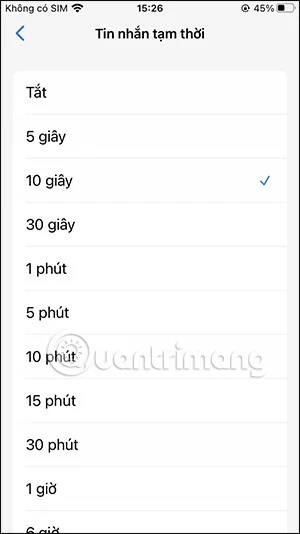
Switch to the options interface, you will click on Temporary Messages . Then the time option will appear for you to set up Messenger messages to automatically delete after the other person has read the message.
Step 4:
Now we send Messenger messages as usual. When the other person reads the message, it will count down and delete the Messenger message automatically when the time is up.
In addition, with this end-to-end encryption feature, when someone takes a screenshot of a Messenger message, a notification will appear as below.
Create a spooky office cubicle with Halloween desk decor ideas that keep your workspace usable, tidy, and mindful of workplace safety.
Plan a recognizable Halloween 2026 look with pop culture costumes inspired by Spider-Man, Supergirl, Toy Story 5, Moana, Mario, and Wednesday.
Sort leftover Halloween candy safely, share or repurpose sealed treats, and choose food use or compost for pumpkins based on their condition.
Compare workplace Halloween costume choices by respect, dress code, mobility, and safety—and learn when a subtle accessory or a policy check is the better option.
Find a couples costume that fits your style, budget, and comfort level, from Addams Family classics to original inside-joke duos.
Need a last-minute high school Halloween costume? Compare 10 easy closet-based ideas by prep time, comfort, school-day practicality, and simple safety checks.
Use a simple 2026 Halloween decorating timeline for indoor décor, outdoor displays, and fresh pumpkins, with practical adjustments for weather and events.
Mix five vivid, approachable Halloween cocktails with measured recipes, simple prep tips, and an alcohol-free option for your party guests.
Find 15 office-friendly Halloween costume ideas for 2026, with practical checks for dress codes, respectful themes, comfort, and workplace safety.
Plan a fun elementary school Halloween party with easy crafts, games, inclusive treats, costume tips, and a sample 75-minute classroom schedule.








