Solving Microsoft Teams Error 2400: Unable to Connect to Servers
Tired of Microsoft Teams Error 2400 blocking your connection? Follow our proven, step-by-step fixes to solve "Unable to Connect to Servers" and get back to productive meetings fast.
Telegram has the option to delete messages and delete message history like other messaging apps, helping users remove unwanted messages or delete entire conversations. If you do not schedule Telegram messages to be deleted automatically , you will need to delete messages manually according to the instructions below.
Instructions for deleting messages on Telegram
Step 1:
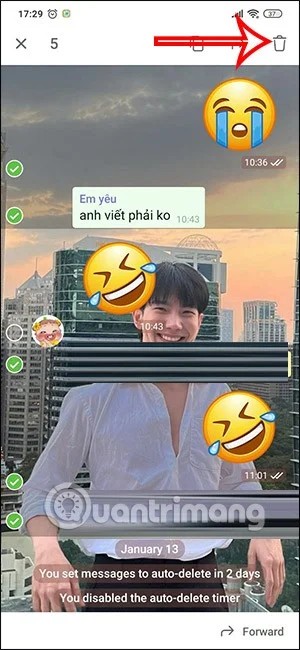
At the conversation interface on Telegram, you will press and hold on the message you want to delete . Then click on the circle at the top of that message. You can press multiple messages at the same time to delete multiple messages.


Step 2:
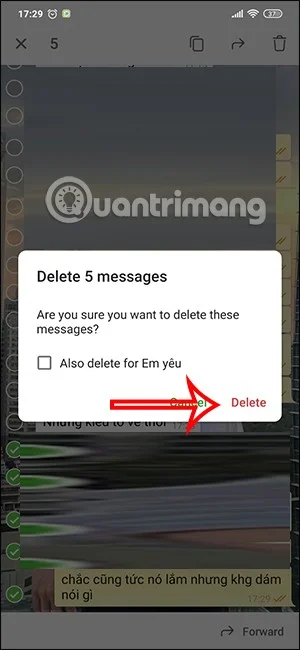
After selecting the message, click on the trash icon in the top right corner of the screen to delete the message. Telegram will then ask you if you are sure you want to delete the messages you have selected, then click Delete to delete .
If you want to delete the message for the other party, click Also delete for….

Step 3:
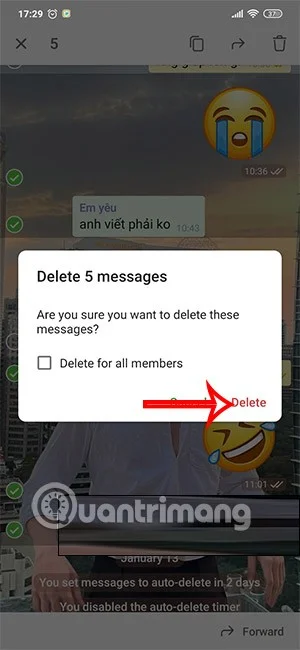
If you delete a message in a Telegram group chat , we do the same thing. And Telegram also asks if you want to delete the messages for everyone in the group chat. If yes, text Delete for all memebers.


Instructions for deleting Telegram chat history
If we want to delete Telegram chat history, we will have to delete the Telegram chat conversation or completely delete the Telegram chat group.
Step 1:
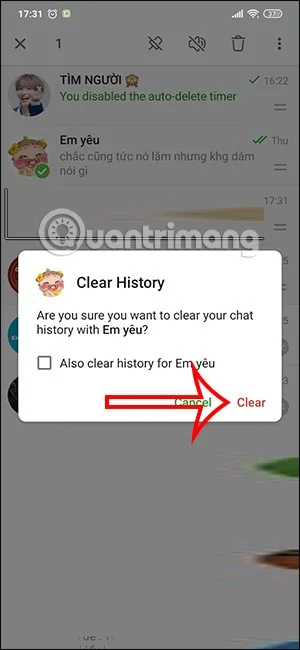
At the conversation management interface on Telegram. You press and hold on the chat you want to delete and select the 3 dots icon in the right corner. Now you will press Clear History to delete this running chat.

Step 2:
At this point you will also see a message asking if you are sure you want to delete this message history on Telegram. Click Clear to delete the message history.


Tired of Microsoft Teams Error 2400 blocking your connection? Follow our proven, step-by-step fixes to solve "Unable to Connect to Servers" and get back to productive meetings fast.
Struggling to locate your Microsoft Teams recording? Discover exactly where Teams saves meeting files in OneDrive or SharePoint, plus quick steps to find and access them instantly. No more lost recordings!
Struggling with Microsoft Teams "Error G" audio? Discover step-by-step fixes for microphone and speaker issues. Quick, easy solutions to get back to seamless meetings without frustration. Works on Windows, Mac & more!
Tired of the frustrating Microsoft Teams Vcruntime140.dll missing error crashing your meetings? Discover proven, step-by-step fixes to resolve it fast and restore smooth teamwork. No tech skills needed!
Struggling with Microsoft Teams 'Undefined Error' (2026)? Discover proven, step-by-step fixes like clearing cache, updating the app, and more. Get back to seamless collaboration fast!
Discover simple, step-by-step methods to disable Microsoft Teams at startup and unlock better PC performance. Faster boot times, less resource drain—perfect for Windows users seeking smooth operation.
Stuck with Microsoft Teams "Network Error" offline? Discover proven, step-by-step solutions to fix Microsoft Teams network error offline quickly. Get back online fast—no tech skills needed!
Struggling with Microsoft Teams Error 4oggx? Discover proven fixes to resolve sign-in failures, crashes, and connectivity issues fast. Get back to productive calls without frustration!
Encountering the frustrating Microsoft Teams "Remove Account" Data Error? Discover quick, reliable fixes like clearing cache, resetting the app, and more to get back to seamless collaboration without losing data. Updated with the latest solutions.
Tired of the frustrating Microsoft Teams "Layout Error" Sidebar? Follow our proven, step-by-step troubleshooting guide with the latest fixes to get your Teams sidebar working smoothly again. No tech skills needed!
Stuck with Microsoft Teams offline error in 2026? Discover proven troubleshooting steps, common causes, and quick fixes to restore your connection fast. No tech skills required!
Tired of Microsoft Teams crashing with "Error M" memory issues? Follow our step-by-step guide to fix Error M in Teams, clear cache, update software, and boost performance—no tech skills required!
Discover the easiest step-by-step guide to setting up Microsoft Teams Town Hall events. Host massive virtual gatherings effortlessly with pro tips for seamless execution. Perfect for leaders and organizers!
Struggling with Microsoft Teams "Download Error" on PC? Discover proven, step-by-step fixes to resolve download failed issues quickly. Get back to seamless collaboration in minutes—no tech skills needed!
Stuck with Microsoft Teams "Error L" License error? Follow this step-by-step troubleshooting guide to resolve licensing issues quickly, restore access, and boost productivity without IT hassle. Updated with latest fixes.