Desk Decorating Ideas for a Spooky Office Cubicle

Create a spooky office cubicle with Halloween desk decor ideas that keep your workspace usable, tidy, and mindful of workplace safety.
Surviving in survival games always requires good gear and rightly so, you will need more resources to get it. Copper is one of the most important resources in RuneScape Dragonwilds that you can mine to increase your power level .
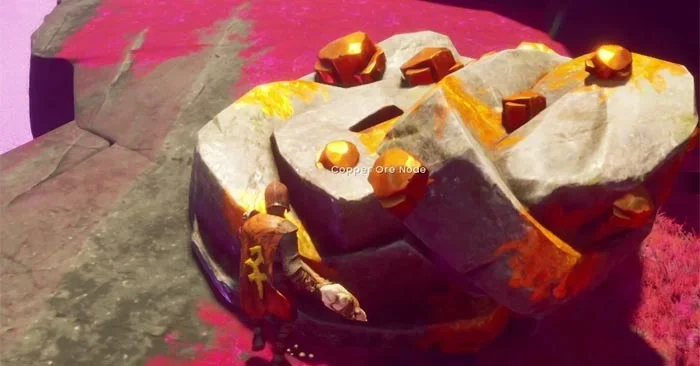
So, if you want to know how to increase your chances of survival, the article below will show you how to earn copper in RuneScape Dragonwilds .
Copper Locations in RuneScape Dragonwilds
You can get copper from copper mines in RuneScape Dragonwilds. The best place to find them is the Fractured Plains. Once you are in the Fractured Plains, head west, closer to the broken bridge. This area is where you can find a lot of copper ore. You should build a lodestone nearby for fast travel. Use the image attached below to easily travel across the plains.
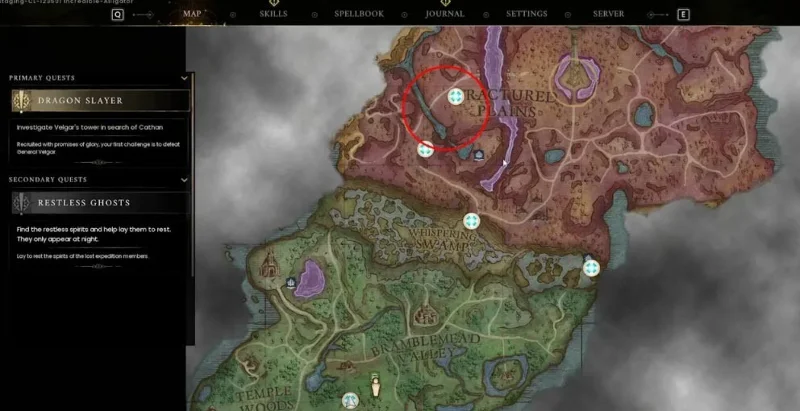
If you are new to RuneScape Dragonwilds, you will need at least level 2 power for your weapon or armor. Furthermore, you will have to cross the Whispering Swamp to get there, so make sure you are smart enough to avoid enemies.
In the Fractured Plains, take advantage of the higher terrain to avoid high-level enemies. When in higher terrain, use your crafted bow to shoot down goblins or wolves.
How to mine copper in RuneScape Dragonwilds
To get copper from copper ore, you need to mine it in RuneScape Dragonwilds. To do that, you will need a bone pickaxe. Here is how to craft a bone pickaxe:
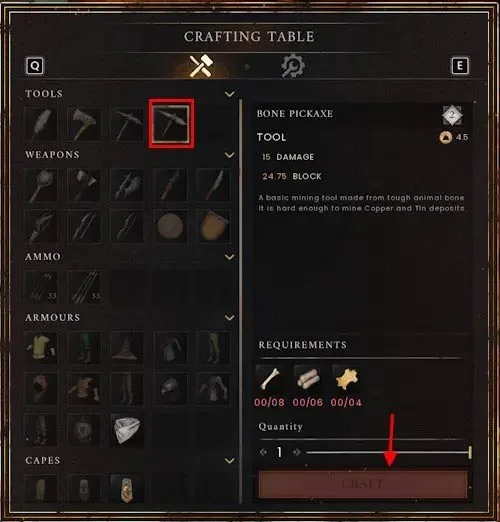
Once you have a Bone Pickaxe, you can mine copper. Just mine and collect all of it. You can also speed up your mining by using the Rocksplosion spell in RuneScape Dragonwilds to get copper. You will need 15x Earth Rune, 5x Fire Rune, and a Pickaxe to use this spell. Remember, you must have a Bone Pickaxe in your inventory for this spell to work on the ore mine.
Create a spooky office cubicle with Halloween desk decor ideas that keep your workspace usable, tidy, and mindful of workplace safety.
Plan a recognizable Halloween 2026 look with pop culture costumes inspired by Spider-Man, Supergirl, Toy Story 5, Moana, Mario, and Wednesday.
Sort leftover Halloween candy safely, share or repurpose sealed treats, and choose food use or compost for pumpkins based on their condition.
Compare workplace Halloween costume choices by respect, dress code, mobility, and safety—and learn when a subtle accessory or a policy check is the better option.
Find a couples costume that fits your style, budget, and comfort level, from Addams Family classics to original inside-joke duos.
Need a last-minute high school Halloween costume? Compare 10 easy closet-based ideas by prep time, comfort, school-day practicality, and simple safety checks.
Use a simple 2026 Halloween decorating timeline for indoor décor, outdoor displays, and fresh pumpkins, with practical adjustments for weather and events.
Mix five vivid, approachable Halloween cocktails with measured recipes, simple prep tips, and an alcohol-free option for your party guests.
Find 15 office-friendly Halloween costume ideas for 2026, with practical checks for dress codes, respectful themes, comfort, and workplace safety.
Plan a fun elementary school Halloween party with easy crafts, games, inclusive treats, costume tips, and a sample 75-minute classroom schedule.








