How to Fix Microsoft Teams Undefined Error (2026)
Struggling with Microsoft Teams 'Undefined Error' (2026)? Discover proven, step-by-step fixes like clearing cache, updating the app, and more. Get back to seamless collaboration fast!
We have not seen any account loss in Play Together, but if users use third-party software or violate Haegin's terms and policies for Play Together, this may happen.
Serious cases result in a permanent ban, and light cases result in a temporary lockout of the Play Together account. Therefore, players will find ways to get their accounts back or unlock Play Together accounts that have been locked for a long time.
There are many people who work hard to hatch Play Together eggs , enter Play Together codes , earn a lot of diamonds in Play Together , but only because of violating the privacy policy, getting involved in third-party software or using cheat software, they are permanently locked. Here is how to get your Play Together account back.
How to unlock Play Together account, get back Play Together account
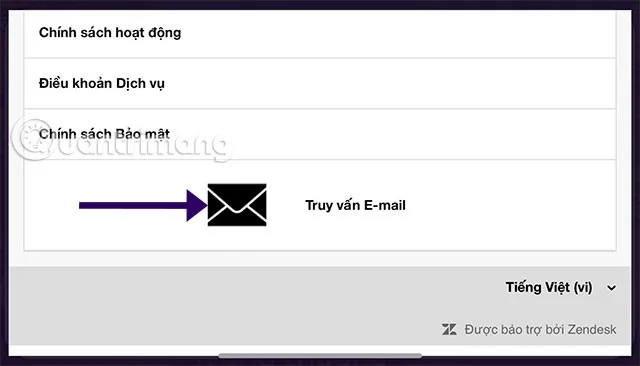
Step 1: First, you can choose the link below to go to the Play Together help page and select Email Query, then send information that your account does not violate any terms to the game publisher to the email address included there.
If you use a Guest account to access Play Together and contact the developer, select Smartphone > Settings > Help and support.
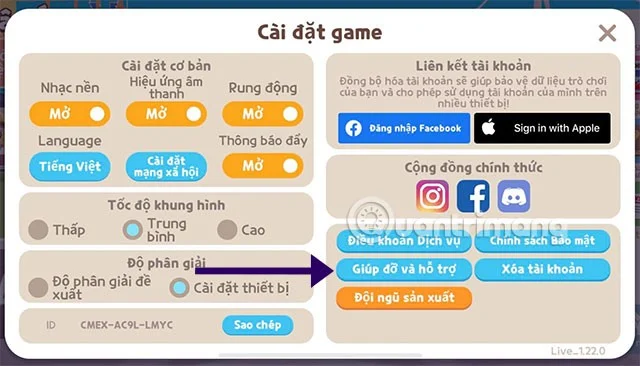
Select Email Query .

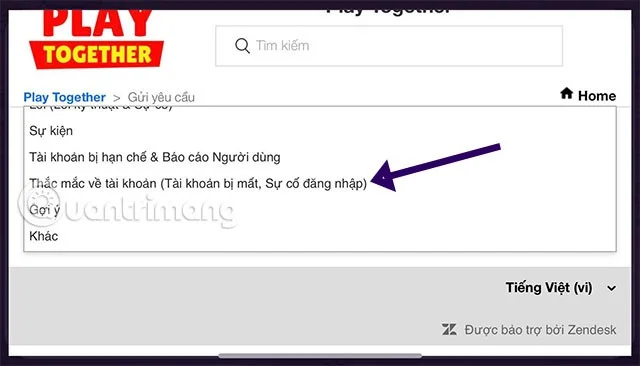
Select Account Issues (Lost Account, Login Issues) .

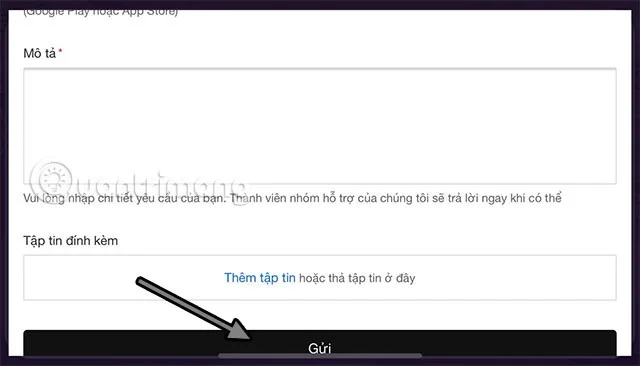
Fill in the information such as email address, scroll down and write information about the account being locked or unable to log in in the Description section. Remember to clearly write the linked account name or lost account ID in this Description section. You can add an image attachment below and then click Submit.

How to link Facebook, Google accounts with Play Together
If you lose your account and you log in with one of the accounts such as Facebook or CHPlay/Apple ID, you can log in again with your Facebook or Google account if using an Android device.
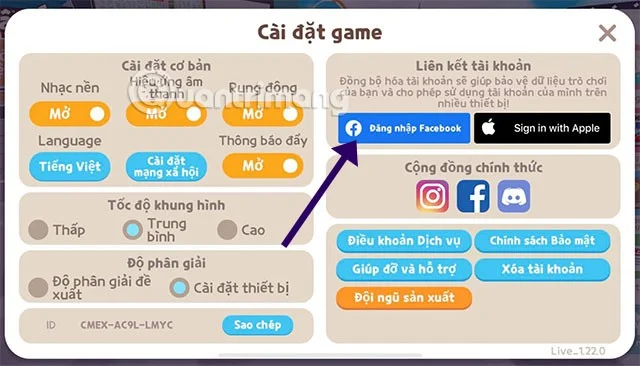
As for iOS users, you can try logging in with your Facebook account, Apple ID or Game Center account. But before that, you need to link your account by going to Smartphone > Settings > Log in to Facebook or other types of accounts.

Continue to log in to your Facebook account.

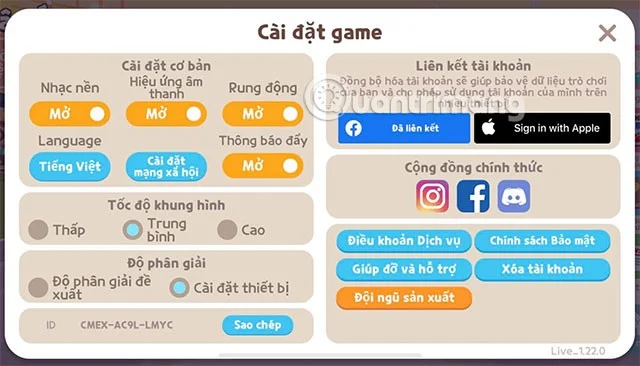
A linked notification will appear, and your account is now officially linked to Play Together.
Linking your account will be useful in case your account is lost, you can get it back by filling in the linked account information if you don't remember the ID.

Above is how to contact Haegin to retrieve a locked Play Together account. Retrieving and unlocking a Play Together account in the game will take a lot of time. Therefore, please limit the use of third-party software or violate Haegin's policies to avoid having your account locked.
See also:
Struggling with Microsoft Teams 'Undefined Error' (2026)? Discover proven, step-by-step fixes like clearing cache, updating the app, and more. Get back to seamless collaboration fast!
Discover simple, step-by-step methods to disable Microsoft Teams at startup and unlock better PC performance. Faster boot times, less resource drain—perfect for Windows users seeking smooth operation.
Stuck with Microsoft Teams "Network Error" offline? Discover proven, step-by-step solutions to fix Microsoft Teams network error offline quickly. Get back online fast—no tech skills needed!
Struggling with Microsoft Teams Error 4oggx? Discover proven fixes to resolve sign-in failures, crashes, and connectivity issues fast. Get back to productive calls without frustration!
Encountering the frustrating Microsoft Teams "Remove Account" Data Error? Discover quick, reliable fixes like clearing cache, resetting the app, and more to get back to seamless collaboration without losing data. Updated with the latest solutions.
Tired of the frustrating Microsoft Teams "Layout Error" Sidebar? Follow our proven, step-by-step troubleshooting guide with the latest fixes to get your Teams sidebar working smoothly again. No tech skills needed!
Stuck with Microsoft Teams offline error in 2026? Discover proven troubleshooting steps, common causes, and quick fixes to restore your connection fast. No tech skills required!
Tired of Microsoft Teams crashing with "Error M" memory issues? Follow our step-by-step guide to fix Error M in Teams, clear cache, update software, and boost performance—no tech skills required!
Discover the easiest step-by-step guide to setting up Microsoft Teams Town Hall events. Host massive virtual gatherings effortlessly with pro tips for seamless execution. Perfect for leaders and organizers!
Struggling with Microsoft Teams "Download Error" on PC? Discover proven, step-by-step fixes to resolve download failed issues quickly. Get back to seamless collaboration in minutes—no tech skills needed!
Stuck with Microsoft Teams "Error L" License error? Follow this step-by-step troubleshooting guide to resolve licensing issues quickly, restore access, and boost productivity without IT hassle. Updated with latest fixes.
Tired of Microsoft Teams video call freezing mid-meeting? Follow this proven troubleshooting Microsoft Teams video call freezing guide with quick fixes, advanced tips, and real solutions to restore smooth video instantly.
Frustrated by Microsoft Teams 'Download Failed Due to Unexpected Error'? Discover proven, step-by-step solutions to fix this common issue quickly and get back to seamless collaboration. Updated with the latest fixes for peak performance.
Frustrated because your Microsoft Teams recording failed? Uncover the top common reasons like permissions issues, storage limits, and network glitches, plus step-by-step fixes to prevent future failures and record flawlessly every time.
Struggling with Microsoft Teams "Error B" connection? Discover step-by-step fixes for smooth connectivity. Clear cache, check networks, and more in this ultimate guide to resolving Error B instantly.