Desk Decorating Ideas for a Spooky Office Cubicle

Create a spooky office cubicle with Halloween desk decor ideas that keep your workspace usable, tidy, and mindful of workplace safety.
Coin Master Spins are something that friends can give each other in the game, many players when lacking spins have suggested friends who have a "huge" amount of spins in the game and use the method of sending spins in Coin Master to transfer spins to their friends.
And luckily if that support comes in time, if you are just a little short of the item milestone to get a spin in the event held every day. This is definitely a very necessary feature when you are short of spins. Here is how you can use it to send spins to your friends.
How to send spins to friends Coin Master
Quick Guide
Specific instructions
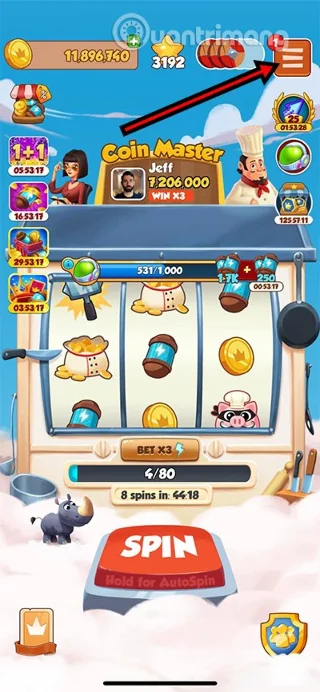
Step 1: To send Coin Master spins to your friends, log in to your Coin Master account. Once you have logged in to the game, select the three-bar icon in the upper right corner of the screen.
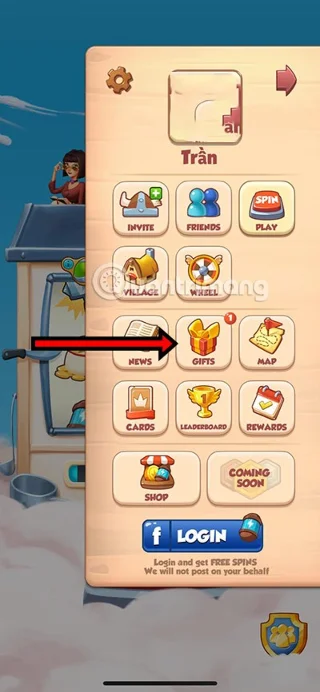
Step 2: In this list of features, you will see Gift, select that feature. Here you will also see many features related to friend requests, checking your village, viewing the map, receiving daily rewards...
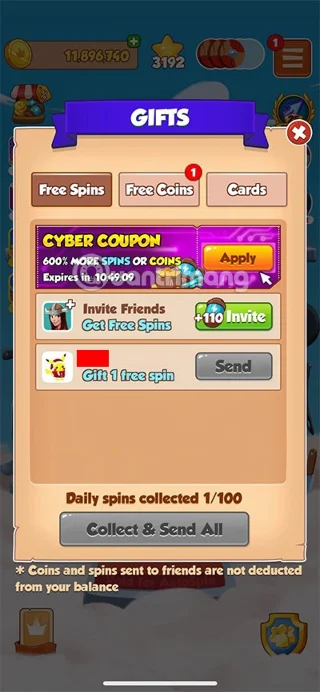
Step 3: In the Gifts section, in the Free Spins tab, you will see a list of friends, click Send on each name of the person you want to send spins to. You can only send spins to your friends every 48 hours.
Remember that the Send button must be green so you can send Spins to your friends. In addition, the number of spins you send and receive per day will be limited.
When you send a spin, you will receive a notification about the spin you sent and your friends will also receive a notification about the spin you sent them. They can use the spin you sent to spin and get rewards like any normal spin.
You can also send Coin Master spins to your friends by sending an invite link. This invite link will give your friends a certain amount of spins. You will also receive a certain amount of spins if your friends send this invitation.
Here are some tips for you to get spins through friends in Coin Master:
Create a spooky office cubicle with Halloween desk decor ideas that keep your workspace usable, tidy, and mindful of workplace safety.
Plan a recognizable Halloween 2026 look with pop culture costumes inspired by Spider-Man, Supergirl, Toy Story 5, Moana, Mario, and Wednesday.
Sort leftover Halloween candy safely, share or repurpose sealed treats, and choose food use or compost for pumpkins based on their condition.
Compare workplace Halloween costume choices by respect, dress code, mobility, and safety—and learn when a subtle accessory or a policy check is the better option.
Find a couples costume that fits your style, budget, and comfort level, from Addams Family classics to original inside-joke duos.
Need a last-minute high school Halloween costume? Compare 10 easy closet-based ideas by prep time, comfort, school-day practicality, and simple safety checks.
Use a simple 2026 Halloween decorating timeline for indoor décor, outdoor displays, and fresh pumpkins, with practical adjustments for weather and events.
Mix five vivid, approachable Halloween cocktails with measured recipes, simple prep tips, and an alcohol-free option for your party guests.
Find 15 office-friendly Halloween costume ideas for 2026, with practical checks for dress codes, respectful themes, comfort, and workplace safety.
Plan a fun elementary school Halloween party with easy crafts, games, inclusive treats, costume tips, and a sample 75-minute classroom schedule.








