How to Improve ChatGPTs Deep Research with These 8 Key Features!

ChatGPT 's Deep Research tool is great for digging into almost any topic you choose, but it still needs some improvements to be truly useful. After using Deep Research, many people think it would be much better with these additional features.

Table of Contents

1. Customizable parameters

When using ChatGPT's Deep Research, people often answer follow-up questions to provide more context for the tool. However, they wish they could use customizable parameters instead.

Think of this feature as filters when shopping online. Many people would love to be able to select the number of resources they want ChatGPT to analyze, along with the published time frames. Furthermore, it would be great to be able to search based on different keywords.

Customizable parameters would make the research much more organized. The results would be worth the time ChatGPT spends doing Deep Research. Until that happens, there is at least a way you can force ChatGPT to use high quality sources .

2. Research layout options

ChatGPT's Deep Research feature can present information in a variety of ways. For example, the tool will use tables when comparing statistics or other aspects. In other cases, the tool will present information in comprehensive subsections.

How to Improve ChatGPT's Deep Research with These 8 Key Features!
ChatGPT Savings Reminder Results Table

While the layout options are great, many people wish ChatGPT would let them choose how they want the tool to present information. Sometimes you'll see content presented as sentences when you'd rather use a table.

Sometimes you can use prompt to ask ChatGPT to present information in the format you prefer, but unfortunately it doesn't always listen.

3. Larger monthly allowance

Perhaps the biggest complaint people have about ChatGPT’s Deep Research tool is the monthly credit usage. While this is fine for casual users, 10 monthly queries is not enough for those who regularly need to do comprehensive research.

10 queries per month is understandable for a free user, but as someone paying $20/month for ChatGPT, you’ll obviously feel like you’re not getting the best service possible.

How to Improve ChatGPT's Deep Research with These 8 Key Features!

At a minimum, the Plus plan should have 15-20 queries per month. Users are willing to pay more for higher-tier subscriptions. OpenAI can incentivize people to sign up for these plans to provide a better user experience and increase revenue.

4. A separate section in ChatGPT

People use ChatGPT for a variety of conversations, whether they’re planning a new chapter in their lives or just trying to get their current thoughts out. As you add more conversations, the interface becomes clumsy and disorganized. Frustratingly, there’s no way to differentiate between regular conversations and discussions that have used Deep Research.

While it is possible to create new projects via the sidebar, many people would like ChatGPT to automatically organize their chats using Deep Research. This would be a nice improvement to the ChatGPT UI and not too difficult to implement.

Even if an app doesn't have its own section, a point of differentiation - like an icon - would be helpful.

5. Integration with custom GPT

Custom GPTs are a lesser known feature of ChatGPT. Many people like the fact that they can easily get the exact type of feedback they are looking for, and custom GPTs are useful for any preference. Unfortunately, you can't integrate them with the Deep Research feature at this time.

Responses will be much more accurate if they have the context of a custom GPT. This is especially true, since some common conversations have multiple threads.

How to Improve ChatGPT's Deep Research with These 8 Key Features!
Custom GPT as a programming assistant

We don't know how this is possible. But if there is a way to integrate Deep Research and custom GPT, no other AI tool can compete in this area.

6. Ability to break text into smaller parts

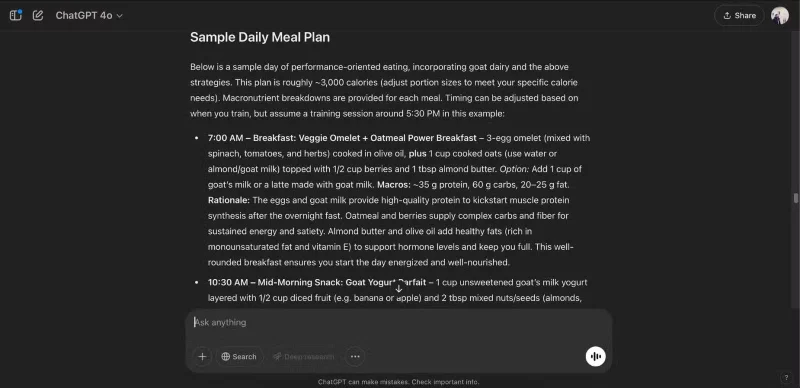
Many have compared ChatGPT's Deep Research to similar tools, such as Microsoft's equivalent Copilot . When it comes to detailed feedback, Deep Research outperforms its competitors. But at the same time, you'll sometimes see very long paragraphs after the research is finished.

How to Improve ChatGPT's Deep Research with These 8 Key Features!
Find diet information on ChatGPT's Deep Research

Skimming on a screen is much harder than reading a book, and you will sometimes miss key points in your research. When this happens, your research takes much longer than it should. Breaking up text into smaller chunks is a simple but effective solution.

If all the text is really important, ChatGPT can split the text into smaller chunks. That way, you can easily identify the most essential information.

7. Option to exclude specific websites

Inaccurate information is one of the many big problems with ChatGPT, and sadly, this also affects the Deep Research feature. You can filter out certain sites when researching through the search engine, but this is not the case when using Deep Research - which means you have to be extremely careful to double-check resources.

Similar features exist in other types of apps, such as website blockers. Users can enter a URL to exclude a website from search. This will increase the time it takes to complete these tasks, but it will be a huge success.

8. Sound

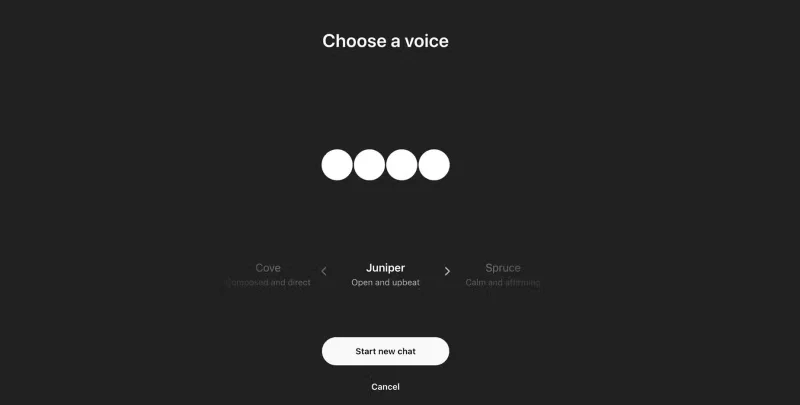
ChatGPT has some cool voice features, but none of them apply to Deep Research. You have to write a text prompt and get a text response. While people are generally happy with these searches, sometimes they want to use audio.

How to Improve ChatGPT's Deep Research with These 8 Key Features!
Change the speaker's voice in ChatGPT's Voice Mode.

In addition to speaking to Deep Research, many people would love to have written feedback, like the tool telling them about their findings and providing a transcript afterwards. This would be interactive and beneficial for those who prefer to learn by listening rather than reading.

OpenAI will certainly be adding new features to ChatGPT’s Deep Research tool in the future, and the tool should prioritize some simple yet effective additions. Customizable parameters would lead to more accurate findings, and more control over the layout of the information would be nice.

Sign up and earn $1000 a day ⋙

Leave a Comment

Why ChatGPT is better than DeepSeek

Why ChatGPT is better than DeepSeek

DeepSeek initially had high hopes. As an AI chatbot marketed as a strong competitor to ChatGPT, it promised intelligent conversational capabilities and experiences.

ChatGPT Starts Adding Google Drive Integration, But Not for Everyone

ChatGPT Starts Adding Google Drive Integration, But Not for Everyone

ChatGPT has started adding support for Google Drive integration but this feature is not available to all users.

Each ChatGPT reply consumes an average of 2.5 Wh of electricity.

Each ChatGPT reply consumes an average of 2.5 Wh of electricity.

OpenAI's ChatGPT chatbot uses more than half a million kWh of electricity every day, 17,241 times more than the average US household (about 29 kWh/day).

Why use Llama 3.2 instead of ChatGPT?

Why use Llama 3.2 instead of ChatGPT?

Amidst all the AI ​​hype, Llama 3.2 is a gentle option that pays attention to the finer details and it's time you switched to this tool.

5 AI Tools to Help You Write Your First Song

5 AI Tools to Help You Write Your First Song

The following tools will create a quick sketch to inspire or even help you create a complete track.

Apple: Siri Isnt Really Ready to Beat ChatGPT

Apple: Siri Isnt Really Ready to Beat ChatGPT

With the launch of the new generation iPad Mini, Apple has clearly affirmed that “AI-filled” software experiences are the way the company is heading in the future.

What makes ChatGPTs search feature superior to Perplexity?

What makes ChatGPTs search feature superior to Perplexity?

While Perplexity has been reliable for a long time, ChatGPT's new capabilities have users slowly returning to the original Generative AI chatbot.

15 Things You Can Do With ChatGPT

15 Things You Can Do With ChatGPT

Since its launch in November 2022, ChatGPT has received a lot of attention for its myriad uses. To help you get the most out of this tool, here are 15 ways you can use ChatGPT.

How to Use Canva and ChatGPT to Create Mass Content Designs

How to Use Canva and ChatGPT to Create Mass Content Designs

Along with ChatGPT, this tutorial will show you how the Bulk Create app works in Canva. You'll be amazed at how you can create a month's worth of content in just a few minutes.

ChatGPT May Be Running Silently on Your Phone and How to Fix It

ChatGPT May Be Running Silently on Your Phone and How to Fix It

Background Conversations keep a user's conversation with ChatGPT going while using other apps or when the screen is off. This means ChatGPT can listen or monitor a user's phone usage behavior 24/7.

4 Ways to Use ChatGPTs Canvas Mode

4 Ways to Use ChatGPTs Canvas Mode

ChatGPT's new Canvas mode adds a new dimension to writing and editing in the world's leading Generative AI engine.

ChatGPT Will Kill These 4 Types of Websites

ChatGPT Will Kill These 4 Types of Websites

AI chatbots are completely reshaping the way users interact with websites and making some types of websites obsolete in the process.

The first person to have ChatGPT implanted in the brain to help manipulate electronic devices

The first person to have ChatGPT implanted in the brain to help manipulate electronic devices

ChatGPT is being tested by Synchron, one of the pioneers of brain implant (BCI) chips to help patients manipulate electronic devices.

ChatGPT will soon be able to see everything happening on your screen

ChatGPT will soon be able to see everything happening on your screen

One important thing in the full event video was that the upcoming ChatGPT app feature was demoed but no real details were shared. That is, ChatGPT's ability to see everything that's happening on the user's device screen.

7 Ways ChatGPTs Image Import Function Helps You Solve Everyday Problems

7 Ways ChatGPTs Image Import Function Helps You Solve Everyday Problems

Did you know ChatGPT can see images? By using the image import function, it can analyze images and help you solve daily challenges seamlessly.

The Best Diets for Heart Health

The Best Diets for Heart Health

In addition to regular exercise and not smoking, diet is one of the best ways to protect your heart. Here are the best diets for heart health.

The most commonly deficient nutrients in the diet

The most commonly deficient nutrients in the diet

Diet is important to our health. Yet most of our meals are lacking in these six important nutrients.

How to use Conversation Awareness and Live Listen on AirPods

How to use Conversation Awareness and Live Listen on AirPods

At first glance, AirPods look just like any other true wireless earbuds. But that all changed when a few little-known features were discovered.

How to regain access to hard drive, fix error of not being able to open hard drive

How to regain access to hard drive, fix error of not being able to open hard drive

In this article, we will guide you how to regain access to your hard drive when it fails. Let's follow along!

How to use dental floss

How to use dental floss

Dental floss is a common tool for cleaning teeth, however, not everyone knows how to use it properly. Below are instructions on how to use dental floss to clean teeth effectively.

How to gain muscle according to experts

How to gain muscle according to experts

Building muscle takes time and the right training, but its something anyone can do. Heres how to build muscle, according to experts.

How to cure insomnia for pregnant women in the last 3 months

How to cure insomnia for pregnant women in the last 3 months

The third trimester is often the most difficult time to sleep during pregnancy. Here are some ways to treat insomnia in the third trimester.

Scientifically Proven Ways to Automatically Burn Calories

Scientifically Proven Ways to Automatically Burn Calories

There are many ways to lose weight without changing anything in your diet. Here are some scientifically proven automatic weight loss or calorie-burning methods that anyone can use.

All about iOS 26

All about iOS 26

Apple has introduced iOS 26 – a major update with a brand new frosted glass design, smarter experiences, and improvements to familiar apps.

Yoga exercises to treat insomnia

Yoga exercises to treat insomnia

Yoga can provide many health benefits, including better sleep. Because yoga can be relaxing and restorative, its a great way to beat insomnia after a busy day.

What is the flower of the other shore? Meaning and legend of the flower of the other shore

What is the flower of the other shore? Meaning and legend of the flower of the other shore

The flower of the other shore is a unique flower, carrying many unique meanings. So what is the flower of the other shore, is the flower of the other shore real, what is the meaning and legend of the flower of the other shore?

Healthy snacks that help you lose weight

Healthy snacks that help you lose weight

Craving for snacks but afraid of gaining weight? Dont worry, lets explore together many types of weight loss snacks that are high in fiber, low in calories without making you try to starve yourself.

What to do when you have trouble sleeping?

What to do when you have trouble sleeping?

Prioritizing a consistent sleep schedule and evening routine can help improve the quality of your sleep. Heres what you need to know to stop tossing and turning at night.

How to add a printer to Windows 10

How to add a printer to Windows 10

Adding a printer to Windows 10 is simple, although the process for wired devices will be different than for wireless devices.

How to get beautiful nails quickly

How to get beautiful nails quickly

You want to have a beautiful, shiny, healthy nail quickly. The simple tips for beautiful nails below will be useful for you.