Home
» Games
»
How to invite friends to play PUBG Mobile
How to invite friends to play PUBG Mobile
Video How to invite friends to play PUBG Mobile
Despite appearing for a while, the attractiveness of survival shooter PUBG Mobile has never diminished. However, there is a limitation, if you do not know how to invite your friends to play Pubg Mobile , then we will often have to play alone, and this is a highly tactical team game .
Although you and your friends have the same login and join the room in PUBG Mobile, the rate of sharing a map is not always 100%. Another limitation is that without a Room Card (earned only when doing tasks in the Royale Pass ), players cannot create their own PUBG Mobile room , so the only way currently for players to have To play with friends is to invite them to join us. How to do it, you can refer to the following tutorial.
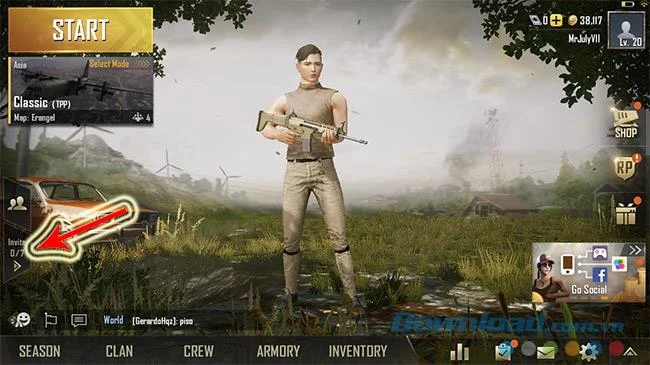
Step 1 : Open the game, at the first interface, touch the Invite friends icon as below. Note, you can only invite people who are already friends with you, if not, please make friends with them first and wait for approval.
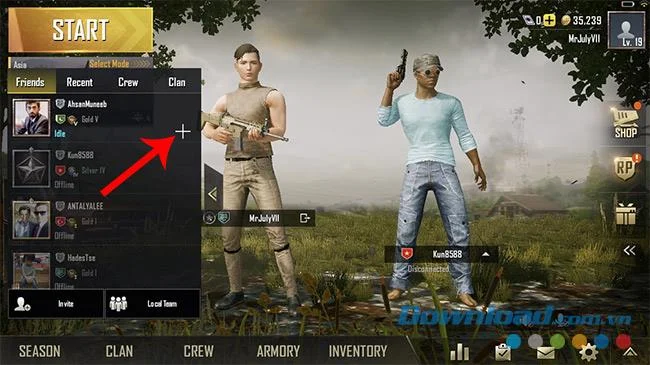
Step 2 : In the list that appears, see if they are in Online mode or not? If yes, touch the plus icon in their display.
Step 3 : At this time, on the screen of the recipient will appear a message that they are being invited to play with. You can choose to use the sign icon (red) to refuse or select the symbol v (green) to agree.
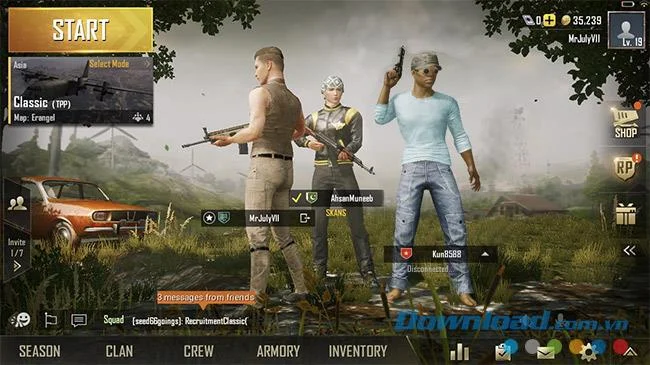
If rejected, the invitee will receive a notification that the invited person has declined, and if they accept, your screen will display as below.
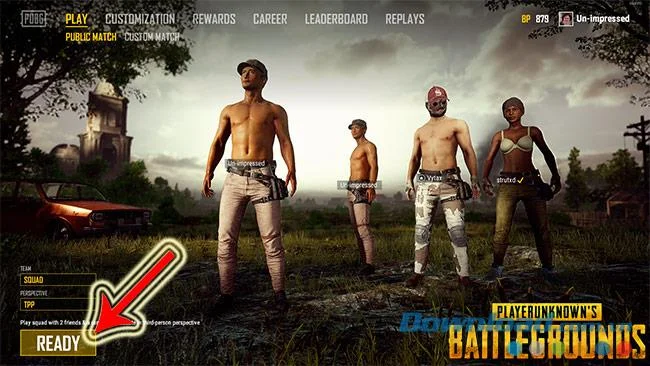
Continue to follow the instructions above to invite others to join the team. When enough people, only the "owner" can put all the groups on the map. The way to realize this is very simple: if you are invited, your screen will show READY instead of START as it used to.
Only when the entire team is Ready, can the invitee activate Start to start playing PUBG Mobile . The image above is the author of the invitee, the Start screen, while the image below illustrates the screen of the invitee, only Ready.
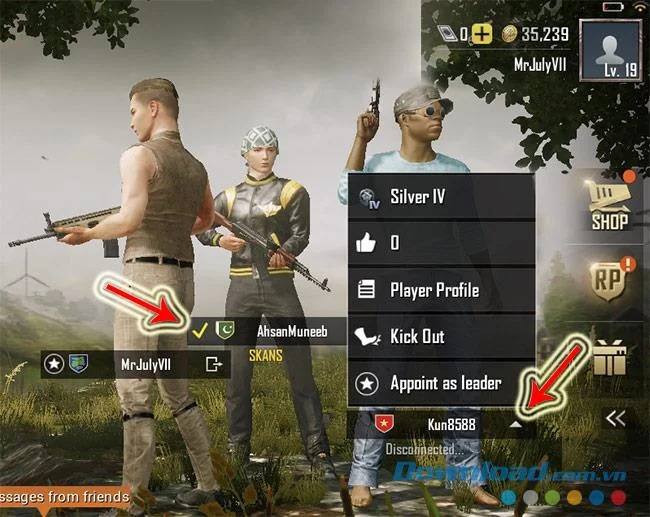
On the player's main screen, we can see some of the following information:
Players have a star icon in the box displaying the name of the inviter and leader. Only this person can activate Start
The remaining players, if they have selected Ready, will have a yellow V icon
Also in the field showing this name, if you click (click) on the down arrow icon in the teammate's name frame, we can see other information items about them, such as:
Silver IV : Rank, character rank
Like icon : The number of times someone has Like, recognized
Player Profile : Character information
Kick Out : Kick this person out of the group, click away from the team
Star icon Appoint as leader : Allow this person to be the leader (only the current leader has the right)
As such, it is not necessary that only the invited person will be the group leader, but only the invited person will be allowed to "authorize" the leader of the group. Overall, Pubg Mobile is a highly tactical and highly cohesive survival game , so if you can play with your friends, your chances of winning and fun will increase. so many, so much.