
How to know if someone has deactivated or deleted their Instagram account?

When someone leaves a social network , it affects their close friends - sharing messages, calls, and content is no longer the same. This can happen when your favorite account leaves Instagram .

If you feel like someone has been inactive for a while, they may have stopped using Instagram altogether. Here are different ways to determine if someone has deactivated or deleted their Instagram account.

1. Search for users

The first thing you should do if you notice an Instagram account is no longer showing up in your feed is to search for it on Instagram. Deactivated accounts will not appear in search results.

You should search for their name and username to confirm deactivation or deletion of their account. To do this, open your Instagram app, tap the search bar, and type in their name or username.

Finding a specific user on Instagram doesn’t always mean they’ve deactivated their account. However, you may not be able to find that user because they changed their Instagram username or blocked you. Move on to the next method for more accurate results.

2. Review your messages

Starting out as a simple messaging feature, Instagram DMs offer a number of useful features. They can also help you determine if a particular user has deactivated or deleted their account. This will only work if you have previously messaged them directly.

You can check for deactivated or deleted accounts in your Instagram messages by following these steps:
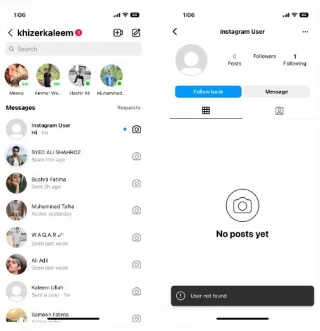
  1. Tap Messages at the top right of your Instagram home page.
  2. Use the search bar in DMs to find that specific person's name/username. Instagram will display relevant results.
  3. Navigate to the relevant profile that you feel matches the results. Deactivated accounts will not have any profile pictures and will display the username as “Instagram User”. Messages sent to those accounts will not be delivered.
How to know if someone has deactivated or deleted their Instagram account?
Instagram account disabled

3. Confirm visibility of activity on your profile

How to know if someone has deactivated or deleted their Instagram account?
Instagram likes on a profile

When someone deactivates their account, it deletes all of their activity from Instagram. Their likes, comments, and posts will disappear.

If someone close to you has deactivated their Instagram account, you can check their likes and comments on your content. You may also have tagged them in your photos.

To check if your friend deleted their account, scroll through your own profile to see if their interactions are still showing up. If you don't see them, you know the answer.

4. Check from another Instagram account

When someone deactivates their Instagram account, everyone on the app will no longer be able to access it. No one will be able to see or search for it. On the other hand, if a user has blocked you, others will still be able to search for them.

Ask a close friend to search for an account that seems to have been disabled. If they can’t find it, you can assume the account has been disabled or deleted. However, if the account is visible to others, it could mean you’ve been blocked on Instagram.

5. Search from web browser

Instagram is also accessible on web browsers. You can also find disabled or deleted accounts using your web browser.

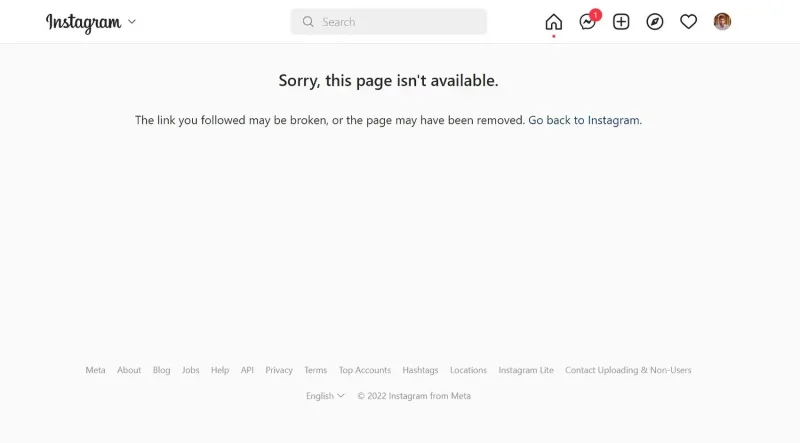
Type “instagram.com/username” into your address bar. Replace “username” with the person's actual username. The message Sorry, this page isn't available” will appear if you don't have access to the account. This means the person has deactivated their account or blocked you.

When doing this, make sure to include underscores or periods as they also show up in the URL.

How to know if someone has deactivated or deleted their Instagram account?
Instagram User Unavailable

When searching from your browser, enter the exact username in the address.

6. Ask the person directly

How to know if someone has deactivated or deleted their Instagram account?

Obviously you care about who deactivated their Instagram. Otherwise, why are you looking them up? If you feel like nothing will give you the answer you want, just ask the person directly.

Who knows, maybe they deleted their account for personal reasons or they need your help with something. For example, many people delete their social media accounts because they are being cyberbullied or hacked.

You should politely ask the person if they deactivated Instagram or blocked you. Regardless of the action, listen to their reasoning and see if there is anything you can do to help.

Leave a Comment

Spotify and Instagram are teaming up to develop an MSN-like feature for sharing songs in real time

Spotify and Instagram are teaming up to develop an MSN-like feature for sharing songs in real time

Meta and Spotify have been developing an MSN-like feature that would allow Instagram users to see in real time the music they're listening to.

Instagram launches new text tool for all users

Instagram launches new text tool for all users

A picture can say a thousand words. So why would you want to add text to a photo? Instagram seems to think it’s a good option to offer to all of its users.

Users May Soon See Instagram Comments on Threads

Users May Soon See Instagram Comments on Threads

Instagram could roll out a way to share comments on other Instagram posts to Threads, according to Alessandro Paluzzi, who regularly analyzes Meta's social media apps to spot upcoming features.

Instagram Will Allow Reels Up to 3 Minutes Long

Instagram Will Allow Reels Up to 3 Minutes Long

Instagram has just announced that it will allow users to post Reels videos up to 3 minutes long, double the previous 90-second limit.

Instagram Now Lets Users Schedule and Pin Direct Messages

Instagram Now Lets Users Schedule and Pin Direct Messages

Instagram's direct messaging feature is now getting a bunch of new features, including scheduled direct messages that you can write in advance and set to send at a later date, up to 29 days in advance.

Apple Intelligence Blocked on All Meta Apps on iOS

Apple Intelligence Blocked on All Meta Apps on iOS

Apple Intelligence is an artificial intelligence (AI) system developed by Apple specifically for its devices including iPhone, iPad and Mac.

Best time to post Instagram Reels

Best time to post Instagram Reels

The timing of your Instagram Reels can make the difference between massive engagement and dead silence. Let’s find out the best times to post on Instagram Reels.

How to sell on Instagram

How to sell on Instagram

This guide will give you the tools and strategies to successfully sell products on Instagram.

Instagram Will Replace AR Filters With Controversial AI-Generated Videos

Instagram Will Replace AR Filters With Controversial AI-Generated Videos

As reported in August, Meta confirmed that it will discontinue Spark, Instagram's AR filter, in January 2025.

Instagram confirms testing new Dislike button

Instagram confirms testing new Dislike button

It is a fact that not everything shared on social media receives positive feedback from users.

Create Instagram account without phone number

Create Instagram account without phone number

Learn how to create an Instagram account without a phone number. This step-by-step guide will help you sign up using an email address instead, making it quick and easy.

Instagram uses AI to detect teens lying about their age and automatically switch to restricted accounts

Instagram uses AI to detect teens lying about their age and automatically switch to restricted accounts

Meta will use AI to predict the age of Instagram users and automatically move anyone under 18 to a teen account if the tool believes they are lying about their age.

How to Hide Your Instagram Account and Prevent Other Users from Finding You

How to Hide Your Instagram Account and Prevent Other Users from Finding You

If you don't want to be visible, there are a few things you can do to hide your Instagram account and prevent your contacts and others from finding you on the social network.

Meta AI Makes Instagram Fun Again

Meta AI Makes Instagram Fun Again

While Meta AI isn't the most comprehensive AI tool, it does have a specific use on Instagram to help users find more content to enjoy.

Solving Microsoft Teams OneDrive Error File Sync

Solving Microsoft Teams OneDrive Error File Sync

Tired of Microsoft Teams OneDrive Error blocking file sync? Follow our step-by-step guide to solve Microsoft Teams "OneDrive Error" File Sync issues quickly. Proven fixes for smooth collaboration in Teams channels. Get your files syncing error-free today!

How to Fix Microsoft Teams Workflows and Power Automate Errors

How to Fix Microsoft Teams Workflows and Power Automate Errors

Tired of Microsoft Teams workflows and Power Automate errors halting your productivity? Get step-by-step solutions to common issues like authentication failures, timeouts, and flow errors. Fix them in minutes and automate effortlessly!

Troubleshooting Microsoft Teams Download Error on Macbook

Troubleshooting Microsoft Teams Download Error on Macbook

Facing Microsoft Teams "Download Error" on MacBook? Discover proven troubleshooting steps to resolve download failures quickly, from cache clears to reinstalls, and get back to smooth teamwork.

Troubleshooting Microsoft Teams Where is Teams Folder Error

Troubleshooting Microsoft Teams Where is Teams Folder Error

Tired of the frustrating Microsoft Teams "Where is Teams" Folder Error? Discover proven, step-by-step troubleshooting fixes to resolve it quickly and restore smooth teamwork. Latest methods included!

How to Fix Microsoft Teams JavaScript Error on Desktop App

How to Fix Microsoft Teams JavaScript Error on Desktop App

Frustrated by Microsoft Teams JavaScript Error on desktop app? Discover proven steps to fix it fast: clear cache, update, reset, and reinstall. Get back to seamless collaboration in minutes!

How to Fix Microsoft Teams Guest Login Error

How to Fix Microsoft Teams Guest Login Error

Struggling with Microsoft Teams "Guest Login" Error? Discover step-by-step fixes, from quick cache clears to admin settings, to resolve guest access issues fast and collaborate seamlessly. Updated with the latest tips!

How to Fix Microsoft Teams For PC Download Error

How to Fix Microsoft Teams For PC Download Error

Tired of the Microsoft Teams "For PC" download error blocking your work? Follow our proven, step-by-step guide to resolve it quickly and get Teams running smoothly on your PC today.

Solving Microsoft Teams Windows 7 Login Error

Solving Microsoft Teams Windows 7 Login Error

Struggling with Microsoft Teams "Windows 7" login error? Discover step-by-step fixes for this frustrating issue on Windows 10/11. Clear cache, edit registry, and more – get back to seamless collaboration today!

How to Fix Microsoft Teams Error Code 0x80070005 (2026 Guide)

How to Fix Microsoft Teams Error Code 0x80070005 (2026 Guide)

Tired of Microsoft Teams Error Code 0x80070005 blocking your meetings? Follow this 2026 guide with step-by-step fixes for access denied issues. Get Teams running smoothly in minutes!

How to Install the Microsoft Teams Add-in for Outlook 2026

How to Install the Microsoft Teams Add-in for Outlook 2026

Master the installation of the Microsoft Teams Add-in for Outlook 2026 effortlessly. Boost your productivity with seamless scheduling and meetings. Follow our proven, up-to-date steps for instant success!

How to Fix Microsoft Teams License Error 2026

How to Fix Microsoft Teams License Error 2026

Struggling with Microsoft Teams "License Error" 2026? Discover proven, step-by-step solutions to resolve it fast. Clear cache, check licenses, and get back to seamless collaboration—no IT help needed!

The Best Exercises for 50+

The Best Exercises for 50+

Whether youre in your 50s, 60s, or even 70s, its not too late to prioritize your health and put yourself first. Here are the best exercises for people 50 and older.

Solving Microsoft Teams Error Caa50024 on Windows 10/11

Solving Microsoft Teams Error Caa50024 on Windows 10/11

Struggling with Microsoft Teams Error Caa50024 on Windows 10/11? Follow our step-by-step fixes to resolve crashes and launch issues quickly. Latest proven solutions for seamless teamwork.

How to Fix Microsoft Teams Login Error AADSTS50011

How to Fix Microsoft Teams Login Error AADSTS50011

Stuck with Microsoft Teams login error AADSTS50011? Discover proven, step-by-step fixes to resolve the reply URL mismatch issue and log in seamlessly. No tech skills needed!

How to Fix Microsoft Teams Win 7 Compatibility Error

How to Fix Microsoft Teams Win 7 Compatibility Error

Tired of the frustrating Microsoft Teams "Win 7" Compatibility Error blocking your meetings? Get instant fixes with our step-by-step guide, including workarounds for older Windows versions. Resolve it now and stay connected!









