Veera is one of the mages with extremely annoying control abilities that is often used a lot while climbing the ranks. This article will help you understand how to get acquainted and equip Veera effectively. Let's explore now.
Table of Contents
Learn Veera's move set
To master this mage, the first thing we need to do is master Veera's moves.
 |
Passive: Enchant
After escaping combat, Veera gains increased movement speed.
|
 |
Move 1: Hell Bat
Veera throws out a Hell Bat that deals magic damage.
|
 |
Move 2: Blow Kiss
Veera's kiss deals magic damage to enemies and stuns them while reducing their magic armor.
|
 |
Move 3: Little Devil
Veera summons a Demon to attack nearby enemies and deal magic damage.
|
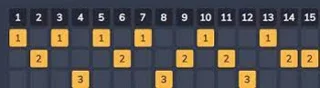
Veera's skill order
For this champion, players need to max out skill 1 first. Therefore, the order of skill increase should follow the following table:

Summoner Spells for Veera
Veera is a champion with low health, so to be able to easily participate in combat and avoid being caught by the enemy team, the Flash spell will be the most suitable.
 |
Flash:
Instantly turn in the specified direction a short distance.
|
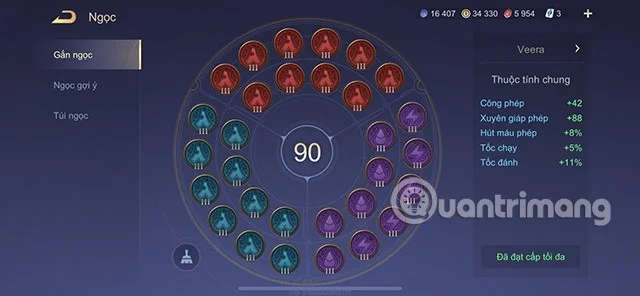
Gem table for Veera Lien Quan season S1 2023
In this S1 2023 season, players can use the gem table as suggested below by Quantrimang to increase the amount of damage that Veera causes to the opponent. Specifically:
- Red Gem: Magic Power +4.2; Magic Penetration +2.4
- Purple Gem: 5 Attack Speed +1%, Movement Speed +1% and 5 Spell Vamp +1.6%
- Green Gem: Attack speed +0.6%; Magic penetration +6.4

Badges for Veera in season S1 2023
The most suitable badge system for Veera to use this season is the Tower of Light and the Abyss of Chaos. In which
- Main Branch: Light Tower: Level 1 Contrast, Level 2 Heart Piercing, Level 3 Divine Light.
- Sub-branch: Chaos Abyss: Level 1 Demon Fire, Level 2 Strong Attack.

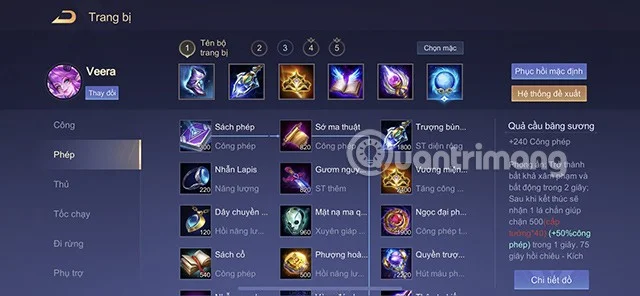
How to build Veera Lien Quan Mobile season S1 2023
You don't know how to build items for this mage with great control ability to climb the ranks in season S1 2023? Here are some suggestions for you.
- Sorcerer's Shoes: +60 Movement Speed, +75 Magic Penetration.
- Explosive Staff: +200 Magic Power, +30 Mana Regen/5s, +5% Movement Speed. Echo: Creates a small explosion that deals 100 (+40% bonus Magic Power) magic damage around the target hit.
- Hecate's Crown: +240 Magic Power, +35% Magic Power.
- Soul Book: +200 Magic Power, +10% Cooldown Reduction, +20 Mana Regen/5s, +300 Max Health. Wanted: Damage that hits the target reduces their healing ability by 40% for 1.5 seconds (if damage is from a basic attack, the effect lasts for 3 seconds).
- Chaos Staff: +180 Magic Power, +10% Cooldown Reduction, +40% Magic Penetration.
- Frost Orb: +240 Magic Power, Seal: Become invulnerable for 2 seconds. After ending, receive a shield that blocks 500 (hero level * 40) (+50% magic power) for 1 second.

How to play the marksman Veera season S1 2023
Early game
Veera needs to quickly clear the mid lane with skill 1. Then quickly move to the two wings to support teammates in time. Because Veera is a champion with low mobility, when moving, you should be careful, you can go around your jungle to be safe and avoid being ambushed by the enemy when the enemy knows your direction of movement.

Mid and late game
Veera's skill 2 has a very good stun ability, so when playing Veera you need to have the right movement to support your teammates well during combat. Especially in the mid and late game, players should pay attention, predict the enemy's movement direction to hide, attack first and ambush weak health generals on the opponent's side.
Note that Veera's combo is strongest when focused on 1 target, so when fighting, choose a good position to deal as much damage as possible to the enemy's main single target.

Veera is a mage with high damage but very low mobility and very low health, so what Veera needs are good protection champions like Baldum, Gildur or Rouie. These champions have good protection skills so that Veera can confidently unleash her strong damage on the enemy team.
Standard combo for Veera
When using Veera you should use the following combo:
Skill 2 > Ultimate > Skill 1 > Skill 1.
Note that you need to press skill 1 very quickly to be able to unleash all skills on the enemy general. Once equipped properly, this combo of Veera can easily defeat the enemy general.
Above are all the ways to play and equip Veera in season S1 2023 of Lien Quan Mobile that Quantrimang wants to introduce to you. Hope you can use this general well when climbing the rank in season S1 2023.