How to present survey results in PowerPoint or Google Slides

You have the survey results in hand but don't know how to present them in PowerPoint or Google Slides? Don't worry, this article will guide you how to present the survey in Microsoft PowerPoint , Google Slides .

How to present a survey in PowerPoint, Google Slides

Graphs & Charts

When it comes to presenting numerical data to your audience, one of the best ways is to use charts. A good chart conveys the most relevant features of your survey, while also allowing you to make comparisons, highlight trends, or display other relevant elements.

You should use different colors in the chart, representing each value or result of the survey, this will make the topic clear and transparent.

Below are different types of charts and graphs you can use to present your survey data. Just choose the one that's right for you.
Bar chart

How to present survey results in PowerPoint or Google Slides

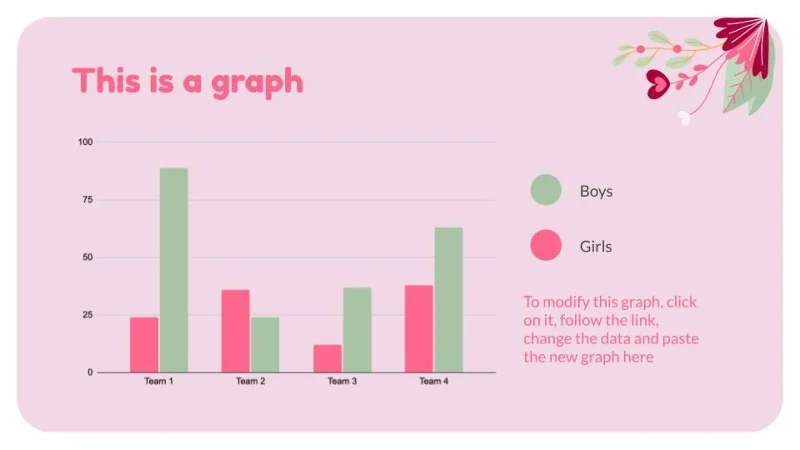
These are a safe choice because they are easy to create and interpret. All values ​​can easily be compared to each other.

Line chart

How to present survey results in PowerPoint or Google Slides

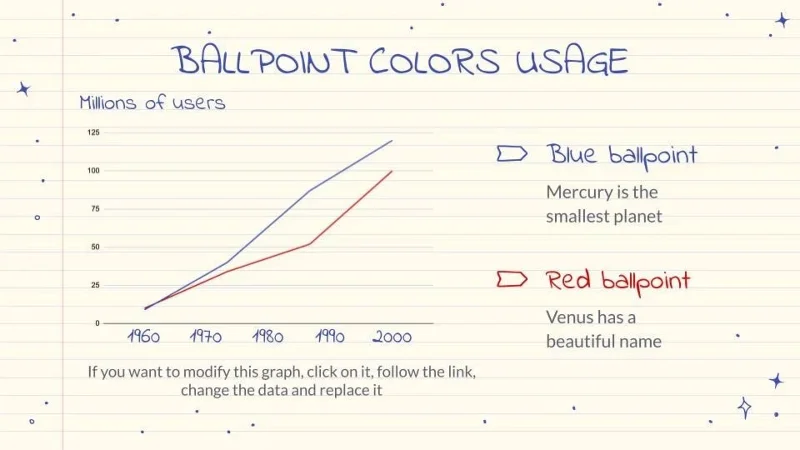
This type of chart is great for illustrating how different factors change over time or a certain distance.
Venn Diagram

How to present survey results in PowerPoint or Google Slides

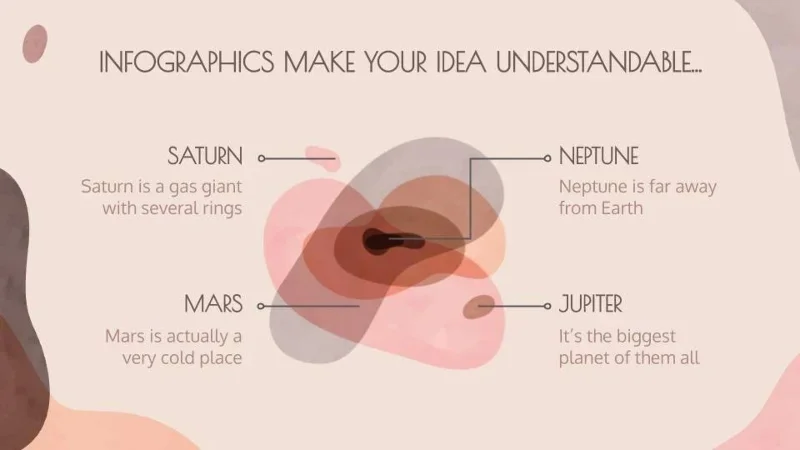
A Venn diagram (named after its creator, John Venn) is an information graphic that shows groups of one or more elements delimited by closed lines so that the elements of each group remain inside.

In the image you can see the Venn diagram in an abstract style, without fixed lines, in case you want to give your result a more casual touch!
Pie chart

How to present survey results in PowerPoint or Google Slides

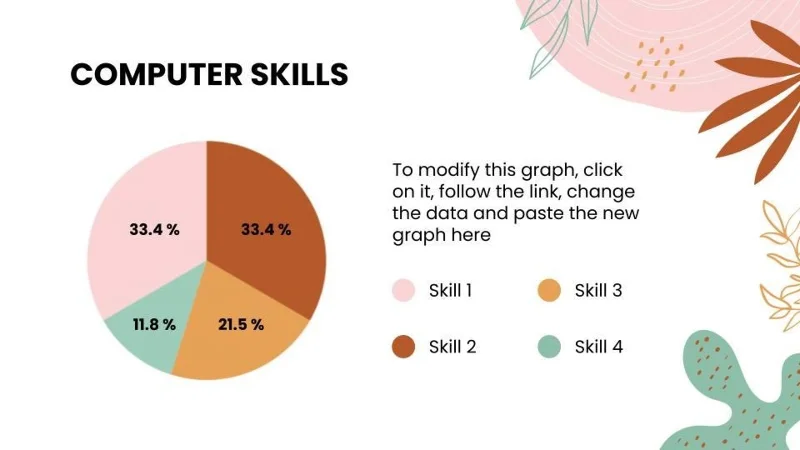
This type of chart is very popular and is used to compare different parts that form a circle. You should use different colors for each data according to the topic.
Information graph

How to present survey results in PowerPoint or Google Slides

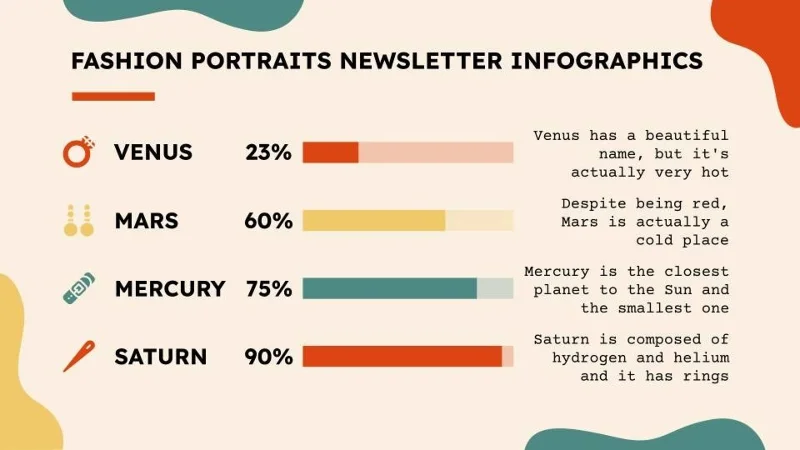
Infographics are perfect for discussing surveys. They are eye-catching and organize information in a way that makes sense. Infographics make data more appealing and easier to understand. They are a great addition to your presentations.

Other survey results presentation tips

  • In addition to the numerical data, present the survey's objectives and conclusions. Your audience will appreciate it if you involve them in the process of interpreting the survey.
  • Explain how you collected the information. Detail your survey process so your audience can see the effort involved.
  • Talk about the different variables in your survey. Age, location of the survey, and other variables are part of different surveys.
  • Use a moderate number of charts or infographics. Balance is key, so include only data that is relevant to the development of the survey and leave out variables or sections that are irrelevant.

Leave a Comment

Troubleshooting Microsoft Teams Installation Errors on Windows 11

Troubleshooting Microsoft Teams Installation Errors on Windows 11

Struggling with Microsoft Teams installation errors on Windows 11? Get step-by-step fixes for common issues like 0x80070005, 80070422, and more. Quick, effective troubleshooting to get you back to collaborating seamlessly.

Troubleshooting Microsoft Teams Screen Error Black Screen

Troubleshooting Microsoft Teams Screen Error Black Screen

Tired of Microsoft Teams "Screen Error" black screen ruining your meetings? Discover proven, step-by-step troubleshooting fixes for Teams black screen issues, screen sharing errors, and more. Get back to seamless collaboration fast!

How to Fix Microsoft Teams Update Error Loop

How to Fix Microsoft Teams Update Error Loop

Frustrated with the endless Microsoft Teams Update Error loop? Discover step-by-step fixes to resolve stuck updates, clear cache, reinstall, and more. Get back to seamless collaboration fast!

How to Fix Microsoft Teams Download Error on Phone

How to Fix Microsoft Teams Download Error on Phone

Encountering Microsoft Teams "Download Error" on your phone? Get instant fixes for Android & iOS. Clear cache, update apps, and more—back to chatting in minutes without frustration!

Solving Microsoft Teams VOIP Connection Error

Solving Microsoft Teams VOIP Connection Error

Struggling with Microsoft Teams VOIP connection error? Discover step-by-step fixes to solve Microsoft Teams VOIP connection error instantly. Network tweaks, cache clears, and more for seamless video calls.

Solving Microsoft Teams Unexpected Error on Startup

Solving Microsoft Teams Unexpected Error on Startup

Tired of the frustrating Microsoft Teams 'Unexpected Error' on startup? Discover step-by-step fixes, from clearing cache to advanced resets, to get Teams running smoothly again. Quick, reliable solutions for Windows and Mac users.

How to Fix Microsoft Teams Download Error Unexpected

How to Fix Microsoft Teams Download Error Unexpected

Tired of Microsoft Teams "Download Error" Unexpected blocking your workflow? Follow our expert, step-by-step guide with quick fixes and advanced tips to resolve it instantly. No reinstall needed!

Causes of oil heater noise, oil leakage and no heating when in use

Causes of oil heater noise, oil leakage and no heating when in use

Oil heaters make noise, leak oil, and do not heat up. These are all problems that arise when using a heater. So what are the causes of these problems? Read our article below!

How to Assign Participants to Breakout Rooms in Microsoft Teams

How to Assign Participants to Breakout Rooms in Microsoft Teams

Master how to assign participants to breakout rooms in Microsoft Teams with this step-by-step guide. Boost meeting engagement, automate assignments, and troubleshoot like a pro for seamless virtual collaboration.

How to Fix Microsoft Teams Giá Error Pricing Update

How to Fix Microsoft Teams Giá Error Pricing Update

Struggling with Microsoft Teams "Price Error" after the latest pricing update? Discover step-by-step fixes to resolve it quickly, restore seamless collaboration, and avoid subscription headaches. Updated with the newest solutions.

Solving Microsoft Teams Background Error Transparency

Solving Microsoft Teams Background Error Transparency

Struggling with Microsoft Teams Background Error Transparency? Discover proven step-by-step fixes for blurry, glitchy virtual backgrounds. Restore perfect transparency in Teams meetings effortlessly. Updated with the latest solutions.

How to Fix Microsoft Teams Đăng nhập Error (Login)

How to Fix Microsoft Teams Đăng nhập Error (Login)

Struggling with Microsoft Teams "Đăng nhập" login error? Discover step-by-step fixes for smooth sign-in. Clear cache, update app, and more – no tech skills needed! Works on Windows, Mac, and web.

Solving Microsoft Teams Web Error 503 Service Unavailable

Solving Microsoft Teams Web Error 503 Service Unavailable

Tired of Microsoft Teams Web Error 503 Service Unavailable blocking your meetings? Discover quick, step-by-step fixes to resolve the 503 error fast – no tech skills needed! Clear cache, check status, and get back to collaborating seamlessly.

Troubleshooting Microsoft Teams Update Error 0x80070002

Troubleshooting Microsoft Teams Update Error 0x80070002

Stuck with Microsoft Teams Update Error 0x80070002? Discover proven troubleshooting steps to resolve this frustrating issue quickly and get your Teams app updated seamlessly for uninterrupted collaboration.

Solving Microsoft Teams Error AADSTS50020: User Account Conflict

Solving Microsoft Teams Error AADSTS50020: User Account Conflict

Tired of Microsoft Teams Error AADSTS50020 blocking your sign-in? Discover step-by-step fixes for user account conflicts, backed by the latest Azure AD solutions. Get back to work fast!