How to sell on Instagram

Instagram is more than just a place to post pretty pictures. It can be a powerful tool for selling products. According to a survey, 74% of women and 68% of men prefer to shop on Instagram over any other social media app. Of course, that raises the question of how to sell on Instagram. It’s not just about posting photos or videos.

How to sell on Instagram

This guide will give you the tools and strategies to successfully sell products on Instagram .

Why is Instagram a potential sales platform?

  • Reach: Instagram has over 2 billion monthly active users. You can be sure that your target audience is actively using Instagram every day. You have access to that huge pool of potential customers.
  • Visual Appeal: Instagram is a highly visual platform. It is perfect for showcasing products and services in an engaging way. With high-quality images and videos, you can grab the attention of your target audience and encourage them to make a purchase.
  • Targeting capabilities: Instagram's advanced targeting options allow you to reach specific demographics, interests, and behaviors. You can ensure your content is seen by the right people who are more likely to be interested in what you have to offer.
  • Engagement: Instagram is among the most engaged social networks. People actively engage with content on Instagram, making it a great place to showcase your products or services.
  • E-commerce integrations: Instagram makes it easier for businesses to sell directly on the platform with features like shoppable posts and tags. These integrations make it convenient for customers to make purchases without ever leaving the app.

How to sell on Instagram

How to sell on Instagram

Shop on Instagram

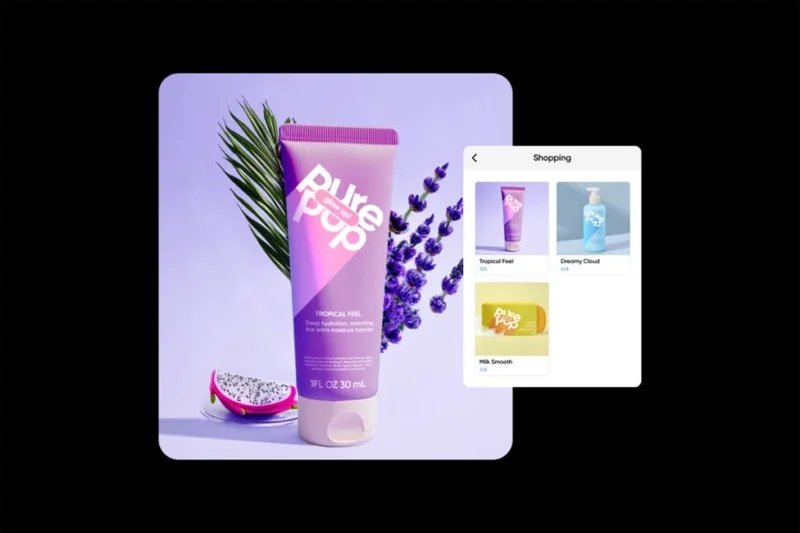
Instagram Shops allows businesses to create a digital store within the app. This feature is only available for physical items and makes it easy for customers to browse and purchase products.

The great thing about stores is that you can direct users to a third-party site, like your website, to make a purchase, or you can set it up so people can make purchases directly through Instagram without leaving the app.

Shoppable posts

Shoppable posts are regular Instagram posts that are tagged with products from Instagram stores. When users tap on a product tag, they can see more information about the product and even buy it directly from the post. According to Instagram, these types of posts can increase sales by up to 37%.

Instagram Stories

With over 500 million daily active users, Instagram Stories have become a popular way for businesses to engage with their target audience. Story stickers like “product” or “swipe up” allow businesses to tag products in their stories and direct viewers to their online store.

Advertising on Instagram

If you want to reach more people and drive sales, Instagram advertising is an effective way to do it. With Instagram's targeting options, you can reach specific audiences and promote your products directly to them. When someone clicks on one of your ads, you can take them to your website or store.
How to sell on Instagram

How to Start Selling on Instagram

Follow these steps to start selling products on Instagram.

Step 1: Set up a business account on Instagram

You can't sell on Instagram unless you have a business account. If you're using a personal or creator account, you'll need to switch. To switch to a business account, go to your account profile, select the menu, then " Settings and privacy ."

If you're using a creator account, tap " Creator tools & controls ." If you're using a personal account, tap "Account types & tools."

Once done, click " Switch account type " or " Switch to professional account ". Finally, select " Switch to business account ".

Step 2: Create your store using Meta Commerce Manager

The next step in how to sell on Instagram is to go to Meta Commerce Manager to set up your Instagram shop. You will need to use a desktop computer for this step.

Start by selecting “ Create Store .” Enter general information like your store name and website.

Next, if you are using a third-party shopping platform like Shopify, connect your Instagram platform to it. If you are not using any of these options, click “I do not use these platforms.”

Next, choose the payment method you want your customers to use. Your customers can either check out on a third-party site (usually your own) or directly through Instagram. If you choose the first option, customers will be able to browse products on Instagram, but when it's time to buy, they'll be taken to a different site.

If the second option is selected, the customer can pay

Finally, you will choose the country to ship to.

Step 3: Add products to your Instagram catalog

You'll also do this in Commerce Manager. Technically, you can do it on your phone, but the screen will be very small.

Start by choosing how you'll add products to your catalog. There are three ways to do this:

  • Handmade
  • Through spreadsheet or other file
  • Automatically via Meta Pixel
  • Choose a method and start adding products to your Instagram catalog.

If you did everything correctly, you should now be able to sell products through Instagram.

Leave a Comment

Spotify and Instagram are teaming up to develop an MSN-like feature for sharing songs in real time

Spotify and Instagram are teaming up to develop an MSN-like feature for sharing songs in real time

Meta and Spotify have been developing an MSN-like feature that would allow Instagram users to see in real time the music they're listening to.

Instagram launches new text tool for all users

Instagram launches new text tool for all users

A picture can say a thousand words. So why would you want to add text to a photo? Instagram seems to think it’s a good option to offer to all of its users.

Users May Soon See Instagram Comments on Threads

Users May Soon See Instagram Comments on Threads

Instagram could roll out a way to share comments on other Instagram posts to Threads, according to Alessandro Paluzzi, who regularly analyzes Meta's social media apps to spot upcoming features.

Instagram Will Allow Reels Up to 3 Minutes Long

Instagram Will Allow Reels Up to 3 Minutes Long

Instagram has just announced that it will allow users to post Reels videos up to 3 minutes long, double the previous 90-second limit.

Instagram Now Lets Users Schedule and Pin Direct Messages

Instagram Now Lets Users Schedule and Pin Direct Messages

Instagram's direct messaging feature is now getting a bunch of new features, including scheduled direct messages that you can write in advance and set to send at a later date, up to 29 days in advance.

Apple Intelligence Blocked on All Meta Apps on iOS

Apple Intelligence Blocked on All Meta Apps on iOS

Apple Intelligence is an artificial intelligence (AI) system developed by Apple specifically for its devices including iPhone, iPad and Mac.

Best time to post Instagram Reels

Best time to post Instagram Reels

The timing of your Instagram Reels can make the difference between massive engagement and dead silence. Let’s find out the best times to post on Instagram Reels.

Instagram Will Replace AR Filters With Controversial AI-Generated Videos

Instagram Will Replace AR Filters With Controversial AI-Generated Videos

As reported in August, Meta confirmed that it will discontinue Spark, Instagram's AR filter, in January 2025.

Instagram confirms testing new Dislike button

Instagram confirms testing new Dislike button

It is a fact that not everything shared on social media receives positive feedback from users.

How to know if someone has deactivated or deleted their Instagram account?

How to know if someone has deactivated or deleted their Instagram account?

When someone leaves a social network, it affects their close friends - sharing messages, calls, and content is no longer the same. This can happen when your favorite account leaves Instagram.

Create Instagram account without phone number

Create Instagram account without phone number

Learn how to create an Instagram account without a phone number. This step-by-step guide will help you sign up using an email address instead, making it quick and easy.

Instagram uses AI to detect teens lying about their age and automatically switch to restricted accounts

Instagram uses AI to detect teens lying about their age and automatically switch to restricted accounts

Meta will use AI to predict the age of Instagram users and automatically move anyone under 18 to a teen account if the tool believes they are lying about their age.

How to Hide Your Instagram Account and Prevent Other Users from Finding You

How to Hide Your Instagram Account and Prevent Other Users from Finding You

If you don't want to be visible, there are a few things you can do to hide your Instagram account and prevent your contacts and others from finding you on the social network.

Meta AI Makes Instagram Fun Again

Meta AI Makes Instagram Fun Again

While Meta AI isn't the most comprehensive AI tool, it does have a specific use on Instagram to help users find more content to enjoy.

Solving Microsoft Teams OneDrive Error File Sync

Solving Microsoft Teams OneDrive Error File Sync

Tired of Microsoft Teams OneDrive Error blocking file sync? Follow our step-by-step guide to solve Microsoft Teams "OneDrive Error" File Sync issues quickly. Proven fixes for smooth collaboration in Teams channels. Get your files syncing error-free today!

How to Fix Microsoft Teams Workflows and Power Automate Errors

How to Fix Microsoft Teams Workflows and Power Automate Errors

Tired of Microsoft Teams workflows and Power Automate errors halting your productivity? Get step-by-step solutions to common issues like authentication failures, timeouts, and flow errors. Fix them in minutes and automate effortlessly!

Troubleshooting Microsoft Teams Download Error on Macbook

Troubleshooting Microsoft Teams Download Error on Macbook

Facing Microsoft Teams "Download Error" on MacBook? Discover proven troubleshooting steps to resolve download failures quickly, from cache clears to reinstalls, and get back to smooth teamwork.

Troubleshooting Microsoft Teams Where is Teams Folder Error

Troubleshooting Microsoft Teams Where is Teams Folder Error

Tired of the frustrating Microsoft Teams "Where is Teams" Folder Error? Discover proven, step-by-step troubleshooting fixes to resolve it quickly and restore smooth teamwork. Latest methods included!

How to Fix Microsoft Teams JavaScript Error on Desktop App

How to Fix Microsoft Teams JavaScript Error on Desktop App

Frustrated by Microsoft Teams JavaScript Error on desktop app? Discover proven steps to fix it fast: clear cache, update, reset, and reinstall. Get back to seamless collaboration in minutes!

How to Fix Microsoft Teams Guest Login Error

How to Fix Microsoft Teams Guest Login Error

Struggling with Microsoft Teams "Guest Login" Error? Discover step-by-step fixes, from quick cache clears to admin settings, to resolve guest access issues fast and collaborate seamlessly. Updated with the latest tips!

How to Fix Microsoft Teams For PC Download Error

How to Fix Microsoft Teams For PC Download Error

Tired of the Microsoft Teams "For PC" download error blocking your work? Follow our proven, step-by-step guide to resolve it quickly and get Teams running smoothly on your PC today.

Solving Microsoft Teams Windows 7 Login Error

Solving Microsoft Teams Windows 7 Login Error

Struggling with Microsoft Teams "Windows 7" login error? Discover step-by-step fixes for this frustrating issue on Windows 10/11. Clear cache, edit registry, and more – get back to seamless collaboration today!

How to Fix Microsoft Teams Error Code 0x80070005 (2026 Guide)

How to Fix Microsoft Teams Error Code 0x80070005 (2026 Guide)

Tired of Microsoft Teams Error Code 0x80070005 blocking your meetings? Follow this 2026 guide with step-by-step fixes for access denied issues. Get Teams running smoothly in minutes!

How to Install the Microsoft Teams Add-in for Outlook 2026

How to Install the Microsoft Teams Add-in for Outlook 2026

Master the installation of the Microsoft Teams Add-in for Outlook 2026 effortlessly. Boost your productivity with seamless scheduling and meetings. Follow our proven, up-to-date steps for instant success!

How to Fix Microsoft Teams License Error 2026

How to Fix Microsoft Teams License Error 2026

Struggling with Microsoft Teams "License Error" 2026? Discover proven, step-by-step solutions to resolve it fast. Clear cache, check licenses, and get back to seamless collaboration—no IT help needed!

The Best Exercises for 50+

The Best Exercises for 50+

Whether youre in your 50s, 60s, or even 70s, its not too late to prioritize your health and put yourself first. Here are the best exercises for people 50 and older.

Solving Microsoft Teams Error Caa50024 on Windows 10/11

Solving Microsoft Teams Error Caa50024 on Windows 10/11

Struggling with Microsoft Teams Error Caa50024 on Windows 10/11? Follow our step-by-step fixes to resolve crashes and launch issues quickly. Latest proven solutions for seamless teamwork.

How to Fix Microsoft Teams Login Error AADSTS50011

How to Fix Microsoft Teams Login Error AADSTS50011

Stuck with Microsoft Teams login error AADSTS50011? Discover proven, step-by-step fixes to resolve the reply URL mismatch issue and log in seamlessly. No tech skills needed!

How to Fix Microsoft Teams Win 7 Compatibility Error

How to Fix Microsoft Teams Win 7 Compatibility Error

Tired of the frustrating Microsoft Teams "Win 7" Compatibility Error blocking your meetings? Get instant fixes with our step-by-step guide, including workarounds for older Windows versions. Resolve it now and stay connected!









