How to turn off Xiaomi security scan when installing apps

If you are using a Xiaomi, Redmi or Poco phone, there will be an additional security scan before installing an app from the Google Play Store. This security scan feature is pre-installed in MIUI-enabled phones. This security scan takes a while before the app can be used on the phone. In case you install the original app from the Google Play Store, you can skip the app scan process according to the article below.

Instructions to turn off Xiaomi security scan when installing applications

Step 1:

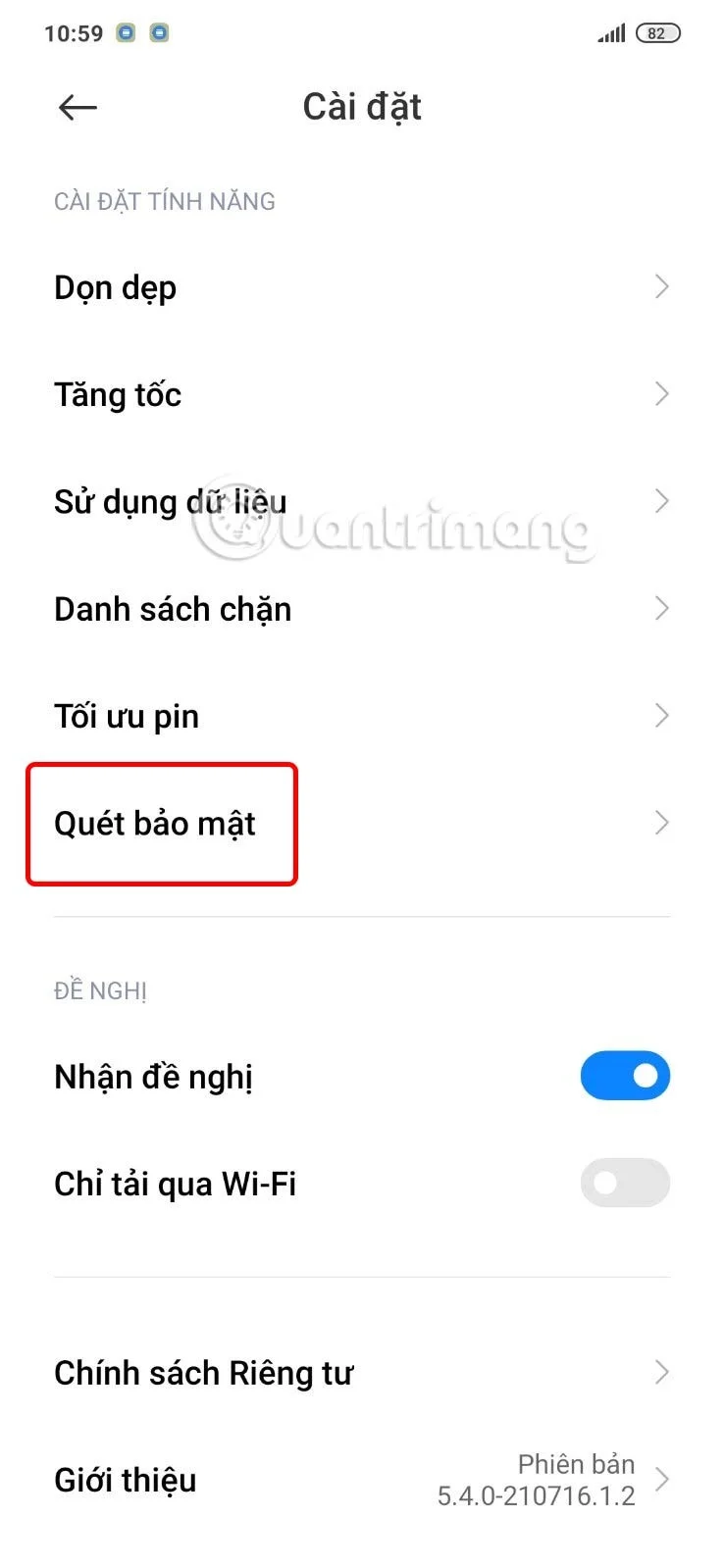
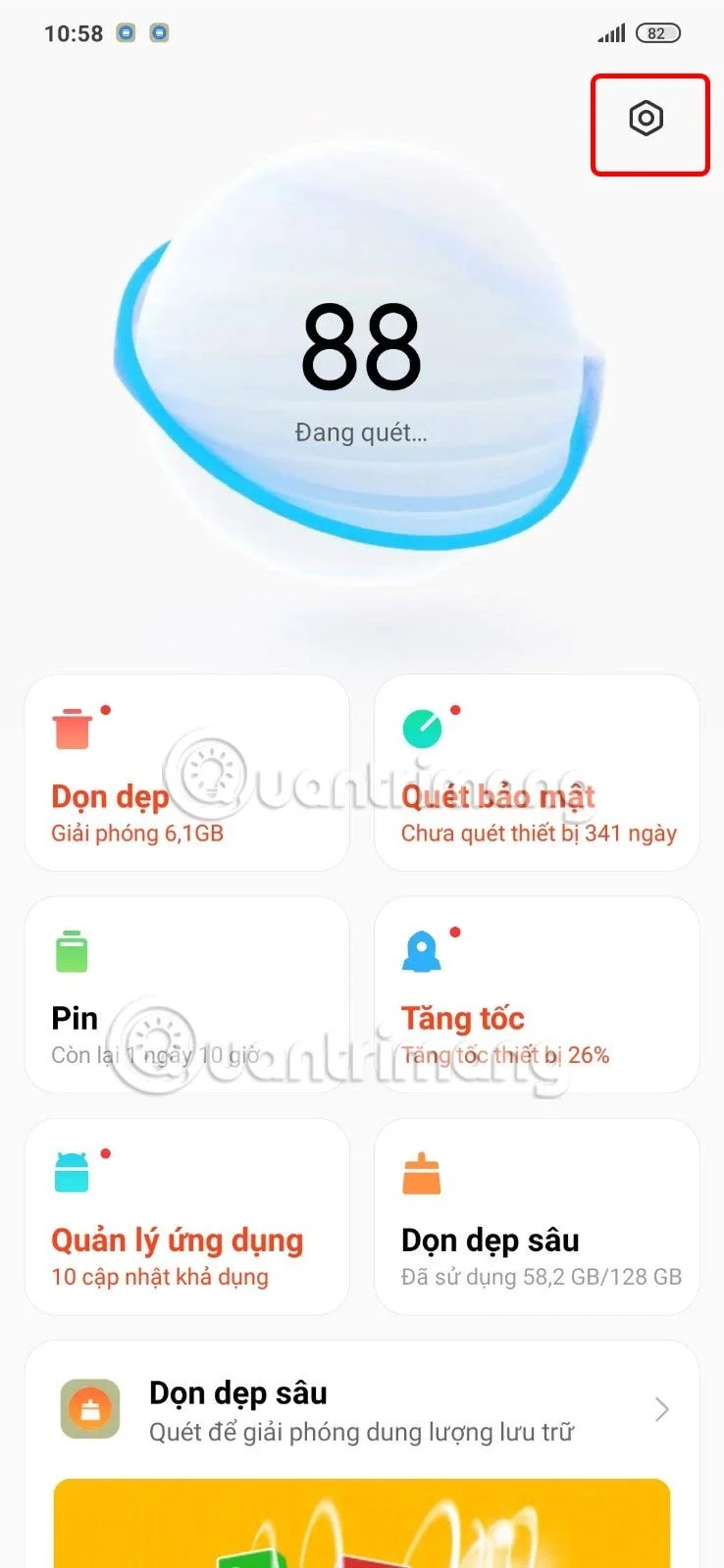
First, we open the Security application on the Xiaomi phone. Then in the application interface, the user clicks on the gear icon to access the Security application settings.
How to turn off Xiaomi security scan when installing apps

Step 2:

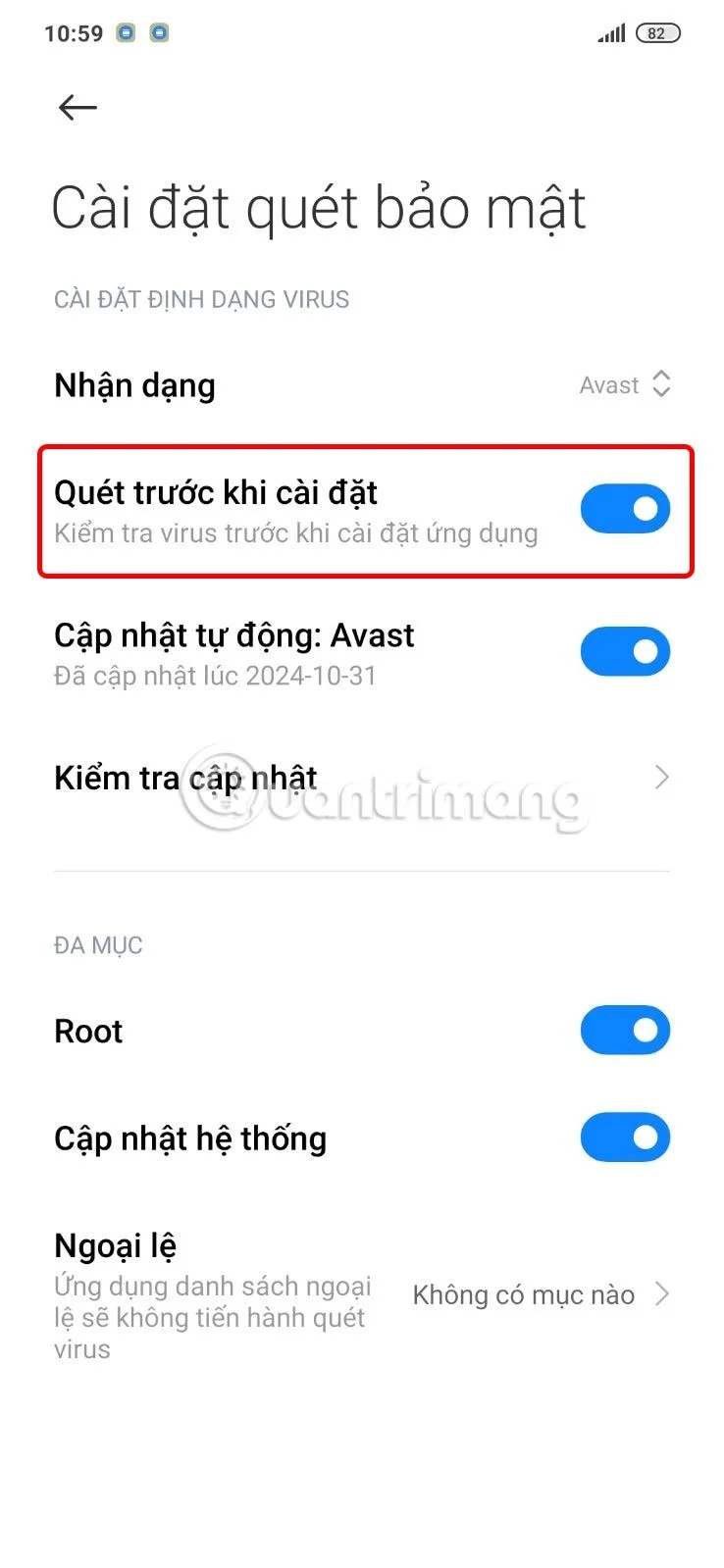
Switch to the settings interface for the Security application, click on the Security Scan section to adjust the security scan feature on Xiaomi phones when installing the application. At this time, you will see the default Scan before installation feature enabled on the phone to perform when you download and install the application on the device.

How to turn off Xiaomi security scan when installing apps

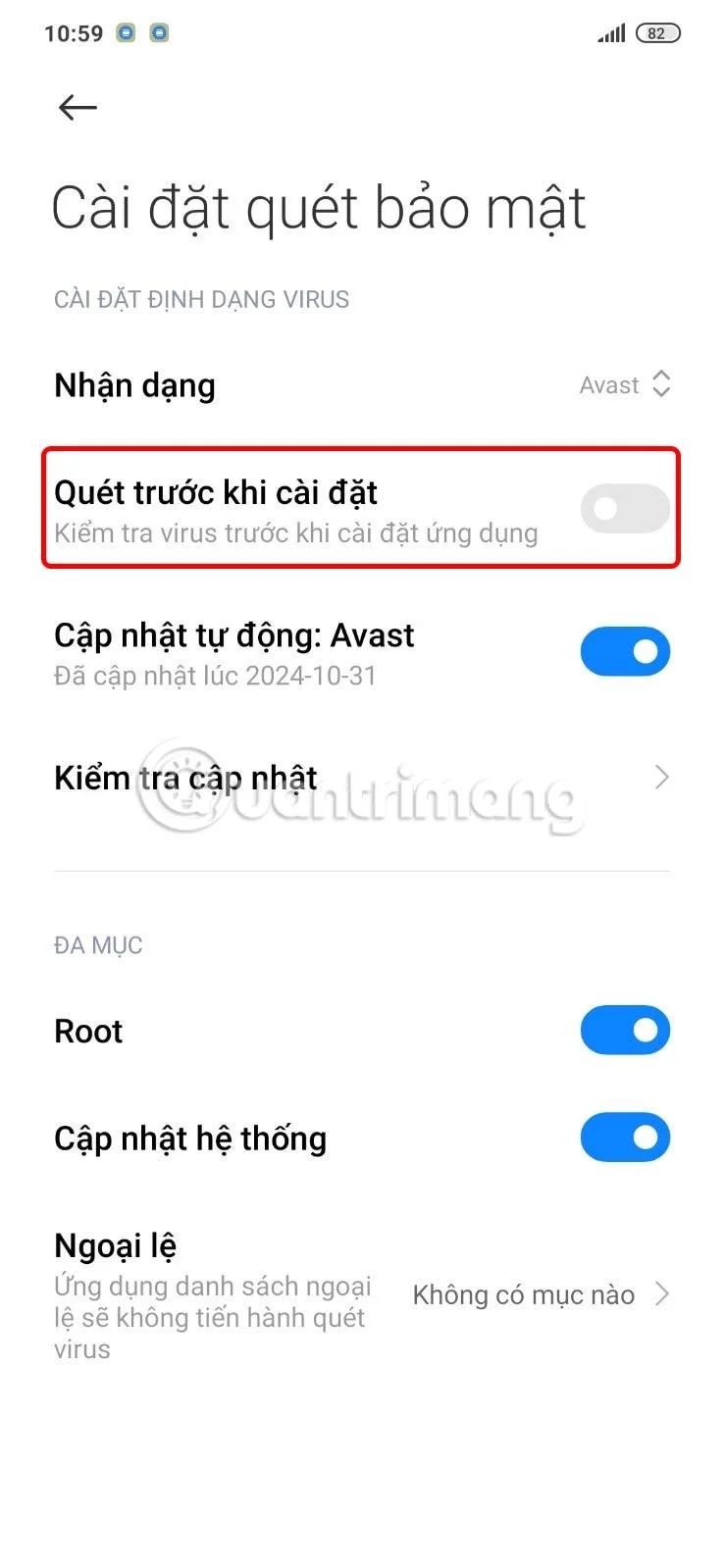
To disable Xiaomi security scanning when installing apps, simply turn off Scan before installation .
How to turn off Xiaomi security scan when installing apps

Leave a Comment

How to Check Microsoft Teams Version History and Build Number

How to Check Microsoft Teams Version History and Build Number

Discover simple steps to check your Microsoft Teams version history and build number on desktop, web, and mobile. Stay updated with the latest features and fixes effortlessly. Perfect for IT pros and everyday users.

How to Fix Microsoft Teams Uninstall Error Stuck

How to Fix Microsoft Teams Uninstall Error Stuck

Tired of Microsoft Teams "Uninstall Error" Stuck? Discover proven, step-by-step fixes to completely remove Teams from your PC. Works on latest Windows versions – no tech skills needed!

Troubleshooting Microsoft Teams Where is My Team? Error

Troubleshooting Microsoft Teams Where is My Team? Error

Facing the frustrating Microsoft Teams "Where is My Team?" error? Discover step-by-step troubleshooting tips, common causes, and quick fixes to resolve it instantly and resume seamless collaboration. Updated with the latest solutions.

How to Fix Microsoft Teams VDI Error on Virtual Machines

How to Fix Microsoft Teams VDI Error on Virtual Machines

Tired of Microsoft Teams VDI errors crashing your virtual machine calls? Get step-by-step fixes for audio glitches, video freezes, and optimization issues on Citrix, VMware, or RDP setups. Boost productivity now!

How to Fix Microsoft Teams Error AADSTS70011

How to Fix Microsoft Teams Error AADSTS70011

Struggling with Microsoft Teams Error AADSTS70011? Discover step-by-step fixes for invalid scope errors, clear cache tips, and quick authentication resets to get back to seamless collaboration in minutes. Updated with latest Teams patches.

Troubleshooting Microsoft Teams Unknown Error: Something Went Wrong

Troubleshooting Microsoft Teams Unknown Error: Something Went Wrong

Stuck with Microsoft Teams unknown error "Something Went Wrong"? Discover quick, effective troubleshooting steps to resolve it instantly. Updated with the latest fixes for seamless collaboration.

Troubleshooting Microsoft Teams Download for PC Not Working

Troubleshooting Microsoft Teams Download for PC Not Working

Is Microsoft Teams download not working on your PC? Discover proven fixes for installation errors, slow downloads, and crashes. Get Teams running smoothly in minutes with our step-by-step guide.

Solving Microsoft Teams Wiki Tab Missing Error

Solving Microsoft Teams Wiki Tab Missing Error

Tired of the frustrating Microsoft Teams Wiki Tab Missing error? Follow our proven, step-by-step guide to restore your Wiki tab instantly and boost team collaboration without hassle.

How to Fix Microsoft Teams Chat Message Failed to Send

How to Fix Microsoft Teams Chat Message Failed to Send

Tired of Microsoft Teams chat messages failing to send? Follow our expert, step-by-step guide to fix the "Failed to Send" error quickly and get back to productive chats without frustration. Proven solutions for all users.

Solving Microsoft Teams How Update Error 2026

Solving Microsoft Teams How Update Error 2026

Tired of Microsoft Teams "How Update" Error 2026 blocking your updates? Follow our proven, step-by-step solutions to resolve it fast and restore smooth teamwork. Works for latest Teams versions!

How to Use Microsoft Teams for Business: A Complete Guide

How to Use Microsoft Teams for Business: A Complete Guide

Discover how to use Microsoft Teams for business with this complete guide. Learn setup, meetings, collaboration, and pro tips to supercharge your workflow and team efficiency.

How to Record a Microsoft Teams Meeting: Step-by-Step

How to Record a Microsoft Teams Meeting: Step-by-Step

Master how to record a Microsoft Teams meeting with this simple step-by-step guide. Capture every detail effortlessly—perfect for work, training, or reviews. Updated for the latest features.

Troubleshooting Microsoft Teams OneDrive Error Syncing

Troubleshooting Microsoft Teams OneDrive Error Syncing

Struggling with Microsoft Teams 'OneDrive Error' syncing issues? Discover proven, step-by-step troubleshooting tips to resolve OneDrive sync errors in Teams quickly and restore seamless collaboration. Updated with the latest fixes.

Solving Microsoft Teams Password Error Recovery

Solving Microsoft Teams Password Error Recovery

Tired of Microsoft Teams password error blocking your work? Master solving Microsoft Teams "Password Error" recovery with proven, step-by-step fixes. Regain access fast and frustration-free!

Troubleshooting Microsoft Teams Installation Errors on Windows 11

Troubleshooting Microsoft Teams Installation Errors on Windows 11

Struggling with Microsoft Teams installation errors on Windows 11? Get step-by-step fixes for common issues like 0x80070005, 80070422, and more. Quick, effective troubleshooting to get you back to collaborating seamlessly.









