
Pop Culture Costume Ideas That Will Dominate Halloween 2026

Plan a recognizable Halloween 2026 look with pop culture costumes inspired by Spider-Man, Supergirl, Toy Story 5, Moana, Mario, and Wednesday.
At I/O 2024, Google announced a number of new AI models, upcoming projects, and a plethora of AI features that will be available across its products. But the one that stands out is the Gemini 1.5 Flash model. It’s an impressively fast and efficient model that offers multi-modal capabilities and a contextual duration of up to 1 million tokens (2 million via a waiting list).
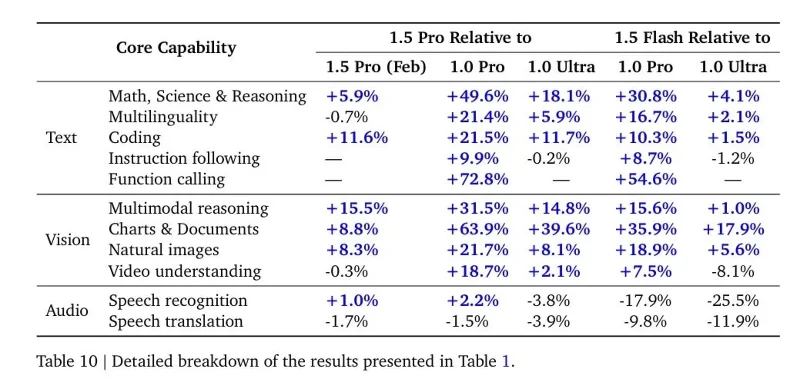
Despite the Gemini 1.5 Flash's small size — Google hasn't revealed its specs — it scores high across all modalities — text, image, and audio. In its Gemini 1.5 technical report, Google reveals that the Gemini 1.5 Flash outperforms larger models like the 1.0 Ultra and 1.0 Pro in many ways. It only lags behind the larger models in speech recognition and translation.
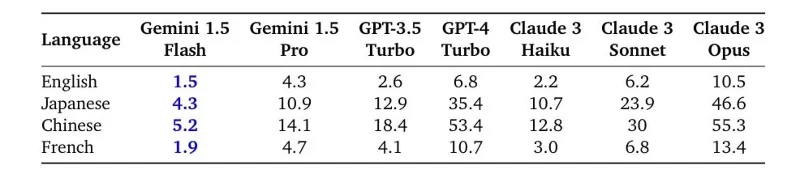
Unlike the Gemini 1.5 Pro, which is a MoE (Mixture of Experts) model, the Gemini 1.5 Flash is a dense model, distilled online from the larger 1.5 Pro model to improve quality. In terms of speed, the Flash model outperforms all existing smaller models, including Claude 3 Haiku, which runs on Google's custom TPU.
And it's incredibly low priced. The Gemini 1.5 Flash costs $0.35 for input and $0.53 for output to handle 128K tokens, $0.70 and $1.05 for 1 million tokens. That's much cheaper than the Llama 3 70B, Mistral Medium, GPT-3.5 Turbo, and of course the larger models.
If you are a developer and need multimodal inference with a larger context window at a low cost, you should definitely check out the Flash model. Here's how you can try Gemini 1.5 Flash for free.
How to use Flash Gemini 1.5 for free
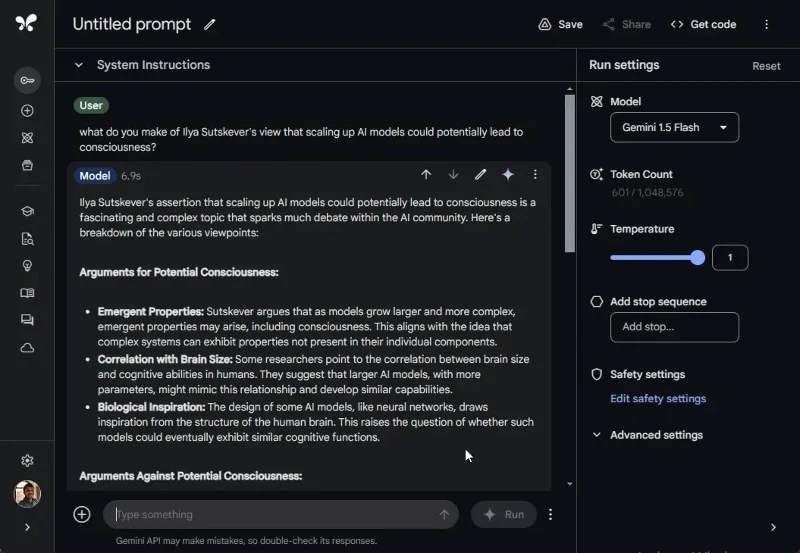
1. Go to aistudio.google.com and sign in with your Google account. There is no waitlist to use the Flash model.
2. Next, select the “Gemini 1.5 Flash” model from the drop-down menu.
3. Now you can start chatting with Flash model. You can also upload images, videos, audio clips, files and folders.
First Impressions of Gemini 1.5 Flash
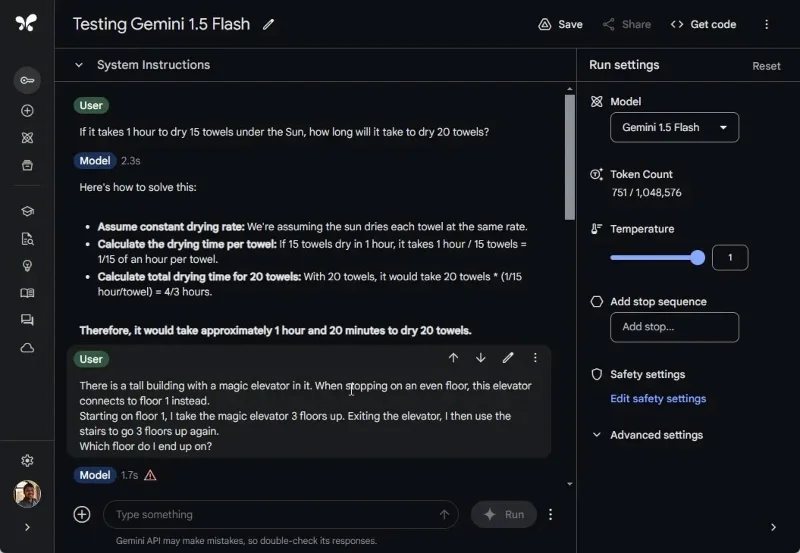
While the Gemini 1.5 Flash is not a state-of-the-art model, its advantages are blazing speed, efficiency, and low cost. It ranks below the Gemini 1.5 Pro in terms of capabilities and other larger models from OpenAI and Anthropic. However, the author has tried some of the reasoning suggestions used to compare ChatGPT 4o and Gemini 1.5 Pro .
It can only generate one correct answer out of 5 questions. It may not be very smart in terms of general reasoning, but for other applications that require multimodal capabilities and a large context window, it may suit your use case. Additionally, the Gemini model is good at creative tasks that can bring value to developers and users.
Simply put, there is no AI model that is fast, efficient, multimodal, has a large contextual window with near-perfect performance. On top of that, it is extremely cheap.
What do you think about Google's latest Flash model? Share your thoughts in the comments section below!
Plan a recognizable Halloween 2026 look with pop culture costumes inspired by Spider-Man, Supergirl, Toy Story 5, Moana, Mario, and Wednesday.
Sort leftover Halloween candy safely, share or repurpose sealed treats, and choose food use or compost for pumpkins based on their condition.
Compare workplace Halloween costume choices by respect, dress code, mobility, and safety—and learn when a subtle accessory or a policy check is the better option.
Find a couples costume that fits your style, budget, and comfort level, from Addams Family classics to original inside-joke duos.
Need a last-minute high school Halloween costume? Compare 10 easy closet-based ideas by prep time, comfort, school-day practicality, and simple safety checks.
Use a simple 2026 Halloween decorating timeline for indoor décor, outdoor displays, and fresh pumpkins, with practical adjustments for weather and events.
Mix five vivid, approachable Halloween cocktails with measured recipes, simple prep tips, and an alcohol-free option for your party guests.
Find 15 office-friendly Halloween costume ideas for 2026, with practical checks for dress codes, respectful themes, comfort, and workplace safety.
Plan a fun elementary school Halloween party with easy crafts, games, inclusive treats, costume tips, and a sample 75-minute classroom schedule.
Compare realistic side hustles for 2026 by startup cost, fees, flexibility, and income control, with current tax and scam guidance from official sources.








