You want to wake up the phone screen quickly without having to press the power button or another hard key but still do not know what to do? Let me follow this article to know how to wake up the screen quickly.
1. The benefits of quick screen wake-up:
- Helps users to conveniently open the screen brighter without having to use hard keys.
- Helps limit the life of the hard button is reduced and the operation is faster.
2. Instructions on how to wake up the screen quickly
Quick start Guide:
Go to Settings -> Smart Features -> Motions and gestures -> Select Lift to wake up
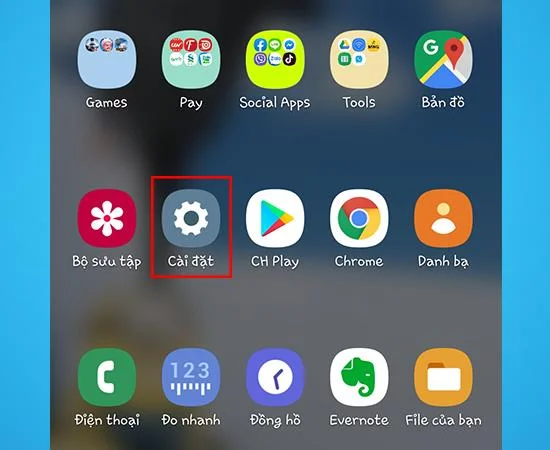
Step 1: You go to Settings from the Application Menu.
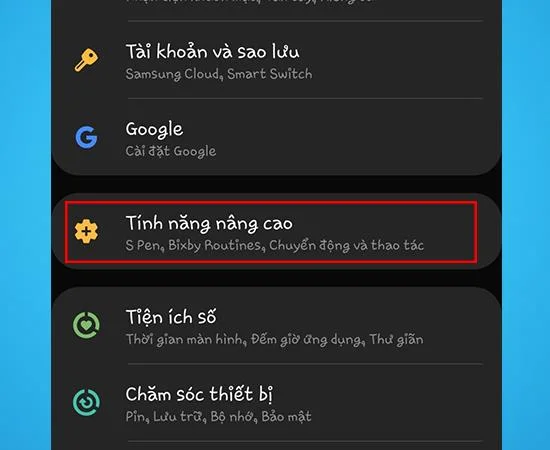
Step 2: Once in Settings, choose Advanced Features.
![How to wake up the screen quickly on Samsung Note 10 Plus]()
Step 3: Next you choose Motion and manipulation.
![How to wake up the screen quickly on Samsung Note 10 Plus]()
Step 4: Finally, you choose Lift up to wake up or Double-tap to wake up. You can also turn on these 2 features at the same time to have more options to wake up the screen.
![How to wake up the screen quickly on Samsung Note 10 Plus]()
Now that the setup process is completed, I wish you success!
Maybe you are interested:
- Guide to double-touch screen opening on Samsung
- 5 steps to delete Google account on Samsung Galaxy Note 10 Plus
- 5 steps to install fingerprint security on Samsung Galaxy Note 10 Plus