Hydrogen train runs 2,800km on just one tank of fuel

The Flirt H2 hydrogen train, built by Swiss company Stadler Rail, has traveled 2,800km on just one tank of hydrogen, breaking the distance record in a test conducted in Colorado, USA.

The vehicle is designed to operate on rail networks that countries currently use for diesel-fuelled trains and was initially designed to travel 460km and reach a top speed of 127km/h on just a tank of hydrogen.
Hydrogen train runs 2,800km on just one tank of fuel
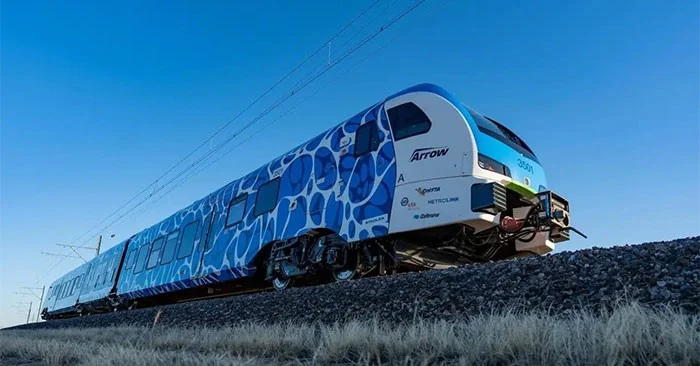
This train uses only one hydrogen fuel tank and can travel up to 2,800km. (Photo: Stadler).

The Flirt H2 is designed with two passenger cars, using electric motors, equipped with a battery pack in the middle and devices that convert hydrogen into electricity through a chemical reaction with oxygen in the air. It will be first introduced in 2022.

In a recent test in Pueblo, Colorado (USA), Flirt H2 operated continuously for 46 hours and used up its hydrogen tank after traveling a distance of up to 2,803km, setting a new record for "the longest distance a hydrogen-powered passenger train has traveled without refueling or recharging on the planet". Previously, the record belonged to an Alstom-designed train that traveled a distance of 1,175km, breaking the record in September 2022.

With this result, it is hoped that the green transport industry, one of the top areas of concern, will soon help humanity achieve the goal of carbon neutrality by 2050 as committed.

Leave a Comment

How to Join a Microsoft Teams Meeting by ID and Passcode

How to Join a Microsoft Teams Meeting by ID and Passcode

Master how to join a Microsoft Teams meeting by ID and passcode effortlessly on desktop, mobile, or web. Step-by-step instructions with screenshots for quick access – no invite required!

How to Fix Microsoft Teams Error Q QSP

How to Fix Microsoft Teams Error Q QSP

Struggling with Microsoft Teams "Error Q" QSP? Discover step-by-step fixes for smooth calling, meetings, and chats. Clear cache, update app, and more—no tech skills needed!

How to Fix Microsoft Teams Uninstall Error: Access Denied

How to Fix Microsoft Teams Uninstall Error: Access Denied

Struggling with Microsoft Teams Uninstall Error: Access Denied? Discover proven, step-by-step solutions to completely uninstall Teams effortlessly. Quick fixes for Windows users—no tech skills required!

How to Fix Microsoft Teams Error Reporting Loop (2026 Fix)

How to Fix Microsoft Teams Error Reporting Loop (2026 Fix)

Stuck in the endless Microsoft Teams "Error Reporting" Loop? Discover the proven 2026 fix with step-by-step solutions to restore seamless collaboration. Clear cache, reset, reinstall—get back to work fast!

How to Fix Microsoft Teams Call Failed Error in 2026

How to Fix Microsoft Teams Call Failed Error in 2026

Struggling with Microsoft Teams "Call Failed" error in 2026? Discover quick, proven fixes to get your calls working smoothly. Step-by-step guide with latest troubleshooting tips for seamless video and audio.

How to Fix Microsoft Teams Copilot Error AI Not Responding

How to Fix Microsoft Teams Copilot Error AI Not Responding

Struggling with Microsoft Teams Copilot Error where AI stops responding? Discover step-by-step fixes for Microsoft Teams "Copilot Error" AI Not Responding, from quick restarts to advanced troubleshooting. Get back to productivity fast!

Solving Microsoft Teams Password Error: Incorrect Credentials

Solving Microsoft Teams Password Error: Incorrect Credentials

Stuck with Microsoft Teams password error "Incorrect Credentials"? Discover quick, proven fixes to get back online fast. Step-by-step guide with latest solutions for seamless login. Solve it now!

How to Fix Microsoft Teams Y Error Configuration

How to Fix Microsoft Teams Y Error Configuration

Struggling with Microsoft Teams "Y Error" configuration issues? Discover proven, up-to-date fixes to resolve the error quickly and restore seamless teamwork. Step-by-step guide inside!

Troubleshooting Microsoft Teams Error Screenshot Not Saving

Troubleshooting Microsoft Teams Error Screenshot Not Saving

Struggling with Microsoft Teams "Error Screenshot" not saving? Discover quick, effective troubleshooting steps to resolve this frustrating issue and restore smooth functionality in your daily workflows.

How to Download Microsoft Teams Chat History and Transcripts

How to Download Microsoft Teams Chat History and Transcripts

Master how to download Microsoft Teams chat history and transcripts effortlessly. Step-by-step guide with proven methods for chats, meetings, and admin exports—no tech skills needed!

Solving Microsoft Teams Ringtone Not Working Error

Solving Microsoft Teams Ringtone Not Working Error

Tired of silent Microsoft Teams ringtone not working? Follow our expert, step-by-step guide with quick fixes and advanced troubleshooting to get notifications ringing again. No tech skills needed!

Troubleshooting Microsoft Teams Login Error on Chromebook

Troubleshooting Microsoft Teams Login Error on Chromebook

Stuck with Microsoft Teams login error on Chromebook? Our ultimate troubleshooting guide delivers quick, reliable fixes for cache issues, updates, and more. Resolve it in minutes and stay connected!

Solving Microsoft Teams Desktop Error Startup Crash

Solving Microsoft Teams Desktop Error Startup Crash

Tired of Microsoft Teams Desktop Error crashing on startup? Follow our proven, step-by-step fixes to resolve Teams startup crash instantly. Works on latest versions!

Why Cant I See Breakout Rooms in My Teams Meeting?

Why Cant I See Breakout Rooms in My Teams Meeting?

Frustrated because Breakout Rooms are missing in your Teams meeting? Uncover the top reasons why you can't see Breakout Rooms in Teams and follow our step-by-step fixes to get them working smoothly in minutes. Perfect for organizers and participants alike!

Solving Microsoft Teams Cho Mac Error (Mac OS)

Solving Microsoft Teams Cho Mac Error (Mac OS)

Tired of the frustrating Microsoft Teams "Cho Mac" error crashing your Mac OS workflow? Follow our proven, step-by-step fixes to solve Microsoft Teams "Cho Mac" Error (Mac OS) quickly and restore seamless team collaboration. Updated with latest patches.









