You are bored by the default message ringtone on Samsung Galaxy S8 and want to change to a new one. Then this article I will guide you on how to change message ringtones on Samsung Galaxy S8 simply!
1. Benefits of changing message ringtones on Samsung Galaxy S8
- Help you and your listeners feel not bored when using.
- Create a new feeling every time you receive a message.
2. Guide to change message ringtones on Samsung Galaxy S8
Quick guide: Messages> 3-dot icon> Settings> Alarms> Select the ringtone you want to change.
- Step 1: Select Message
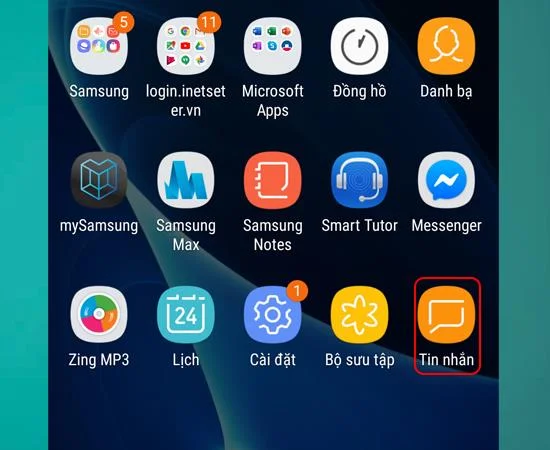
First, at the main screen of your phone, select Messages .
- Step 2: Select Settings for messages
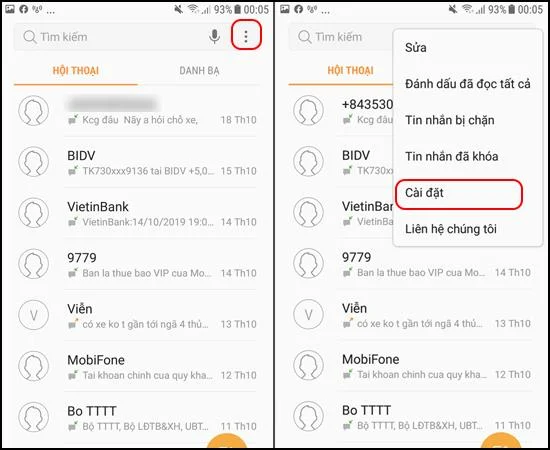
Next you select the 3-dot icon at the top of the screen, then select Settings as shown below.
![Instructions on how to change message ringtones on Samsung Galaxy S8]()
- Step 3: Select Notifications
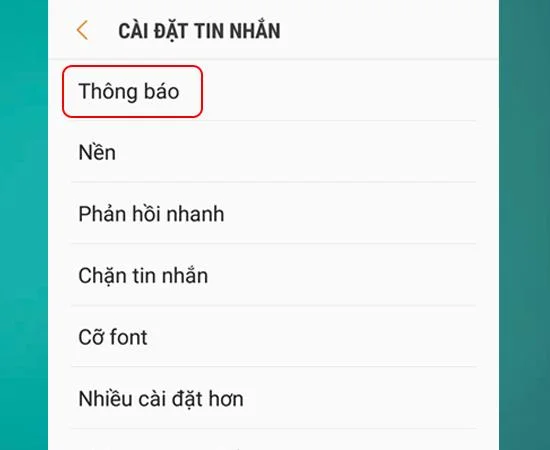
Here you choose Notifications to continue.
![Instructions on how to change message ringtones on Samsung Galaxy S8]()
- Step 4: Select Ringtone you want to change
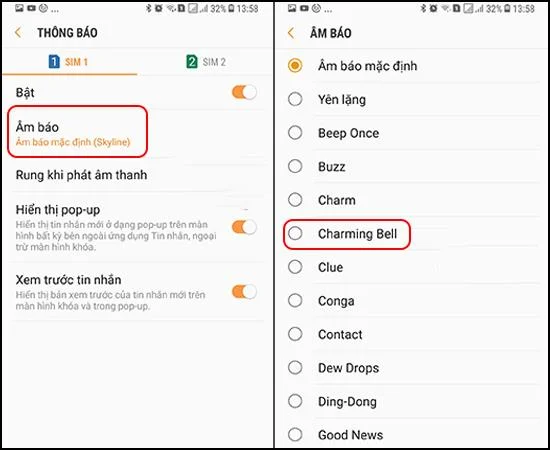
Finally, select the SIM alert you want to set, then choose the ringtone you want to change .
![Instructions on how to change message ringtones on Samsung Galaxy S8]()
So with just a few simple steps you can change the message ringtone on Samsung Galaxy S8 already. Hope this article helps you.
Good luck.
Maybe you are interested:
>>> Instructions to activate the Samsung warranty
>>> 5 steps to enable virtual home button on Samsung Galaxy J3 Pro extremely fast
>>> 5 steps to split the screen on Samsung A5 (2017) most effectively