Samsung is a famous technology company in the world. And in the SSD segment, Samsung is a symbol of quality as well as expensive price. Therefore, the warranty as well as viewing information of this hard drive is essential. This article will guide you how to check warranty genuine Samsung SSD.
Seagate spent $ 1.4 billion to buy Samsung 's hard drive business. So the Samsung SSD testwill have to go through the Seagate test page.
And here is the guide to check genuine Samsung SSD warranty .
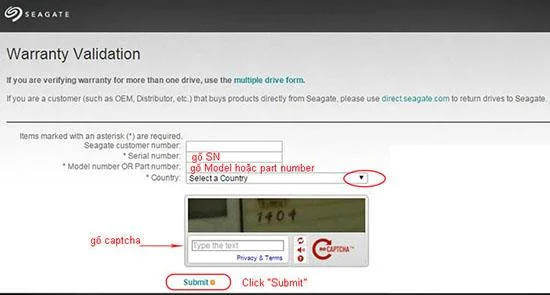
1. Step 1: Visit Seagate's warranty website
You access here
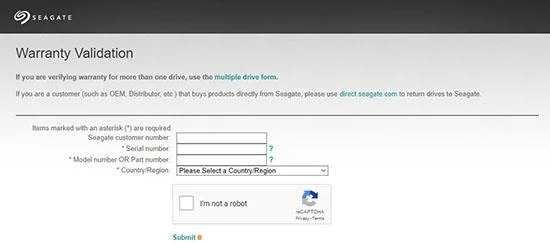
![Instructions on how to check warranty genuine Samsung SSD hard drive]()
(Just follow the instructions in the picture)
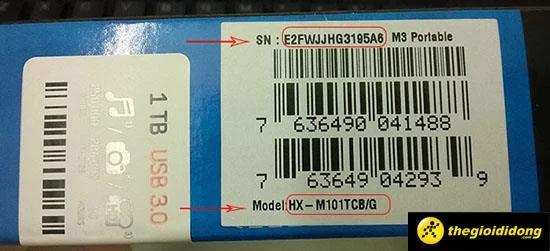
2. Step 2: Type in Serial Number and Model number to check warranty period
The product always has the Serial Number and Model number on the body so you just need to read and fill in the correct boxes.
![Instructions on how to check warranty genuine Samsung SSD hard drive]()
After you have filled in all the information, you just need to Submit is the homepage that gives you the warranty status of the SSD.
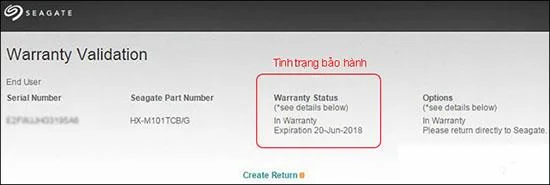
3. Step 3: Read the results and check the warranty period
After performing the second step, you just need to read the results and check the warranty period of your SSD. If you have any problems, you can bring the SSD to Samsung warranty centers in Vietnam.
![Instructions on how to check warranty genuine Samsung SSD hard drive]()
4. Samsung hard drive service center
1. Ho Chi Minh City: Seacare Center - 028 3914 326731
Ho Hao Hon, Co Giang Ward, District 1
Monday - Friday from 8.30AM - 5PM
2. Hanoi: Seacare Center - 04 3747 6470111
Nguyen Chi Thanh, Lang Ha Ward, Dong Da District
Monday - Friday from 8.30AM - 5PM
Hope this article is useful to you and helps check the warranty information for your Samsung hard drive.
Maybe you are interested:
>>> What is SSD hard drive? Types of SSD hard drives in laptops
>>> Format the SSD hard drive right on Windows is very simple
>>> Should I buy old SSDs? Notes on buying old SSDs