Instructions to restore ZingPlay Billionaire Flag from iCloud on iPhone/iPad

ZingPlay billionaire chess is a very familiar game from our childhood, in this game players just need to roll the dice to determine the destination and will help them travel to famous landmarks. , compete with others. However, now, after accidentally deleting or upgrading iOS, many people can't find this game on the App Store app store .

To fix this problem, today WebTech360 will introduce to everyone the simple steps to restore ZingPlay Billionaire Flag from iCloud on iPhone/iPad . We invite you to follow the following article.


Instructions to restore ZingPlay Billionaire Flag from iCloud on iPhone/iPad

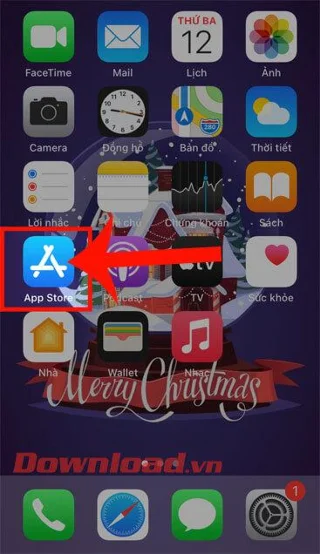
Step 1: To restore this game on iPhone / iPad, we will first open the App Store application on our phone.

Step 2: At the main interface of the application store, click on the account icon in the upper right corner of yourself.
Instructions to restore ZingPlay Billionaire Flag from iCloud on iPhone/iPad Instructions to restore ZingPlay Billionaire Flag from iCloud on iPhone/iPad

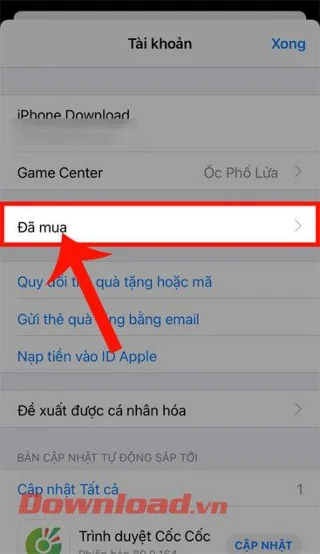
Step 3: In the iCloud account information section now, click on Purchased item .

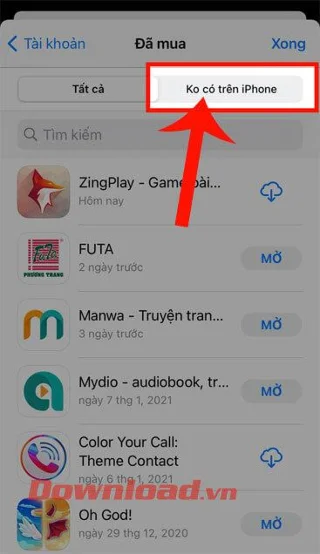
Step 4: Now all the applications that we have downloaded will be displayed on the screen, to restore the Billionaire Chess game, please touch the item Not on iPhone (Not On This Device).

Instructions to restore ZingPlay Billionaire Flag from iCloud on iPhone/iPad Instructions to restore ZingPlay Billionaire Flag from iCloud on iPhone/iPad

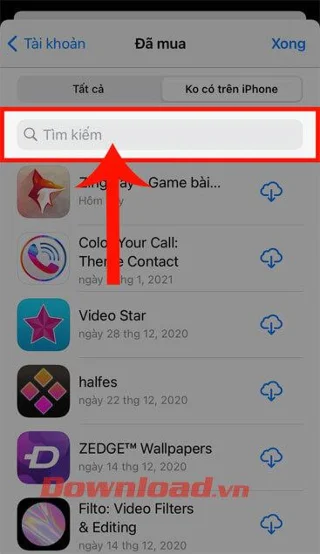
Step 5: Next, click on the search box and type the keyword " ZingPlay Billionaire Flag ".

Step 6: Finally, to restore this game, click on the iCloud cloud icon on the right side of the screen, then wait a moment to reinstall this game on your phone.

Instructions to restore ZingPlay Billionaire Flag from iCloud on iPhone/iPad Instructions to restore ZingPlay Billionaire Flag from iCloud on iPhone/iPad

Wishing you success!

Leave a Comment

How to Steam Sweet Potatoes

How to Steam Sweet Potatoes

How to steam sweet potatoes delivers tender results in 15-20 minutes while keeping nutrients intact. Follow this simple method using a steamer basket or microwave for perfect texture every time.

Fun Free Games on Steam

Fun Free Games on Steam

Discover fun free games on Steam with this practical guide. Learn how to browse, filter, and install the best free-to-play titles quickly and safely.

Free Funny Games on Steam

Free Funny Games on Steam

Find the best free funny games on Steam with this guide to discovering and installing comedic free-to-play titles that deliver laughs without any cost.

How to Steam Carrots

How to Steam Carrots

Learn how to steam carrots for tender results that retain maximum nutrients and flavor. This guide shows the complete process from prep to serving in under 15 minutes.

How to Steam a Tamale

How to Steam a Tamale

Master how to steam a tamale for perfectly moist results every time. Follow this detailed guide to prepare your steamer, time the cook, and check doneness without drying out the masa.

Free Game on Steam Multiplayer

Free Game on Steam Multiplayer

Discover how to find and install a Free Game on Steam Multiplayer in minutes. Access popular free-to-play titles with active communities and zero cost.

Why Are Your Steam Downloads so Slow

Why Are Your Steam Downloads so Slow

Why Are Your Steam Downloads so Slow? Learn the most frequent causes and exact fixes that reliably boost your Steam download speeds in minutes.

How to Steam Dumplings Without a Steamer

How to Steam Dumplings Without a Steamer

Learn how to steam dumplings without a steamer using a wok and plate setup. Achieve tender, juicy results in minutes with this simple kitchen method.

Free to Play Games on Steam

Free to Play Games on Steam

Explore top free to play games on Steam and learn exactly how to browse, install, and start playing without spending money. Get started with our practical guide.

Steam Game Will Not Launch

Steam Game Will Not Launch

Fix Steam game will not launch issues with these targeted troubleshooting steps. Get your games running again without reinstalling or losing progress.