Pop Culture Costume Ideas That Will Dominate Halloween 2026

Plan a recognizable Halloween 2026 look with pop culture costumes inspired by Spider-Man, Supergirl, Toy Story 5, Moana, Mario, and Wednesday.
Intel’s Lunar Lake processors have stirred excitement with promises of great performance and efficiency for thin and light laptops. However, there’s one limitation that many users are unhappy about: These laptops only come with a maximum of 32GB of RAM. Let’s find out why this limitation exists in the following article!
Why are Intel's Lunar Lake laptops limited to 32GB of memory?
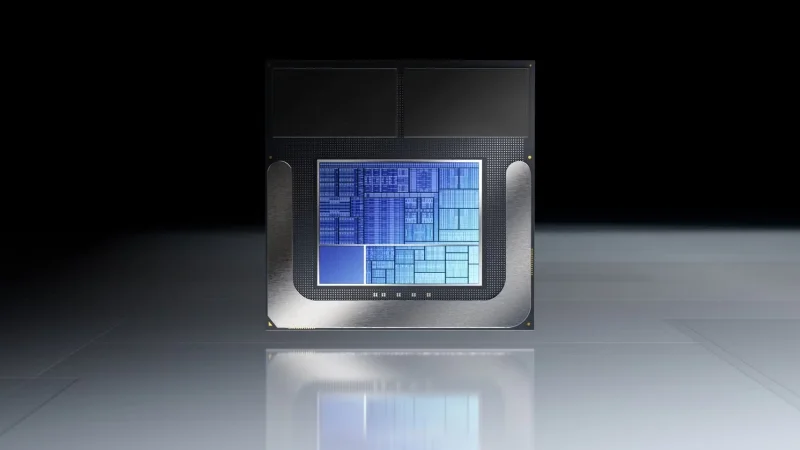
The 32GB RAM limit on Lunar Lake laptops is directly related to Intel’s design choices. Instead of traditional upgradeable memory slots, Intel embedded RAM directly into the System on a Chip (SoC) . Integrating RAM into the SoC reduces processor power consumption and reduces processor temperature. While this makes LPDDR5X memory faster and even more efficient than traditional designs, it also physically limits the maximum amount of RAM they can embed into the SoC.
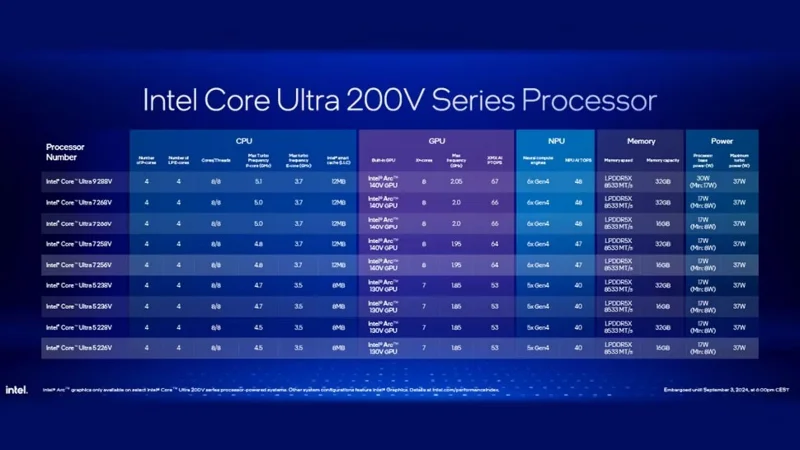
Intel claims that Lunar Lake offers up to 20 hours of battery life thanks to these optimizations. However, this move does not provide flexibility for users who may need more than 32GB in the future. Furthermore, there are other limitations to using SoC embedded memory in an x86 processor. These include:
Additionally, Lunar Lake processors have hyper-threading disabled, further limiting the overall capacity of the processor.
Why is 32GB RAM a big limitation?
Many people are interested in purchasing these new and upcoming AI CPUs to future-proof their setups. However, Intel’s upcoming Lunar Lake CPUs are not upgradeable and don’t offer options for memory configurations higher than 32GB. While 32GB is perfectly acceptable by current standards, if you’re someone who runs a lot of virtual machines and enjoys trying out quantum LLM on your laptop, it’s hard to see a Lunar Lake laptop as something you’d buy and feel confident that you won’t have to upgrade in the next few years.
What makes this a big limitation is that Intel doesn't have to follow something like Apple's Unified Memory architecture. Switching to TSMC's N3B process node, disabling hyperthreading on both Intel's P and E cores, integrating a new GPU and NPU, and being more power efficient would be enough to deliver significant improvements in power efficiency without compromising RAM capacity.
Laptop users who invest in high-end devices want them to last for years. With software development trends pushing for resource-intensive applications, having more RAM options ensures that your machine can handle future software updates and continue to perform optimally. Limiting it to 32GB puts Lunar Lake laptops at a disadvantage compared to systems like AMD’s upcoming Strix Point processors, which can be expanded to 64GB or more.
Intel’s decision to limit Lunar Lake laptops to 32GB of RAM reflects its focus on making these machines more power efficient. For the average consumer or office worker, this may not be an issue. But for power users, developers, gamers, and content creators, this limitation is something many people can’t ignore.
Plan a recognizable Halloween 2026 look with pop culture costumes inspired by Spider-Man, Supergirl, Toy Story 5, Moana, Mario, and Wednesday.
Sort leftover Halloween candy safely, share or repurpose sealed treats, and choose food use or compost for pumpkins based on their condition.
Compare workplace Halloween costume choices by respect, dress code, mobility, and safety—and learn when a subtle accessory or a policy check is the better option.
Find a couples costume that fits your style, budget, and comfort level, from Addams Family classics to original inside-joke duos.
Need a last-minute high school Halloween costume? Compare 10 easy closet-based ideas by prep time, comfort, school-day practicality, and simple safety checks.
Use a simple 2026 Halloween decorating timeline for indoor décor, outdoor displays, and fresh pumpkins, with practical adjustments for weather and events.
Mix five vivid, approachable Halloween cocktails with measured recipes, simple prep tips, and an alcohol-free option for your party guests.
Find 15 office-friendly Halloween costume ideas for 2026, with practical checks for dress codes, respectful themes, comfort, and workplace safety.
Plan a fun elementary school Halloween party with easy crafts, games, inclusive treats, costume tips, and a sample 75-minute classroom schedule.
Compare realistic side hustles for 2026 by startup cost, fees, flexibility, and income control, with current tax and scam guidance from official sources.








