If you’ve played Roblox for long enough, you’ve probably encountered a problem you couldn’t solve. That’s when the support team can save the day. Their job is to help your game run better, smoother, and faster, and to make sure you have a good time playing Roblox.

In this article, we’ll show you how to send Roblox Support an email and get the best customer support possible.
Roblox Customer Support
There are a few ways to contact Roblox in order to resolve your issues. The first is to send an email to their customer service address. This is one of the most direct ways to address any problems you may experience while playing.
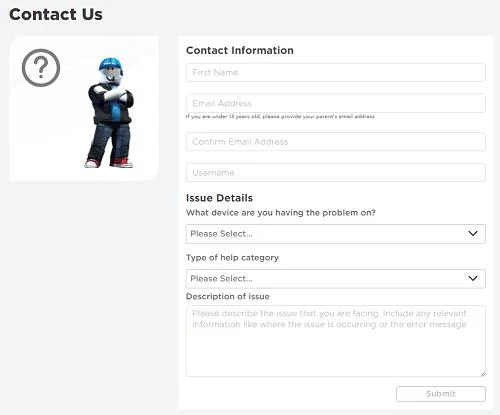
The second option is to go their support page. From there, you can submit a support ticket that will be reviewed and responded to promptly. The page has straightforward instructions on what you need to include in your ticket in order to resolve the issue.

If you’d prefer to talk to someone in person, you can call Roblox customer service at their 888-858-2569 phone number. This will allow you to check any issues you have off your list without having to wait for an email response.
Do note that you’ll never have to include your Roblox account password in any of the conversations you have with the Roblox Support Team. All you need to provide to identify yourself is your first name, username, and email address combination. Posting your password online could leave you vulnerable to hacking. And while the customer service will be able to help you with a hacked account, often it’s easier to prevent a problem rather than fix it.
Turning to the Community for Support
If you feel like you’re not getting the right kind of help from the support staff, you have the entire Roblox community to help you.
The Roblox Developer Forum is a great place to start if you have problems using a particular new update or feature. It’s run directly by the makers of the game, and you can easily search the forum for issues similar to your own. You can also contribute to solving the issue you have by providing any data or feedback about your problem.
The developer forum also has a helpful pinned page about how to send bug reports. This is a great place to start when you’re browsing the forum for the first time.
You can also turn to Roblox’s official Twitter account for help. This is an easy way to communicate with the developers, and you can also check their page for any status updates or downtimes you may be experiencing.
Although Roblox shut down their official community forums in 2017, you can turn to the unofficial forum for help. Although forums are something of an old concept, many still use them to communicate with other players. Plus it’s well-maintained and has its own dedicated Help section.
Another avenue of player community support is Rolox’s REDDIT page. This player-run website has a weekly thread devoted to player questions and support issues. You’ll always be able to find this thread at the very top of the page. You can also use Reddit to communicate with other players who might be experiencing the same issue, and those that have managed to solve it. Likewise, if you think you can solve someone else’s problem, this is a great place to start!

If you think you can solve your issue directly, you can also try looking up Roblox’s fandom page. This is a repository of information you can use to try and fix your problem without any help. Their pages are usually up-to-date, and you can contribute if you find there’s anything you can add.
Supported to Victory
Hopefully, this article has helped you contact Roblox and fix your issues. Roblox is a great game and it would be a shame to have that gameplay soured by some minor problems. If all else fails, you can use the Roblox community for any additional help and maybe even make some new friends along the way.
Have you ever needed to send Roblox support an email? What was your experience like? Let us know in the comments section below.