Desk Decorating Ideas for a Spooky Office Cubicle

Create a spooky office cubicle with Halloween desk decor ideas that keep your workspace usable, tidy, and mindful of workplace safety.
OpenAI recently released its next flagship model, GPT-4o, and showed off some exciting demos. Human-like voice chat has been a standout feature, but it does a lot more than that. OpenAI didn’t highlight the many cool things ChatGPT-4o can do. Let’s take a look at some of the exciting new capabilities of ChatGPT-4o!
Table of Contents
ChatGPT-4o is an AI-powered advancement that enhances efficiency and functionality across a variety of applications. As an “omni” model, it combines multiple modes, including text, audio, image, and video output to deliver real-time information.
Here, we will explore the core features of ChatGPT-4o. By understanding these features, you can appreciate the potential of this technological development to transform human-computer interaction.
GPT-4o is a significant advancement in AI technology because it offers multimodal capabilities. Unlike previous versions, ChatGPT-4o accepts a wide variety of inputs and can generate a multitude of outputs in real time.
This flexibility allows for more natural and intuitive interactions between humans and computers. Whether you are speaking, typing, displaying and presenting images, or playing videos, ChatGPT-4o can understand and respond appropriately.
This illustrates how ChatGPT-4o has become a versatile tool for many different applications.
One of the best things about the GPT-4o is its speed. It can process audio input in less than a quarter of a second, and its average response time is only about a third of a second.
ChatGPT-4o now responds as quickly as a human talking. It makes interactions smooth and enjoyable. This improvement is made possible by combining all input and output processing into a single neural network. Previous versions of chatbots were slow because they used multiple separate models.
GPT-4o is just as good as GPT-4 at handling English text and code. This makes it a useful tool for developers and content creators. But GPT-4o is even better at handling non-English text. This makes it a great tool for people who use other languages.
ChatGPT-4o makes it easier and more natural for people to interact with computers. It can understand and respond to text, audio, images, and videos. The response is fast and accurate, just like chatting with a real person. This is great for customer service, virtual assistants, and other interactive purposes.
The world is so connected today. Being able to talk to people in other languages is important. GPT-4o can do it! It is very good at understanding and responding to text in languages other than English.
This means businesses and companies can reach more people, no matter what language they speak. Whether it’s helping customers, creating content, or teaching, GPT-4o can help break down language barriers and make communication easier.
GPT-4o is a very useful tool. It can handle many different types of input and produce many different types of output. This makes it useful for many things, such as customer service, writing, healthcare, and education.
Businesses can use it to solve problems and improve their work. For example, it can be used to create interactive learning content, assist in medical diagnosis, or write engaging marketing content. GPT-4o is a very useful piece of AI.
ChatGPT-4o is a great tool for many applications across many different industries. Here are some ways GPT-4o can be used.
As the article explains, ChatGPT-4o can now handle text, audio, and even video. This means it’s great for tech support or customer service. It can troubleshoot problems, answer questions, and help people, all in a more natural way.
With its multimedia content creation capabilities, GPT-4o helps marketers and content creators be more creative. It can write text, create audio, and create images. So it is a great tool for creating blog posts, social media content, podcasts, and engaging videos. This means they can come up with more unique and interesting content strategies.
GPT-4o is a useful tool for teaching and learning. It uses text, audio, and video to create interactive learning experiences. It can be used as a virtual tutor, providing personalized help and support. It can also create engaging and interactive learning materials, helping learners understand complex ideas better.
GPT-4o helps developers write code, find and fix bugs, and write tutorials. It can generate code snippets, find and fix bugs, and write detailed tutorials. It also allows teams to work better together and write better code by providing real-time feedback.
GPT-4o is a powerful tool that helps businesses create personalized marketing campaigns. It can reach customers across different communication channels, delivering tailored messages and content. This helps businesses build stronger relationships with their audience and drive sales by delivering more relevant and engaging marketing materials.
GPT-4o helps improve media and entertainment by using AI to create multimedia content. This means that creators of things like video games, virtual reality, and digital art can use GPT-4o to make their projects more interesting and fun for the people who use them.
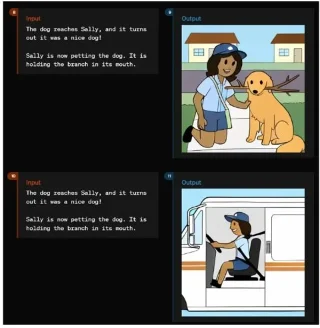
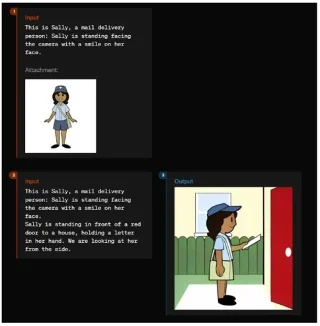
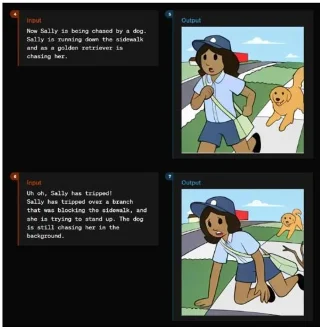
Diffusion models struggle to generate text on images. Dall-E 3 still fails to generate an image with the given text. However, the ChatGPT-4o model is an end-to-end multimodal model that can accurately render text. OpenAI did not mention this in its presentation. However, an example can be found on OpenAI's site where the company explores the capabilities of the model.
It can create and add text to images with ease. The consistency across multiple templates is remarkable. You can also attach images and ask them to generate images from different angles of the same character and ChatGPT-4o maintains consistency across all scenarios. It can also create 3D views of objects, which can be combined to create 3D renderings. Not to mention ChatGPT-4o can also generate fonts.
Note that these capabilities are not yet available on ChatGPT. It still uses Dall-E 3 for image generation. OpenAI may unlock these features in the near future.
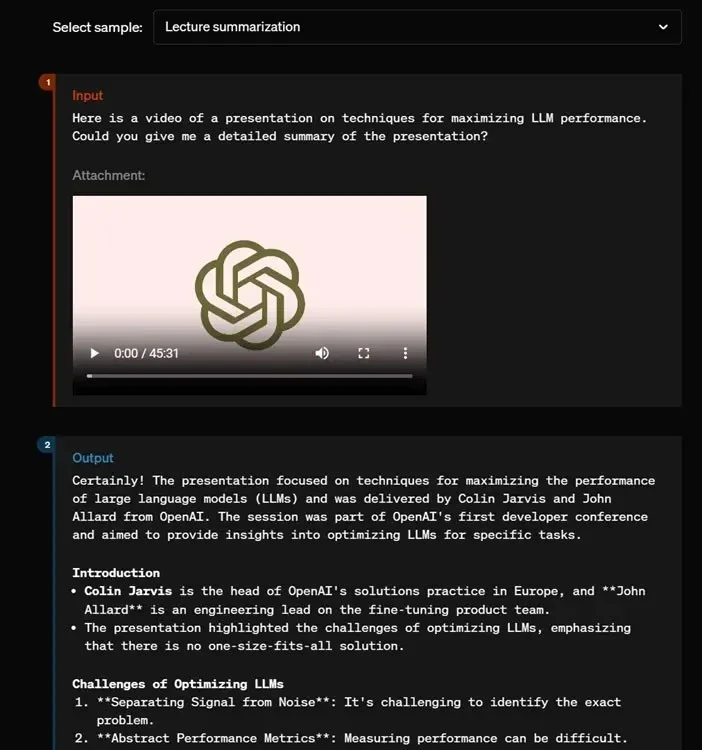
OpenAI doesn’t mention that GPT-4o can also process video. On the model page, OpenAI demonstrates that you can upload a video and ask GPT-4o to summarize it. From transcription to line-by-line summarization, ChatGPT-4o does it all. So it seems that the Gemini 1.5 Pro isn’t the only model that can process video.
During a presentation with Khan Academy's Sal Khan, OpenAI showed off a compelling demo using the GPT-4o model. Basically, on an iPad, you can share your screen with ChatGPT-4o and it can see everything on your screen.
Now, you can ask it to explain and help you find a solution to a problem. Be it math, science, graphs, maps, or anything else, ChatGPT-4o will be your personal tutor guiding you through the learning process. It’s a great application of AI, powered by GPT-4o’s multimodal vision capabilities. By the way, it also works with the ChatGPT desktop app for macOS.
In one of the demos, OpenAI showed that users can use ChatGPT-4o as a live companion in meetings. You can share your screen with ChatGPT-4o so that it can see and hear all the participants. It can also provide input, and participants can also ask the GPT-4o model questions. ChatGPT-4o responds naturally and continues to engage in the conversation. Finally, you can ask it to summarize the meeting. How cool is that?
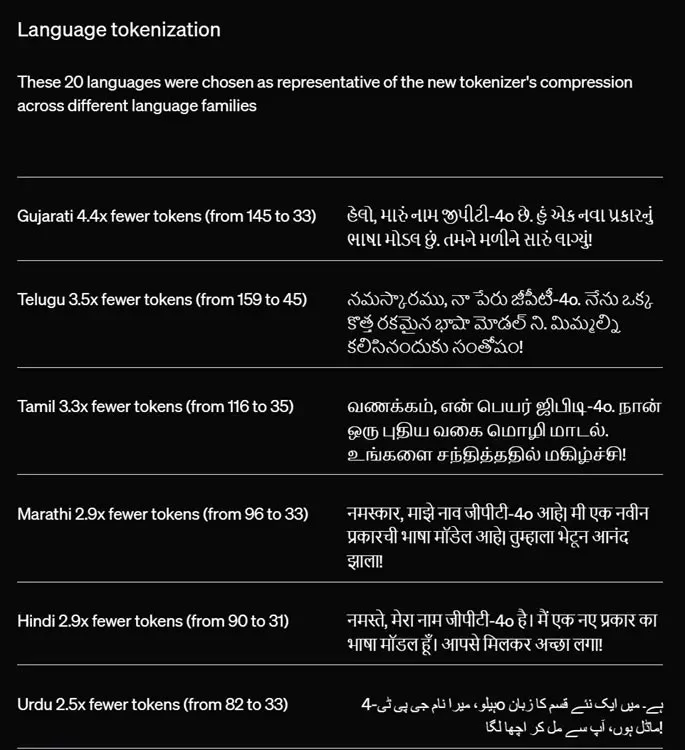
OpenAI not only improved GPT-4o's performance in English, but also improved its performance in other languages. It significantly improved the ability for the model to compress non-English languages to accommodate more tokens.
To give some examples, Gujarati takes up 4.4x fewer tokens, Hindi takes up 2.9x fewer tokens, Telugu takes up 3.5x fewer tokens, Urdu takes up 2.5x fewer tokens, Russian takes up 1.7x fewer tokens, etc. Basically, for languages other than English, ChatGPT-4o becomes even more powerful.
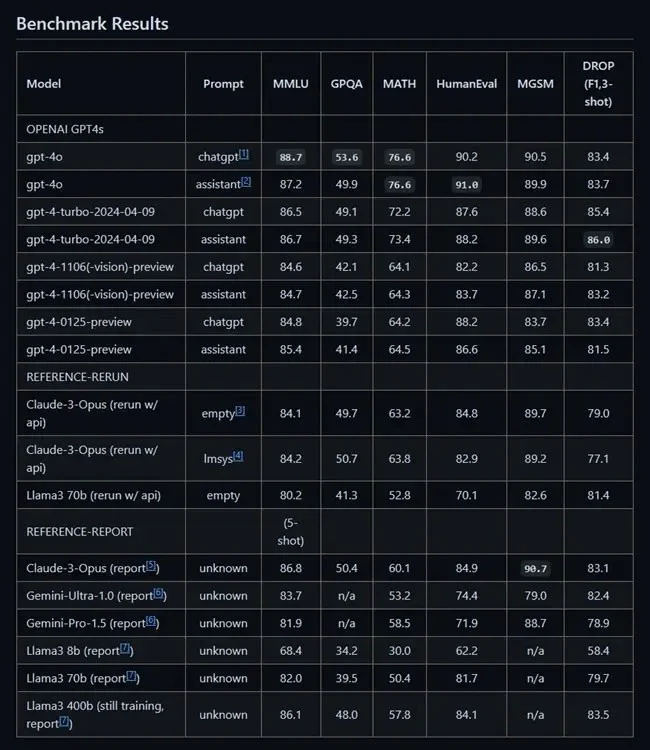
OpenAI doesn't discuss benchmark numbers and focuses on delivering new experiences. However, ChatGPT-4o overshadows all other AI models from Google, Anthropic, Meta, etc. In fact, it outperforms OpenAI's own GPT-4 Turbo model released a few months ago.
From MMLU to HumanEval, GPQA, and DROP, ChatGPT-4o outperformed both proprietary and open source models. In the LMSYS arena as well, the ChatGPT-4o model achieved an overall ELO score of 1310, much higher than other AI models.
ChatGPT-4o is a huge step forward in AI. It can process and generate text, audio, images, and video. This makes it easier for people to chat with computers. It is fast, can understand many languages, and is very good at understanding images and audio.
It serves a variety of purposes, such as customer service, documentation, tutorials, and personal healthcare, making it incredibly valuable. As more businesses and creators adopt it, ChatGPT-4o will change many industries and bring great benefits.
Create a spooky office cubicle with Halloween desk decor ideas that keep your workspace usable, tidy, and mindful of workplace safety.
Plan a recognizable Halloween 2026 look with pop culture costumes inspired by Spider-Man, Supergirl, Toy Story 5, Moana, Mario, and Wednesday.
Sort leftover Halloween candy safely, share or repurpose sealed treats, and choose food use or compost for pumpkins based on their condition.
Compare workplace Halloween costume choices by respect, dress code, mobility, and safety—and learn when a subtle accessory or a policy check is the better option.
Find a couples costume that fits your style, budget, and comfort level, from Addams Family classics to original inside-joke duos.
Need a last-minute high school Halloween costume? Compare 10 easy closet-based ideas by prep time, comfort, school-day practicality, and simple safety checks.
Use a simple 2026 Halloween decorating timeline for indoor décor, outdoor displays, and fresh pumpkins, with practical adjustments for weather and events.
Mix five vivid, approachable Halloween cocktails with measured recipes, simple prep tips, and an alcohol-free option for your party guests.
Find 15 office-friendly Halloween costume ideas for 2026, with practical checks for dress codes, respectful themes, comfort, and workplace safety.
Plan a fun elementary school Halloween party with easy crafts, games, inclusive treats, costume tips, and a sample 75-minute classroom schedule.








