Learn about eternal ice

In the summer, many people have the habit of putting ice in drinks to cool down. However, frozen ice will lose its natural flavor and dilute the drink. However, on the market today there is a type of permanent ice that is being used by many people. In addition to not losing the flavor of the drink, it can also be used many times, even forever. So what is permanent ice, what is it made of and is it safe? Let's find out through the article below.

Table of Contents

What is eternal ice?

Eternal ice or unmelting ice, also known by other names such as Cooling Cubes, Scotch Rochs or Whiskey Stones, was invented in 2007 by Dave Laituri, a designer living in Massachusetts, USA. After its announcement, eternal ice quickly became widely used in the US and European countries.

Learn about eternal iceLearn about eternal ice

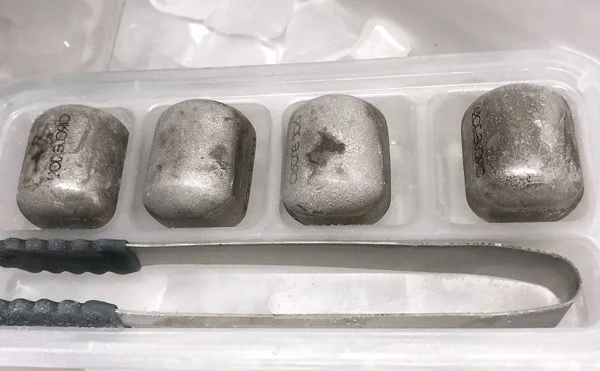
The non-melting ice cubes have the same shape and size as regular ice cubes, each weighing 70 grams and measuring 25mm x 19mm.

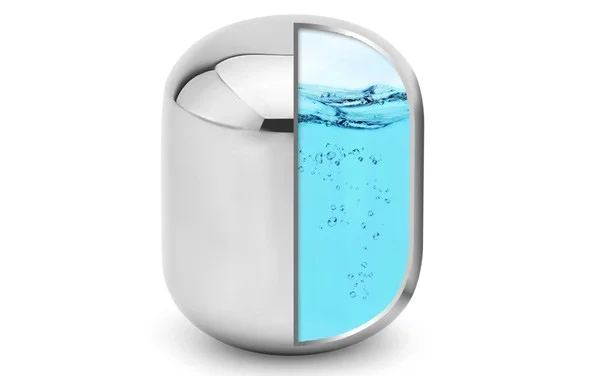
The shell of the non-melting ice cube is made of 304 stainless steel, safe for human health, inside is a cooling gel compound.

Learn about eternal ice

Advantages of permanent ice compared to regular ice

  • 304 stainless steel material is clean and safe for human health.
  • Save water and costs if ice demand is high.
  • The eternal ice can maintain a cold temperature of 10 degrees Celsius for 60 minutes, helping your drink to always be cooled at a certain temperature and retain its original flavor. In contrast to regular ice that melts in water, affecting the quality of the drink.
  • Just 2 - 4 permanent ice cubes can cool about 1 liter of drink within 5 minutes, so they can be used for most other drinks (juice, soft drinks, coffee, ...) besides Whiskey.
  • Eternal ice has the ability to maintain an average cold temperature of 3 - 4 hours, after being cold for 3 hours or more in the refrigerator.

Comparison of permanent ice and regular ice


Eternal Stone

Common stone

Aesthetics

Brings uniqueness to drinks.

Not much attention.

Keep the flavor

Keeps the flavor well as it does not dilute and lose the flavor of the drink.

Watering down dilutes and spoils the flavor of the drink.

Reuse

Reusable many times.

Are not.

Safety level

Made of 304 stainless steel, safe for health.

Depends on the quality of the water source used to make ice.

Cold retention time

Average 3 - 4 hours.

Depending on size and outside temperature but usually only a few minutes.

Other benefits

Does not create frost in the freezer compartment, helping to prolong the durability of the refrigerator.

Often causes frost inside the refrigerator, which can affect the durability of the refrigerator.

How to use eternal ice

Put the unmelted ice cubes in the freezer for about 2 to 4 hours before use.

The amount of ice used depends on different cooling requirements. But with 2 - 4 permanent ice cubes can cool 1 liter of drink after 5 minutes.

Learn about eternal ice

The cooling time of permanent ice varies depending on the brand and conditions, but ranges from 40 to 60 minutes. There are some unmelted ice cubes of unknown origin that can only stay cold for about 10 minutes, but products from reputable Japanese and American brands can extend the cooling time to several hours.

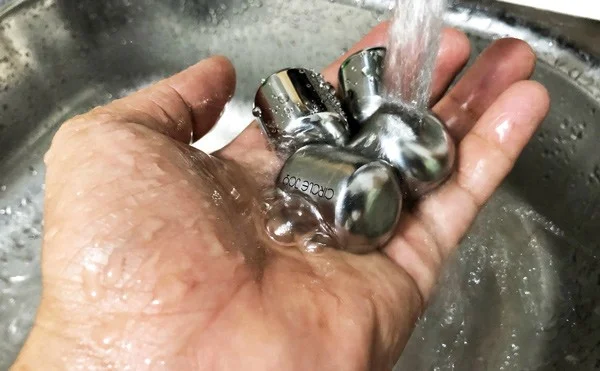
After use, simply rinse the permanent stone with clean water for reuse next time.

Learn about eternal ice

Notes when buying eternal stone

  • Find out which brands of permanent ice are suitable for your needs as they come in different shapes, sizes and cooling times.
  • Choose products with clear origin and reputable purchasing address to avoid buying fake or counterfeit goods.

Leave a Comment

Fixing Microsoft Teams Vcruntime140.dll Missing Error

Fixing Microsoft Teams Vcruntime140.dll Missing Error

Tired of the frustrating Microsoft Teams Vcruntime140.dll missing error crashing your meetings? Discover proven, step-by-step fixes to resolve it fast and restore smooth teamwork. No tech skills needed!

How to Fix Microsoft Teams Undefined Error (2026)

How to Fix Microsoft Teams Undefined Error (2026)

Struggling with Microsoft Teams 'Undefined Error' (2026)? Discover proven, step-by-step fixes like clearing cache, updating the app, and more. Get back to seamless collaboration fast!

How to Disable Microsoft Teams at Startup for Better PC Performance

How to Disable Microsoft Teams at Startup for Better PC Performance

Discover simple, step-by-step methods to disable Microsoft Teams at startup and unlock better PC performance. Faster boot times, less resource drain—perfect for Windows users seeking smooth operation.

How to Fix Microsoft Teams Network Error Offline

How to Fix Microsoft Teams Network Error Offline

Stuck with Microsoft Teams "Network Error" offline? Discover proven, step-by-step solutions to fix Microsoft Teams network error offline quickly. Get back online fast—no tech skills needed!

Solving Microsoft Teams Error 4oggx

Solving Microsoft Teams Error 4oggx

Struggling with Microsoft Teams Error 4oggx? Discover proven fixes to resolve sign-in failures, crashes, and connectivity issues fast. Get back to productive calls without frustration!

How to Fix Microsoft Teams Remove Account Data Error

How to Fix Microsoft Teams Remove Account Data Error

Encountering the frustrating Microsoft Teams "Remove Account" Data Error? Discover quick, reliable fixes like clearing cache, resetting the app, and more to get back to seamless collaboration without losing data. Updated with the latest solutions.

Troubleshooting Microsoft Teams Layout Error Sidebar

Troubleshooting Microsoft Teams Layout Error Sidebar

Tired of the frustrating Microsoft Teams "Layout Error" Sidebar? Follow our proven, step-by-step troubleshooting guide with the latest fixes to get your Teams sidebar working smoothly again. No tech skills needed!

Troubleshooting Microsoft Teams Offline Error in 2026

Troubleshooting Microsoft Teams Offline Error in 2026

Stuck with Microsoft Teams offline error in 2026? Discover proven troubleshooting steps, common causes, and quick fixes to restore your connection fast. No tech skills required!

How to Fix Microsoft Teams Error M Memory

How to Fix Microsoft Teams Error M Memory

Tired of Microsoft Teams crashing with "Error M" memory issues? Follow our step-by-step guide to fix Error M in Teams, clear cache, update software, and boost performance—no tech skills required!

Step-by-Step: Setting Up Microsoft Teams Town Hall Events

Step-by-Step: Setting Up Microsoft Teams Town Hall Events

Discover the easiest step-by-step guide to setting up Microsoft Teams Town Hall events. Host massive virtual gatherings effortlessly with pro tips for seamless execution. Perfect for leaders and organizers!

How to Fix Microsoft Teams Download Error for PC

How to Fix Microsoft Teams Download Error for PC

Struggling with Microsoft Teams "Download Error" on PC? Discover proven, step-by-step fixes to resolve download failed issues quickly. Get back to seamless collaboration in minutes—no tech skills needed!

Troubleshooting Microsoft Teams Error L License

Troubleshooting Microsoft Teams Error L License

Stuck with Microsoft Teams "Error L" License error? Follow this step-by-step troubleshooting guide to resolve licensing issues quickly, restore access, and boost productivity without IT hassle. Updated with latest fixes.

Troubleshooting Microsoft Teams Video Call Freezing

Troubleshooting Microsoft Teams Video Call Freezing

Tired of Microsoft Teams video call freezing mid-meeting? Follow this proven troubleshooting Microsoft Teams video call freezing guide with quick fixes, advanced tips, and real solutions to restore smooth video instantly.

How to Fix Microsoft Teams Download Failed Due to Unexpected Error

How to Fix Microsoft Teams Download Failed Due to Unexpected Error

Frustrated by Microsoft Teams 'Download Failed Due to Unexpected Error'? Discover proven, step-by-step solutions to fix this common issue quickly and get back to seamless collaboration. Updated with the latest fixes for peak performance.

Why Did My Microsoft Teams Recording Fail? Common Reasons

Why Did My Microsoft Teams Recording Fail? Common Reasons

Frustrated because your Microsoft Teams recording failed? Uncover the top common reasons like permissions issues, storage limits, and network glitches, plus step-by-step fixes to prevent future failures and record flawlessly every time.