Pop Culture Costume Ideas That Will Dominate Halloween 2026

Plan a recognizable Halloween 2026 look with pop culture costumes inspired by Spider-Man, Supergirl, Toy Story 5, Moana, Mario, and Wednesday.
Samsung is a well-known smartphone manufacturer with a product range covering almost every segment of the market under the "Galaxy" brand. Some Galaxy S models have listed prices of up to tens of millions of VND, while there are also Galaxy A models that cost only a few million VND.
However, just because Samsung uses the same “Galaxy” brand for all of its smartphones across all of its segments, it can sometimes be confusing to differentiate between models. Finding a Samsung phone that suits your needs isn’t difficult, but the sheer number of options can also make things confusing. So what’s the difference?
Galaxy S
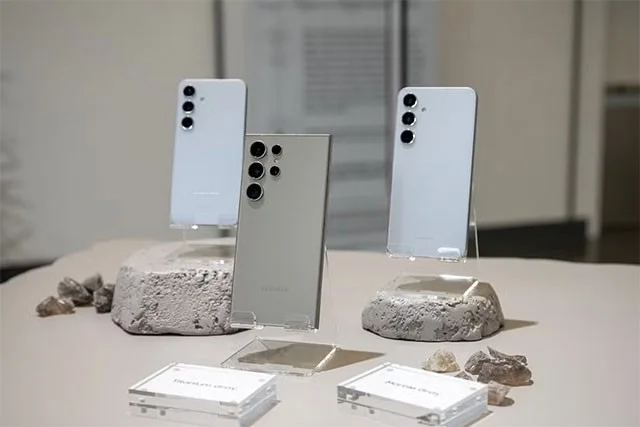
We’ll start with Samsung’s most famous product line, the Galaxy S. For a while, Samsung aggressively marketed the “S” in Galaxy S as standing for “Super Smart.” While the company no longer uses the term, the “S” still tells us that this is the company’s most premium product line, containing the company’s finest achievements.
The 2024 Galaxy S smartphone lineup includes four models: Galaxy S24, Galaxy S24+, Galaxy S24 Ultra, and Galaxy S24 FE. These devices feature the best specs and Samsung’s most advanced features. Large, high-resolution displays, powerful processors, plenty of RAM and storage, wireless charging, water resistance, stylus pens, and more.
The Ultra variant is the top of the line in the Galaxy S line, while the cheapest are the FE models, which range in price from around $1,300 to $700. The FE models can sometimes be considered the “mid-range” Galaxy S variant. They’re not quite as “perfect” as the more expensive Galaxy S devices.
Galaxy A
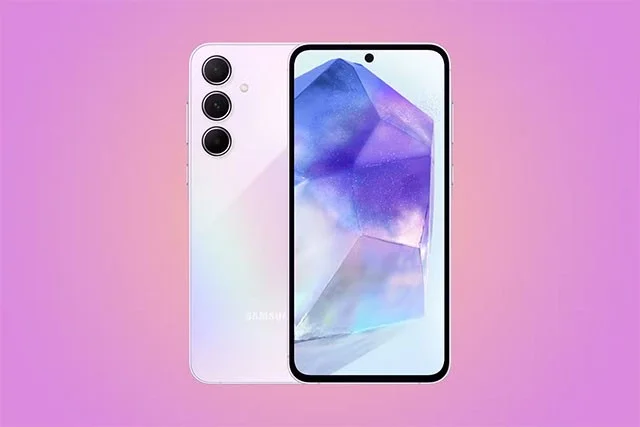
The Galaxy A series is much broader than the Galaxy S series. The 2024 Galaxy A series includes four models: the Galaxy A15 5G, Galaxy A25 5G, Galaxy A35 5G, and Galaxy A55 5G. These devices are definitely in the “accessible” range, meaning they will be more affordable and of course won’t come with as good of specs as the Galaxy S series. There’s a lot in common between the models, but there are also a lot of differences.
The main areas where you'll see a downgrade from the Galaxy S are the phone's build materials, screen resolution, number of cameras, RAM, and processor. Screen size, battery, and software support are all the same.
The Galaxy A series also has a pretty wide price range. At the top end, you'll find the Galaxy A55 for around $550. At the bottom end, you'll find the Galaxy A15 for around $175.
Basically, if you think of smartphones today as having three segments: high-end, mid-range, and budget, then the A series falls into two segments, mid-range and budget.
Galaxy Z
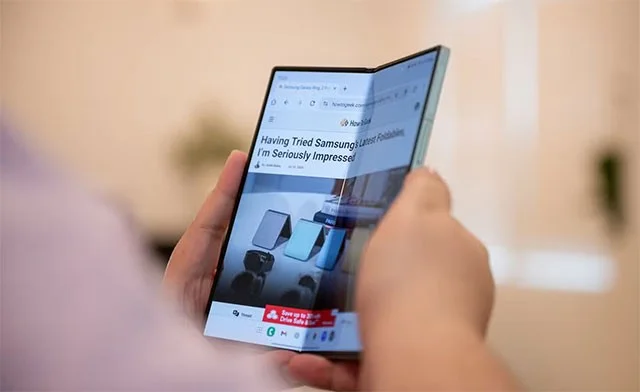
The Galaxy Z is Samsung's latest and most confusing product line. The Galaxy Z series is essentially Samsung's foldable smartphones, but that name isn't used in all regions.
Samsung's original foldable phones were simply called the Galaxy Fold. The "Z" was added later and has been used for subsequent devices in the lineup–Galaxy Z Flip, Galaxy Z Fold 2, Galaxy Z Flip 3, etc.
In March 2022, Samsung began removing the letter "Z" from its foldable devices in certain regions. This is believed to be due to the Russian military and people using the letter "Z" as a pro-war symbol.
In terms of actual devices, the Z series is basically a foldable smartphone. These are Samsung’s most advanced devices. Their prices have dropped significantly over the years. In particular, the Galaxy Z Flip is now cheaper than the Galaxy S Ultra. However, the Fold is still the most expensive product in Samsung’s arsenal.
Which product line is right for you?
For most people, the best choice is the standard Galaxy S model — not the “Plus” or “Ultra.” It’s powerful and a good size, not too big and has most of Samsung’s latest features, but not too expensive either.
Samsung releases new phones regularly. If you don’t find something you like, you can just wait for the next model. Samsung phones are very popular and you can find them in most smartphone stores near you.
Plan a recognizable Halloween 2026 look with pop culture costumes inspired by Spider-Man, Supergirl, Toy Story 5, Moana, Mario, and Wednesday.
Sort leftover Halloween candy safely, share or repurpose sealed treats, and choose food use or compost for pumpkins based on their condition.
Compare workplace Halloween costume choices by respect, dress code, mobility, and safety—and learn when a subtle accessory or a policy check is the better option.
Find a couples costume that fits your style, budget, and comfort level, from Addams Family classics to original inside-joke duos.
Need a last-minute high school Halloween costume? Compare 10 easy closet-based ideas by prep time, comfort, school-day practicality, and simple safety checks.
Use a simple 2026 Halloween decorating timeline for indoor décor, outdoor displays, and fresh pumpkins, with practical adjustments for weather and events.
Mix five vivid, approachable Halloween cocktails with measured recipes, simple prep tips, and an alcohol-free option for your party guests.
Find 15 office-friendly Halloween costume ideas for 2026, with practical checks for dress codes, respectful themes, comfort, and workplace safety.
Plan a fun elementary school Halloween party with easy crafts, games, inclusive treats, costume tips, and a sample 75-minute classroom schedule.
Compare realistic side hustles for 2026 by startup cost, fees, flexibility, and income control, with current tax and scam guidance from official sources.








