LimeWire re-emerges as an AI image generator

With the prominence of modern streaming services like Spotify and Apple Music, it’s easy to forget about LimeWire. The P2P tool that once let you download any music you wanted is back… as an AI image generator.

What does LimeWire look like today?

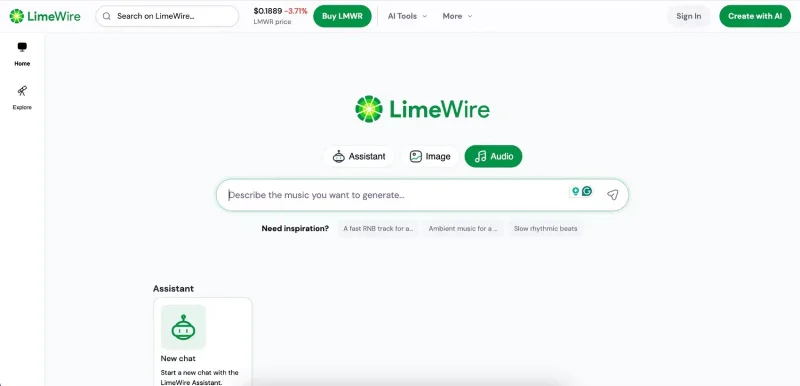
Today, LimeWire looks a lot like other AI visualization tools like Adobe Firefly. It lets you enter text prompts to generate images and sounds, with a few example prompts included on the page for inspiration.

LimeWire re-emerges as an AI image generator
LimeWire Home

When using LimeWire, you can also use the assistant to retrieve information and create various types of content, so many of the things you can do with ChatGPT can also be done in LimeWire.

Besides being an AI generator, LimeWire is also returning as an NFT marketplace in 2022.

LimeWire Price

At its basic level, LimeWire is free to use. The free plan lets you create up to 20 images per day and 4 audio tracks. Paid plans give you larger allowances, ranging from 2,000 to 22,500 images per month and 400 to 4,500 new audio tracks per month. You also get access to all of the AI ​​models.

Here's a quick summary of LimeWire's subscription prices.

Register

Price (Monthly)

Price (Annual)

Basic

$9.99/month

$95.90/year

Advanced

$29.99/month

$278.40/year

Pro

$49.99/month

$470.40/year

Pro Plus

$99.99/month

$950.40/year

How to use LimeWire

Now that you know LimeWire is no longer a file sharing tool, let's see how to use the new and improved version.

1. Create an image in LimeWire

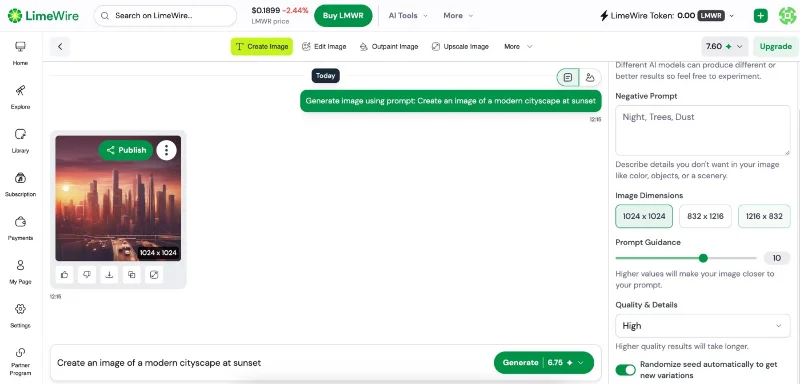
To use LimeWire's image creation feature, follow these steps.

  • On the home page, select Image .
  • Type prompt into the text box and press Enter on your keyboard or the submit button.
  • If you want to try different creation models, select the model on the right side.
  • Customize prompt, size and quality of photo. If you want to adjust beyond the original, you have to spend credits. You will get one free every day.
LimeWire re-emerges as an AI image generator
Create images in the LimeWire app

LimeWire usually takes longer than ChatGPT to produce results, so keep that in mind.

2. Create sound in LimeWire

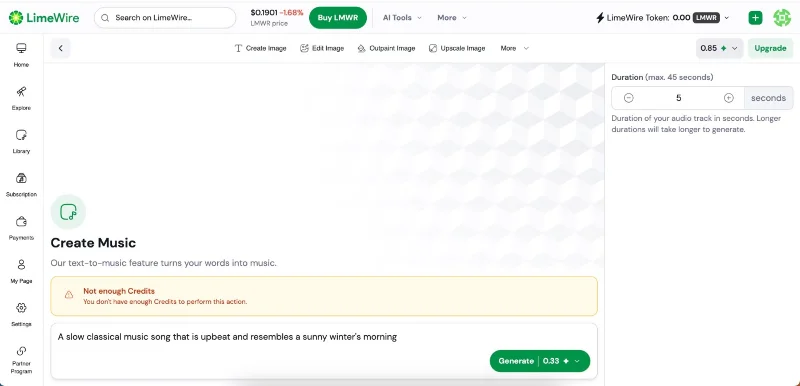
To create a sound in LimeWire, follow these steps.

  • Select the Audio tab on the home page.
  • Enter a prompt for your music. In this case, the composer wants an upbeat classical piece.
  • Press Enter or click the Send button .
  • Choose the song length. You can choose up to 45 seconds, depending on your credits.
  • Select Generate .
LimeWire re-emerges as an AI image generator
Create a song in LimeWire

3. LimeWire Assistant

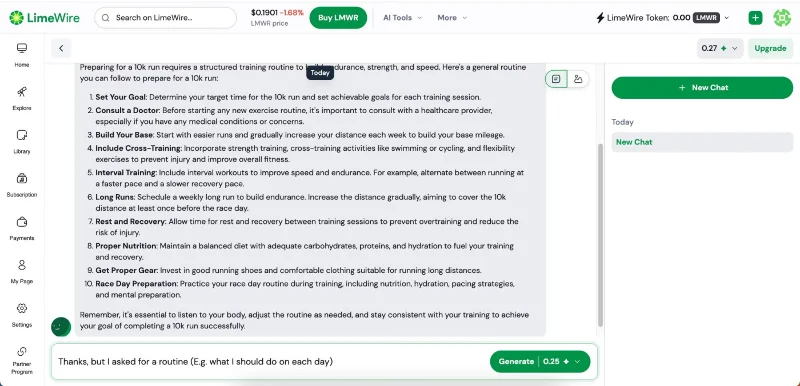
Here's how to use LimeWire's AI assistant:

  • Select Assistant on the home page.
  • Enter prompt. In this case, the author wanted to see if LimeWire could help create a routine to prepare for a 10K run.
  • Wait for LimeWire to generate the prompt.
  • If necessary, change the prompt.
LimeWire re-emerges as an AI image generator
Make music in the LimeWire app

When you edit your prompt with the assistant, you will have to pay in credits for additional edits, so keep this in mind and use your prompts wisely.

LimeWire’s AI engine is an interesting change from previous file-sharing services. It still needs improvement; ChatGPT is faster and provides better advice with the same prompt. Still, it’s worth experimenting with your free credits and seeing what you can create.
Leave a Comment

Fixing Microsoft Teams Download Failed Due to Unexpected Error

Fixing Microsoft Teams Download Failed Due to Unexpected Error

Tired of the frustrating Microsoft Teams download failed due to unexpected error? Discover quick, step-by-step fixes to resolve it fast and download Teams smoothly on Windows, Mac, or web. No tech skills needed!

How to Fix Microsoft Teams Network Error: Check Your Connection

How to Fix Microsoft Teams Network Error: Check Your Connection

Struggling with Microsoft Teams network error: Check Your Connection? Discover proven step-by-step fixes to restore seamless video calls, chats, and meetings. Quick troubleshooting for instant results.

Solving Microsoft Teams Video Error: Black Screen in Meetings

Solving Microsoft Teams Video Error: Black Screen in Meetings

Tired of Microsoft Teams black screen in meetings? Get proven, step-by-step solutions to solve the video error instantly. From quick fixes to advanced tweaks—regain seamless video calls today!

Troubleshooting Microsoft Teams DLL Error Missing File

Troubleshooting Microsoft Teams DLL Error Missing File

Tired of Microsoft Teams crashing with DLL Error? Discover proven troubleshooting steps for missing DLL files like VCRUNTIME140.dll. Get Teams running smoothly in minutes—no tech skills needed!

Microsoft Teams vs Zoom: Comparing Features for Webinars

Microsoft Teams vs Zoom: Comparing Features for Webinars

Discover Microsoft Teams vs Zoom webinar features head-to-head: capacity, interactivity, security, pricing & more. Find the best platform for your next big webinar in this detailed comparison.

Solving Microsoft Teams Chat Not Working on Mobile

Solving Microsoft Teams Chat Not Working on Mobile

Struggling with Microsoft Teams chat not working on mobile? Discover quick, proven fixes for Android & iOS to get your chats flowing again. Step-by-step guide with troubleshooting tips.

How to Fix Microsoft Teams Register Account Error

How to Fix Microsoft Teams Register Account Error

Tired of the frustrating Microsoft Teams "Register" Account Error blocking your work? Discover proven, step-by-step fixes like clearing cache, resetting the app, and network tweaks. Get seamless collaboration back online today—no tech expertise needed!

How to Fix Microsoft Teams Hard Error (2026 Registry Fix)

How to Fix Microsoft Teams Hard Error (2026 Registry Fix)

Tired of Microsoft Teams crashing with "Hard Error"? Get the proven 2026 registry fix that resolves it in minutes. Step-by-step guide, screenshots, and tips for permanent relief. Works on latest versions!

Troubleshooting Microsoft Teams Webhook Integration Error

Troubleshooting Microsoft Teams Webhook Integration Error

Stuck with Microsoft Teams webhook integration errors? Discover proven troubleshooting steps, common error codes, and quick fixes to restore seamless notifications in Teams. Updated with the latest best practices.

How to Use Microsoft Teams Copilot for AI-Powered Productivity

How to Use Microsoft Teams Copilot for AI-Powered Productivity

Discover how to use Microsoft Teams Copilot to boost AI-powered productivity. Step-by-step guide, key features, and tips to transform meetings, chats, and tasks effortlessly. Unlock smarter collaboration today!

Troubleshooting Microsoft Teams Error D Files

Troubleshooting Microsoft Teams Error D Files

Tired of Microsoft Teams "Error D" files blocking your workflow? Get instant fixes for upload/download errors with this step-by-step troubleshooting guide. Resolve issues fast and boost productivity.

How to Fix Microsoft Teams Error Z Zone

How to Fix Microsoft Teams Error Z Zone

Tired of Microsoft Teams "Error Z" Zone crashing your meetings? Follow our expert, step-by-step guide to fix it quickly with the latest methods. Regain seamless teamwork now!

How to Fix Microsoft Teams Check Version Error

How to Fix Microsoft Teams Check Version Error

Tired of the frustrating Microsoft Teams "Check Version" error blocking your meetings? Follow our proven, step-by-step fixes to resolve it fast and restore smooth teamwork. Works on latest versions!

How to Remove and Change a Microsoft Teams Account on Windows 11

How to Remove and Change a Microsoft Teams Account on Windows 11

Struggling with the wrong Microsoft Teams account on Windows 11? Discover simple, step-by-step instructions to remove and change your Microsoft Teams account effortlessly. Perfect for managing work and personal profiles!

How to Fix Microsoft Teams Guide Tutorial Error

How to Fix Microsoft Teams Guide Tutorial Error

Struggling with Microsoft Teams "Guide" Tutorial Error? Discover simple, step-by-step fixes to resolve it quickly. Clear cache, update, and more for seamless teamwork. Updated for latest versions!